3A180100A
3A1/FaxSystem(A)/MCE-Eng
/ 164
(6) Changing an Id-code Name
Perform the following procedure when you want to change a
registered id-code name.
* You will need to enter the registered management password when
you want to change an id-code name. (Refer to “Registering the
Management Password”, page 6-11.)
*
If you want to cancel the procedure part way through, press the
Reset key. The operation panel will return to the initial mode settings.
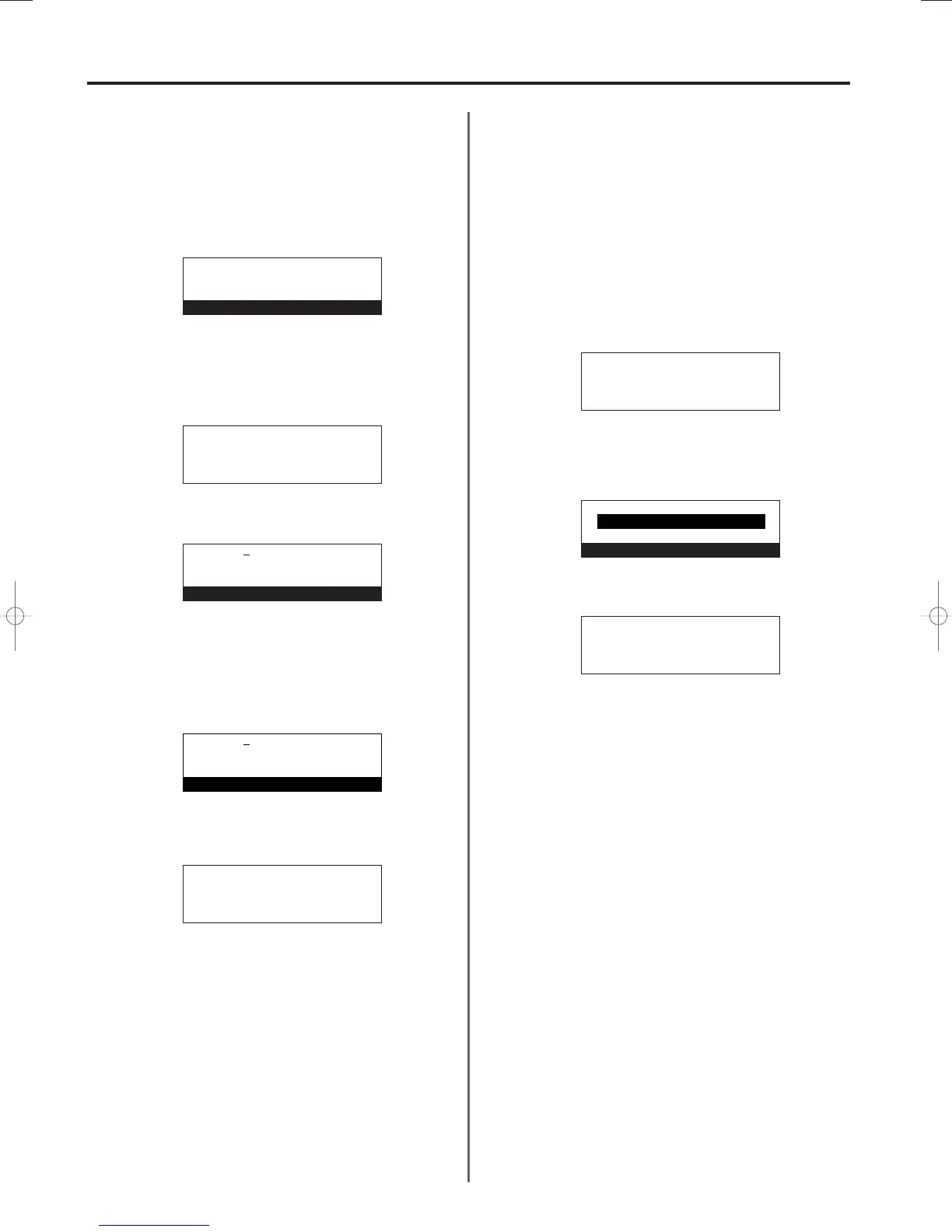
1. Perform steps 1 - 6 of “(5) Registering Access Codes”, page 4-56.
2. Use the cursor up or the cursor down key to select the access
code that corresponds to the id-code name to be changed.
3. Press the Enter key.
4. Enter the desired id-code name.
(Refer to “Entering characters”, page 1-28.)
* The id-code name can be up to 32 characters in length.
* Press the Stop/Clear key to clear the currently displayed name
from the message display and enter the name from the
beginning.
5. Press the Enter key.
Registration of the new id-code name is complete.
> If you want to continue changing other id-code names, repeat
steps 2 - 5.
> If you are finished changing id-code names, press the Reset
key. The operation panel will return to the initial mode settings.
(7) Deleting Access Codes
Perform the following procedure when you want to delete a
registered access code.
* You will need to enter the registered management password when
you want to delete an access code. (Refer to “Registering the
Management Password”, page 6-11.)
*
If you want to cancel the procedure part way through, press the
Reset key. The operation panel will return to the initial mode settings.
1. Perform steps 1 - 6 of “(5) Registering Access Codes”, page 4-56.
2. Use the cursor up or the cursor down key to select the access
code to be deleted.
3. Press the Stop/Clear key.
* If you want to cancel the deletion procedure, simply press the
Stop/Clear key again.
4. Press the Enter key. The selected access code will be deleted.
> If you want to continue deleting other access codes, repeat
steps 2 - 4.
> If you are finished deleting access codes, press the Reset key.
The operation panel will return to the initial mode settings.
4-58
Section 4 Other Features of this Fax
Access code:
#01:
#02:
➪
#03:3363:SKL-G
#03:SKL-G
ID-code name
#03:PDL-G
ID-code name
Access code:
#01:
#02:
➪
#03:3363:PDL-G
Access code:
#01:
#02:
➪
#03:3363:PDL-G
Access code:#03
Press ENTER key.
Delete
Access code:
#01:
#02:
➪
#03:
01-DEC-1999 12:00
Set original
04/OtherF-4/3A1/MCE/Eng.q 23-12-1999 14:43 Page 4-58



 To Next Page