3A180100A
3A1/FaxSystem(A)/MCE-Eng
/ 164
(2) Procedure
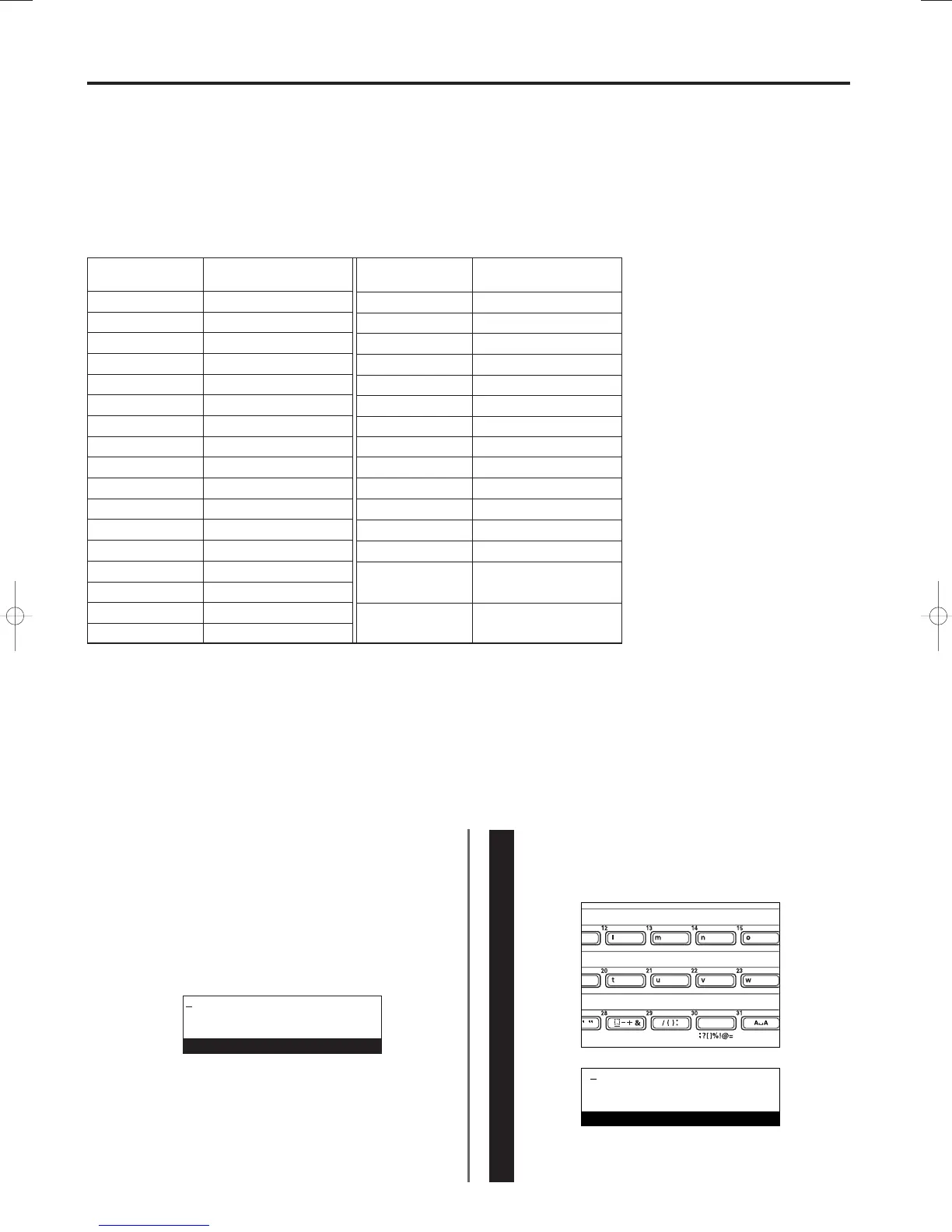
Refer to the following example when entering characters during the
registration procedure for one-touch keys, abbreviated numbers, etc.
[Ex.] To enter “Mt [G]”
Press one-touch key No. 13 (marked with the letter “m”).
An uppercase “M” will appear in the message display and the
cursor will move to the next space.
* You CANNOT enter a space as the first character.
1-28
Section 1 Basic Use of this Fax
Entering Characters
(1) Character Table
Character entry is carried out with the one-touch keys.
The characters registered under each one-touch key are as shown in the following table.
* When entering characters, each one-
touch key will always represent the
same characters regardless of whether
the cover plates are raised or lowered.
The symbols
1 - ^ and m in this
table refer to the following:
1 MESSAGE TEL. key
2 MANUAL RX. key
3 MEMORY TX. key
4 REGISTER key
5 CONFIGURE key
6 PRINT REPORTS key
7 INFORMATION key
8 No designation when both cover
plates are raised
9 BROADCAST key
0 POLLING key
! CONFIDENTIAL key
@ RELAY BROADCAST key
# DELAYED TX. key
$ SUBADDRESS key
% DUPLEX TX key
^ ALTERNATE DISPLAY key
m: The available characters will differ
depending upon the language in use
in the message display. (Refer to
“Available Characters Table”,
page 8-3.)
One-touch key
No.
1, 33, 65 a r
s
t
u
v
w
x
y
z
. , ' "
_ - + &
/ ( ) :
m
18, 50, 2
2, 34, 66 b
19, 51,
3
3, 35, 67 c
20, 52, 4
4, 36, 68 d
21, 53, 5
5, 37, 69 e
22, 54,
6
6, 38, 70 f
Press to enter
a single space
23, 55, 7
7, 39, 71 g
8, 40, 72 h
Press to switch between
input of upper- and
lowercase letters
24, 56, 8
25, 57, 9
26, 58, 0
27, 59, !
28, 60, @
29, 61, #
30, 62, $
31, 63, %
32, 64, ^
9, 41, 73
10, 42, 74
11, 43, 75
12, 44, 76
13, 45, 77
14, 46, 78
15, 47, 79
16, 48, 80
17, 49,
1
i
j
k
l
m
n
o
p
q
Character Character
One-touch key
No.
11
Enter destination name
M
Enter destination name
01/Basic-2/3A1/MCE/Eng.q 23-12-1999 13:23 Page 1-28












 To Next Page