Getting Started8
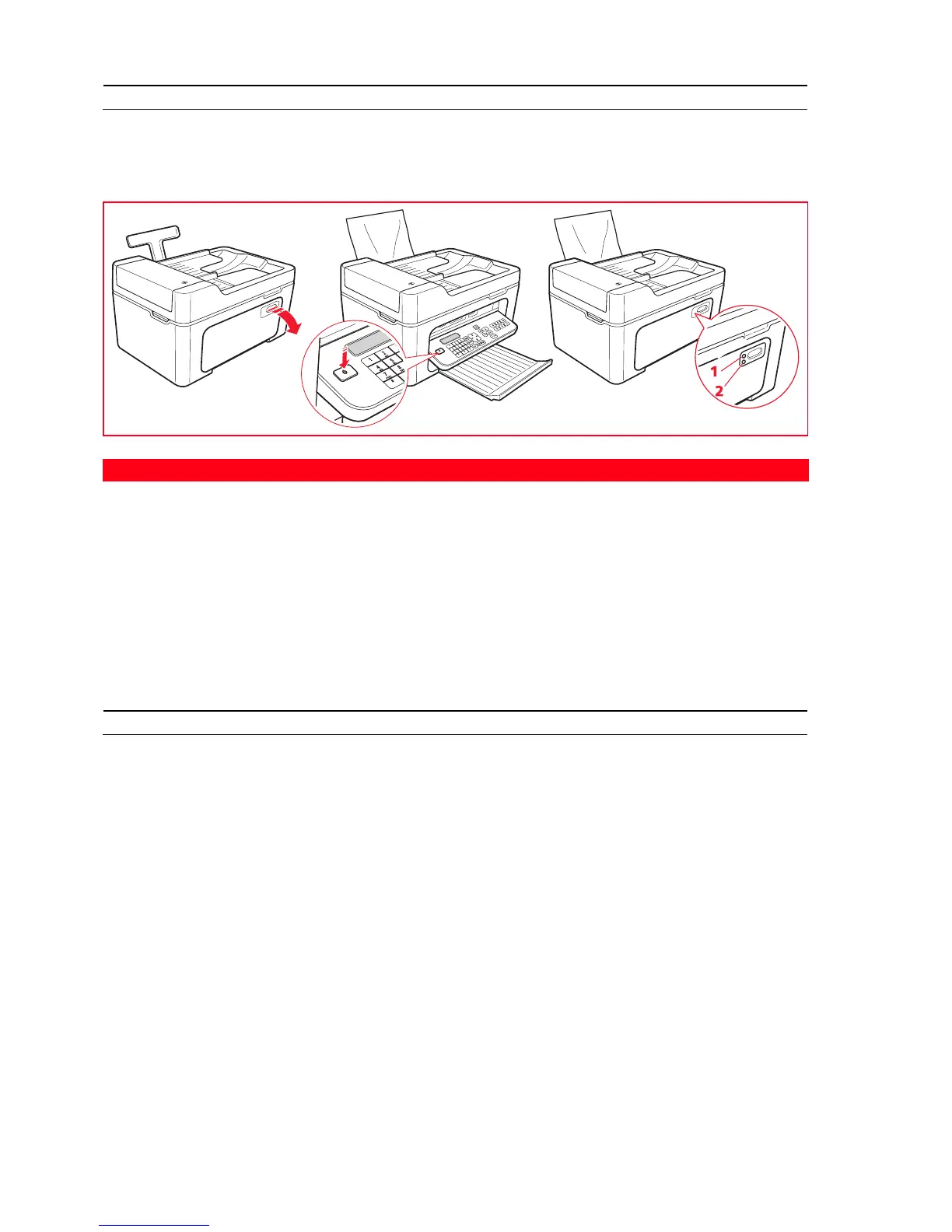
SWITCHING THE PRINTER ON AND OFF
Press the On/Off key.
When the keyboard is closed, the two LEDs indicate if the printer is switched on and if any operating errors have
occurred.
Printer Economy Mode
After a time interval that can be modified from the Toolbox, the printer enters energy saving mode and the keyboard is
disabled.
The printer re-activates on receiving any signal from the computer or the keyboard.
Note: Switching off the printer is not recommended as it results in the loss of the date and time.
LOADING PAPER ONTO THE AUTOMATIC SHEET FEEDER
1 Raise the automatic sheet feeder into its upright position, then press the paper width guide and slide it to its
outermost position.
2 Load the paper vertically (portrait orientation), with the side to print on facing the front of the printer, and
positioned against the right-side guide.
Note: The feeder capacity is 100 sheets of 80 g/m
2
plain paper.
3 Press the left paper guide and slide it up against the left edge of the paper.
Reference Indicator
Description
1 On/Off LED A green light indicates that the printer is switched on.
2 Error LED An orange light indicates that errors are signalled by the LEDs on the
printer front panel.














 To Next Page