Getting Started 5
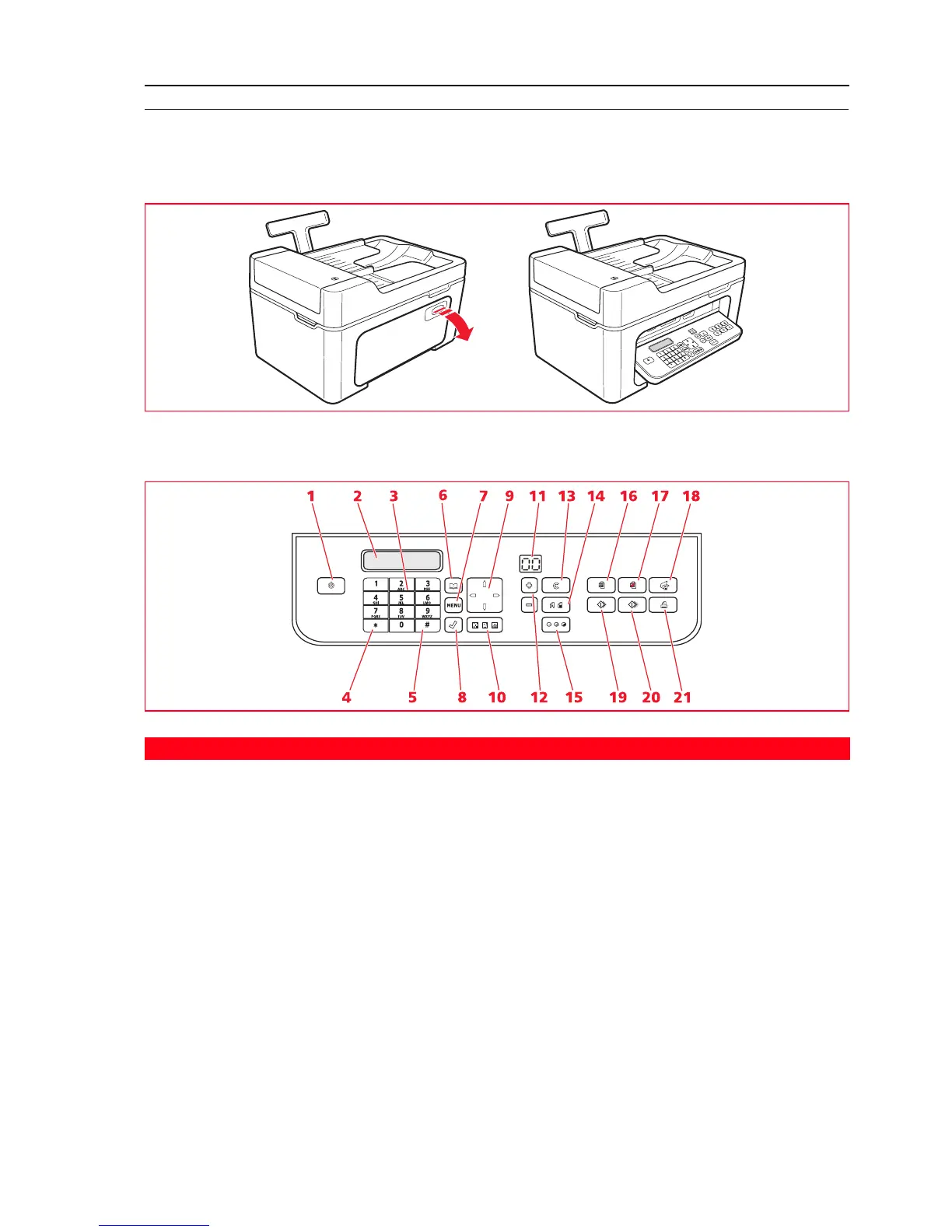
PRINTER KEYBOARD
The keyboard provides selection and start keys for all the functions available: copy, fax and print from digital camera or
compatible memory device connected to the printer. Under normal operating conditions, the keyboard should be left
open. To open the keyboard, press on the shiny area at the top right of the door.
Key Functions
Reference Part Description
1 On/Off key Switch the printer on and off.
If there is a fax in memory that has been received but not yet printed
(yellow light on), switching off the printer is disabled.
Note: Switching off the printer results in the loss of date and time
settings, it is therefore recommended that you do NOT carry out
this operation which has been replaced by automatic energy saving
mode. If, nevertheless, you want to switch the printer off, press
the On/Off key for 5 seconds.
2 Display Indicates the fax status, and displays the menu and phone book.
3 Alphanumeric
keypad
You can enter the telephone number or the initial of the name you want to
find in the phone book.
4 * key Provides access the special functions provided by the telephone company.
Also allows you to change from “Pulse dialling” to “Tone dialling”.
5 # key Provides access to the special functions provided by the telephone
company.














 To Next Page