Home
Olivetti
Desktop
M15 Plus
Page 116
Olivetti M15 Plus - Page 116
118 pages
Manual
Save Page as PDF
To Next Page
To Next Page
To Previous Page
To Previous Page
Loading...
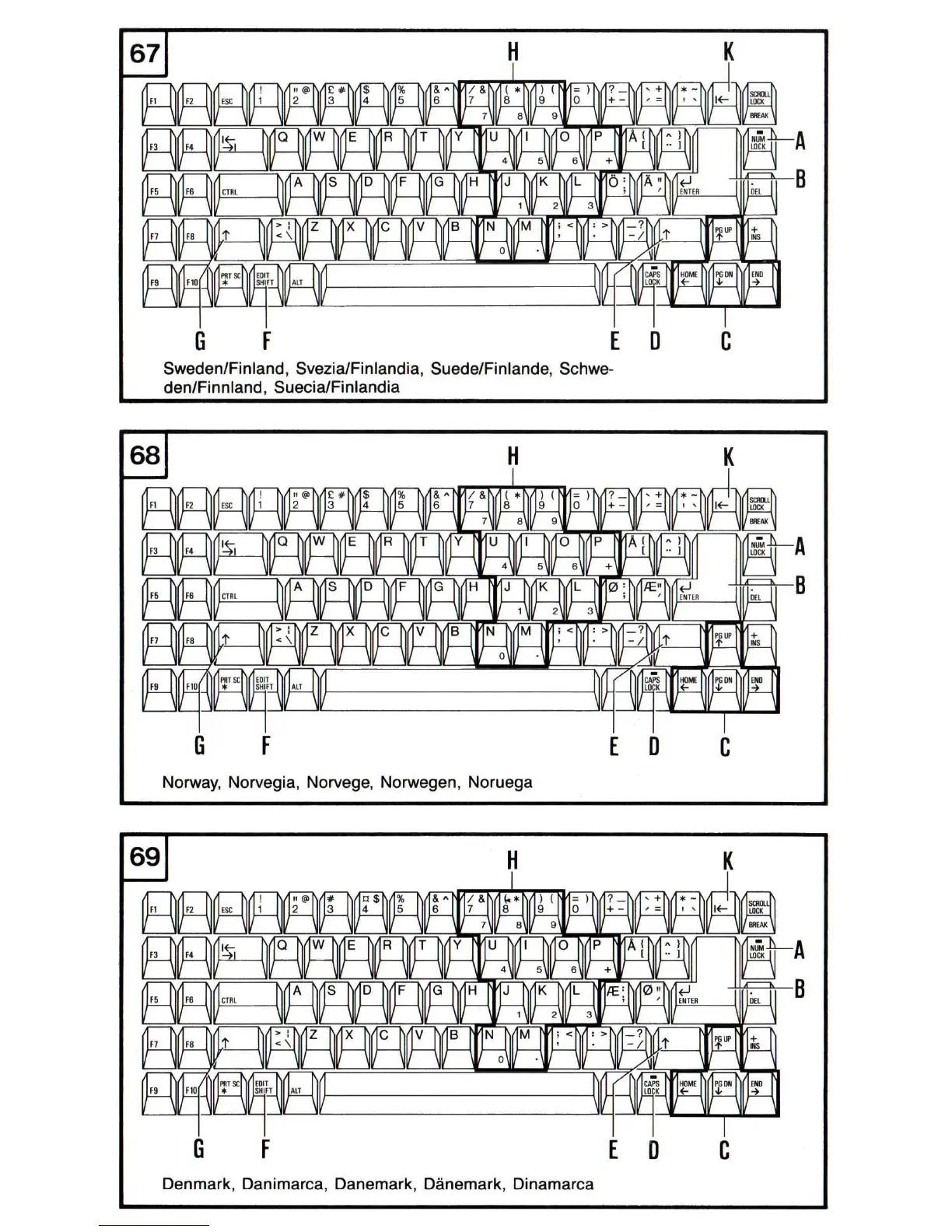
G
F
[
D
Sweden/Finland,
SveziaiFinlandia
,
Suede/Finlande
,
Schwe
-
den/Finnland
,
SueciaiFinlandia
c
[D
C
Norway,
Norvegia
,
Norvege
,
Norwegen,
Noruega
G
F
[
D
C
Denmark
,
Danimarca
,
Danemark,
Danemark,
Dinamarca
115
117
Table of Contents
Main Page
Table of Contents
9
HARDWARE RESET - SWITCHING Orf/On
37
Diskettes, Drives, Hard Disk
38
Working with Diskettes
38
Write-Protection
39
Attaching Labels
40
SOME ADVICE on the CARE of DISKETTES
40
Diskette/Hard Disk Access Indicator Lights
41
Indicator Lights, System with Two Disk Drives
41
Indicator Lights, System with Hard Disk
41
Inserting and Removing the Diskettes
42
Inserting a Diskette
42
Removing a Diskette
43
The Hard Disk
43
Care and Handling of the Hard Disk
43
PROTECTING the HARD DISK before TRANSPORTING the SYSTEM
44
Keyboard Drivers, Utilities
45
LOADING an OPERATING SYSTEM from a DISKETTE in
45
Loading a National Keyboard Driver
45
RECOMMENDED STEPS after LOADING the OPERATING SYSTEM
47
Copying the National Keyboard Driver to the Operating System Diskette
47
System Diskette
47
System with Hard Disk
48
Copying the Travel Utility
48
Using the Travel Utility
49
Working with the Keyboard
50
Entering Text in Upper Case
50
Multi-Character Keys
51
The Cursor Control Keys
52
THE Edit/Shift KEY
52
THE AUTOMATIC REPEAT Function
53
Dead Key Symbols
53
The Number Key Pad
55
How to Complete an Entry
55
Entries
56
Switching Back to the Us-Ascii Keyboard
59
THE SWISS-GERMAN/SWISS-French KEYBOARD
59
The Greek Keyboard
59
Software RESET
60
Ac/Battery Operation, Charging the Batteries
61
General
61
Battery Back up
61
Working on Ac and Charging Batteries
65
NOTE on File SAVING
66
Important Advice on Working with Batteries
67
CHARGING up the BATTERIES for the First TIME
67
A few TIPS on CABLE CONNECTION/DISCONNECTION
68
SYSTEM Feature: ACOUSTIC WARNING in CASE of no DRIVE/KEYBOARD ACCESS
68
When Is Battery Replacement Necessary
69
SWITCHING Off, TRANSPORTING YOUR SYSTEM
70
NOTE on File SAVING
70
SWITCHING off a SYSTEM with TWO DISK DRIVES
70
PROTECTING the HARD DISK before SWITCHING off ASYSTEM with HARD DISK
70
The Travel Utility for
71
The Ship Disk Utility in the Customer Test
73
Special Situations
73
Transporting Your System
73
Adjustments, Upgrading, Replacing Batteries
74
Disk Drive
74
Replacing the Batteries
75
Replacing the Backlight
76
Trouble SHOOTING, CUSTOMER TEST
77
Troubleshooting
77
The Customer Test
79
Loading and Using the Customer Test
80
Before Transporting the System: the Park Disk Heads Option
83
How to Exit the Customer Test
84
Technical Characteristics
85
List of Figures
88
Related product manuals
Olivetti M24
111 pages
Olivetti Programma 101
62 pages



 To Next Page