EasyManua.ls Logo

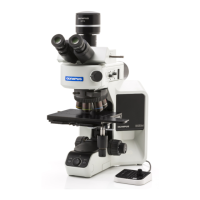
Olympus BX53 - User Manual

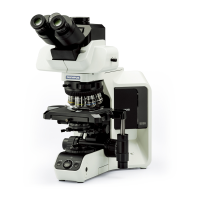
Olympus BX53
48 pages
Print Icon
To Next Page IconTo Next Page
Loading...
INSTRUCTIONS
BX53
SYSTEM MICROSCOPE
This instruction manual is for the Olympus System Microscope Model BX53.
To ensure the safety, obtain optimum performance and to familiarize yourself fully with the use
of this microscope, we recommend that you study this manual thoroughly before operating the
microscope.
Retain this instruction manual in an easily accessible place near the work desk for future reference.
A X 7 8 5 5

Table of Contents

Other manuals for Olympus BX53

Questions and Answers

  • T
    Timothy EdwardsSep 8, 2025
    Why does the brightness not change when turning the light intensity knob on my Olympus BX53 Microscope?
    • M
      morgangeoffreySep 8, 2025
      If the brightness does not change when you turn the light intensity adjustment knob on your Olympus Microscope, check if the light intensity preset button is set to ON and press the button to OFF.
  • M
    Madison SellersSep 10, 2025
    Why won't the coarse adjustment go all the way up on my Olympus BX53?
    • M
      Matthew MejiaSep 10, 2025
      If the coarse adjustment will not go all the way up on your Olympus Microscope, unlock the pre-focusing lever.
  • J
    Jessica GalvanSep 12, 2025
    Why won't the coarse adjustment go all the way down on my Olympus BX53 Microscope?
    • B
      Brandi YoungSep 12, 2025
      If the coarse adjustment will not go all the way down on your Olympus Microscope, raise the condenser holder.
  • K
    kpowersSep 13, 2025
    Why does the objective hit the specimen on my Olympus BX53 Microscope?
    • R
      roblestonyaSep 13, 2025
      If the objective makes contact with the specimen before focus is obtained on your Olympus Microscope, ensure the specimen is mounted correctly (not upside down).
  • C
    Carol CabreraSep 15, 2025
    Why doesn't the field of view match between my eyes on my Olympus BX53 Microscope?
    • A
      Andrea SchroederSep 15, 2025
      If the field of view of one eye does not match that of the other on your Olympus Microscope, adjust the interpupillary distance and diopter. Ensure that the eyepieces used on the left and right sides are the same type. Also, try looking at the overall field before concentrating on the specimen range to accustom your view to the microscope observation.
  • J
    Jennifer WadeSep 18, 2025
    Why does the image shift when I touch the stage on my Olympus BX53?
    • S
      sheatiffanySep 18, 2025
      If the image shifts when you touch the stage on your Olympus Microscope, clamp the stage.

Summary

5-6 Immersion Objectives

1 Using Immersion Objectives

Steps for using immersion objectives, including oil application and focusing.

5-7 Objectives with Correction Collar

Adjustment Procedure

How to adjust the correction collar for optimal performance with cover glass thickness.

6 CAMERA RECORDING

1 System Chart

Diagram showing the setup for camera recording with the microscope.

2 Selecting the Camera Adapter Magnification

Choosing camera adapter magnification based on sensor size.

7 TROUBLESHOOTING GUIDE

1. Observation;Illumination System Issues

Covers bulb issues, dark field of view, obscured view, and dirt/dust.

f) Poor Visibility and Image Quality

Addresses issues like poor image, contrast, indistinct details, and glare.

g) Blurred or Wavering Image

Covers one-sided blur, image wavering, and brightness issues.

j) Reddish Image and Electrical System

Deals with reddish images, bulb issues, and brightness control problems.

3. Coarse;Fine Adjustment Issues

Addresses adjustment knob stiffness, stage drift, and focusing problems.

4. Observation Tube and Stage Issues

Covers problems with matching fields of view, blurred images, and stage movement.

8 SPECIFICATIONS

1. Optical System and Illumination

Details on optical system type, illumination, bulb, and power specs.

3. Focusing and Revolving Nosepiece

Specifications for focusing mechanism, stage height, and nosepiece types.

5. Observation Tube

Specs for observation tubes including field number, tilt, and light path selector.

7. Condenser Specifications

Details on condenser types, NA, aperture iris, and objective ranges.

8. Operating Environment

Conditions for use, altitude, temperature, humidity, and voltage fluctuations.

9 OPTICAL CHARACTERISTICS (UIS2 Series)

Objective Series Data

Table detailing magnification, N.A., W.D., cover glass thickness, resolution, etc. for objectives.

10 ASSEMBLY

10-1 Assembly Diagram Overview

Visual guide showing the sequence of assembling microscope modules.

10-2 Detailed Assembly Procedures: Bulb Installation

Step-by-step guide for installing or replacing the halogen bulb.

10-2 Detailed Assembly Procedures: Optical Components

Instructions for attaching eyepieces, revolving nosepiece, and condenser.

10-2 Detailed Assembly Procedures: Power Connection

Steps for connecting the lamp housing cable and power cord.

11 LAMP HOUSING INSPECTION SHEET

Inspection Checklist

A table of checks for lamp housing condition, performance, and safety.

PROPER SELECTION OF THE POWER SUPPLY CORD

Specifications for Power Cord

Details on voltage, current, temperature, and fittings for the power cord.

Table 1 Certified Cord Agencies

List of agencies and their certification marks for power supply cords.

Table 2 HAR Flexible Cord Marking Methods

Approval organizations and cordage harmonization marking methods for flexible cords.

Olympus BX53 Specifications

General IconGeneral
TypeUpright Microscope
IlluminationLED
FocusCoarse and fine focus
Observation TubeTrinocular
Observation MethodsBrightfield, Darkfield, Phase Contrast, Fluorescence, DIC
Magnification RangeDepending on the objectives used
Objective Turret5 or 6 positions
Condenseruniversal condenser
Power SupplyAC 100-240V, 50/60 Hz
StageRectangular Ceramic-Coated Stage with Slide Holder

Related product manuals