171
EN
Additions/modifi cations by fi rmware update
15
Anti-shock shooting/silent shooting (Anti-Shockz/Silent[♥])
Shooting without the vibration caused by shutter button operations
(Anti-Shockz)
To prevent camera shake caused by the small vibrations that occur during shutter
operations, shooting is performed using an electronic front-curtain shutter.
This is used when shooting with a microscope or a super telephoto lens.
1
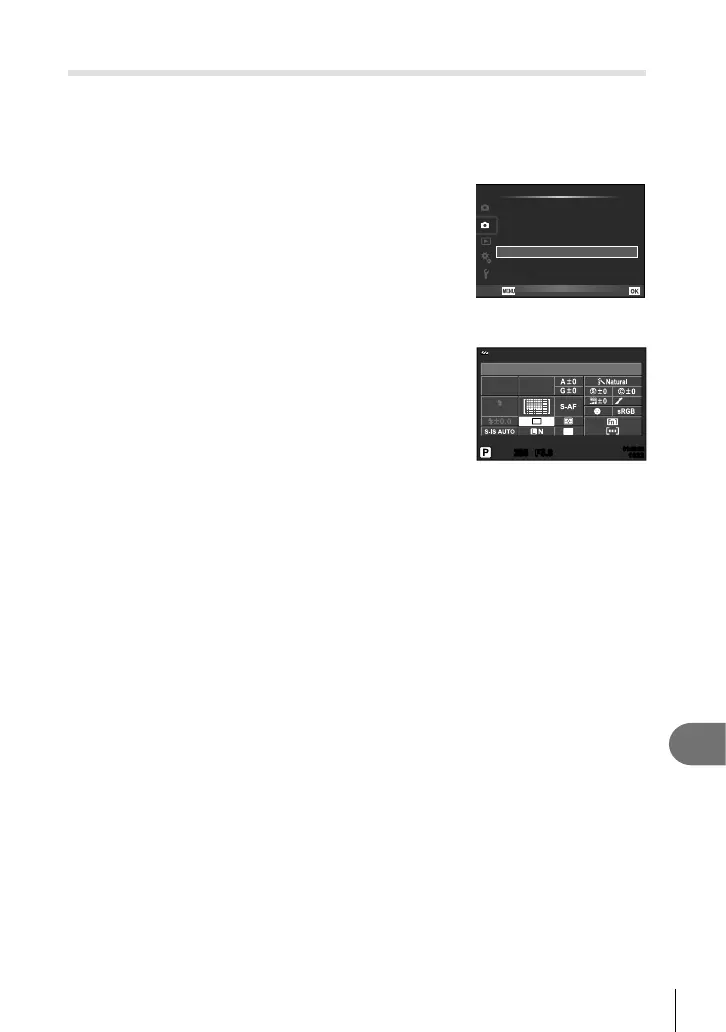
Select [Anti-Shockz/Silent[♥]] in XShooting menu
2 and press Q.
2
Select [Anti-Shockz] and press I.
3
Select the interval between the shutter button
is pressed all the way down and the shutter is
released, and press Q.
• Press the MENU button repeatedly to exit the menu.
1
2
Off
Off
Back
Shooting Menu 2
HDR
Multiple Exposure
Keystone Comp. Off
Set
Anti-Shock[
i
]/Silent[
j
]
OffBracketing
#
RC Mode Off
4
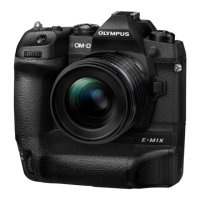
Select j/Y (sequential shooting/self timer) on the
super control panel, live control, or LV super control
panel.
5
Select one of the items marked ♦ using the front dial
and press Q.
6
Shoot.
250250 F5.6
i
NORM
ISO
AUTO
AUTO
WB
AUTO
4:3
01:02:0301:02:03
10231023
Single
• When the set time has elapsed, the shutter is released and the image is shot.
• When the shutter speed is 1/320 s or faster, the mechanical shutter is used for
shooting.







 To Next Page