70
Chapter 4 Workstation Access and Setup
OLYMPUS CAPSULE ENDOSCOPE SYSTEM
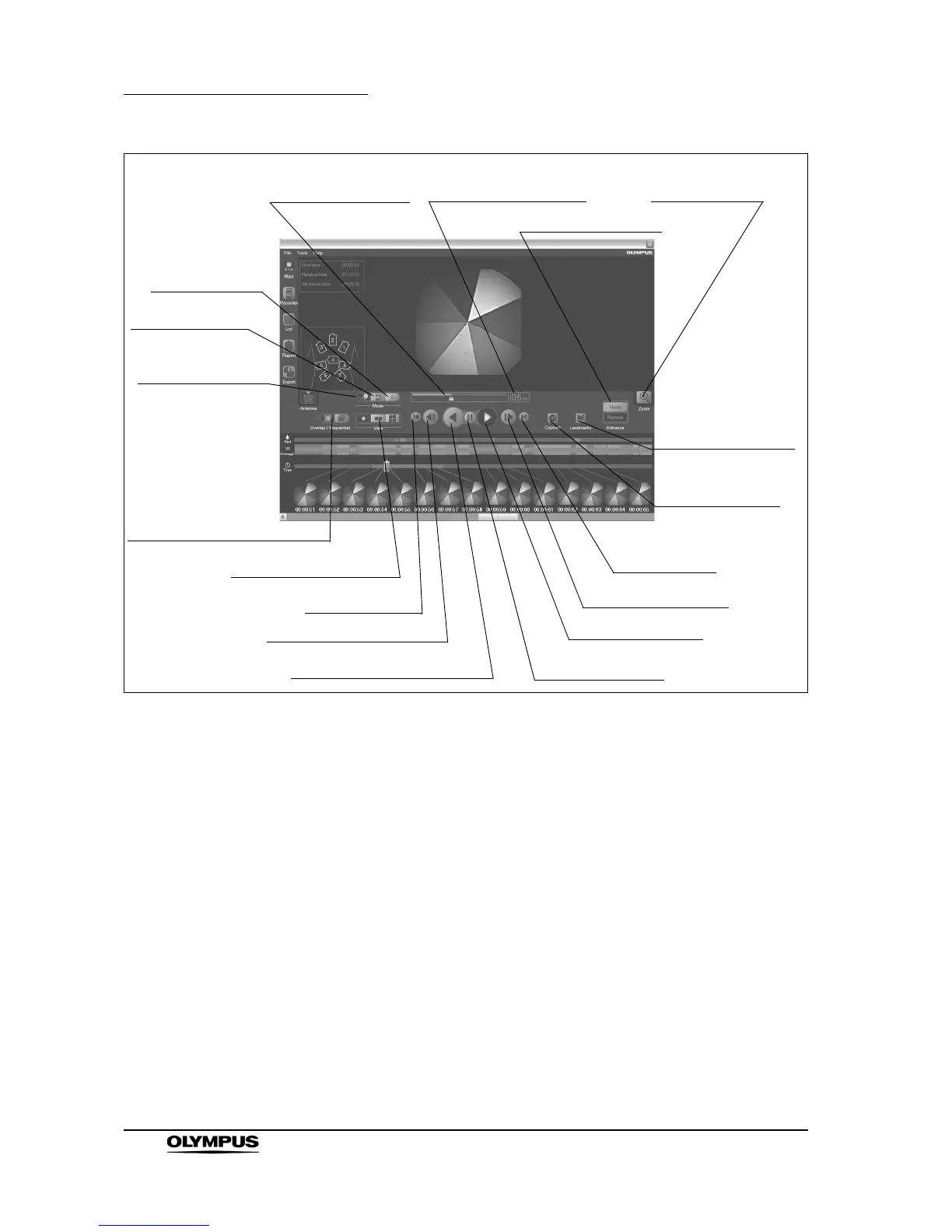
Figure 4.11
1. Speed setting bar
Sets the review speed.
2. Speed setting display
Displays the review speed.
3. Zoom button
Enlarges the image(s) displayed in the image display area.
4. Enhance buttons
Sets the level of structure enhancement.
5. Landmarks button
Displays the feature setting screen for setting the feature for thumbnails.
6. Capture button
Makes a thumbnail in the image display area.
7. Last button
Displays the last image data.
13. First button
12. Previous Image button
11. Reverse Playback button
10. Pause button
9. Playback button
8. Next Image button
7. Last button
1. Speed setting bar
2. Speed setting display
14. Image View buttons
15. Overlap /
Sequential button
3. Zoom button
4. Enhance buttons
16. Normal button
17. Adjust button
18. Red button
6. Capture button
5. Landmarks button







 To Next Page