38
EN
3
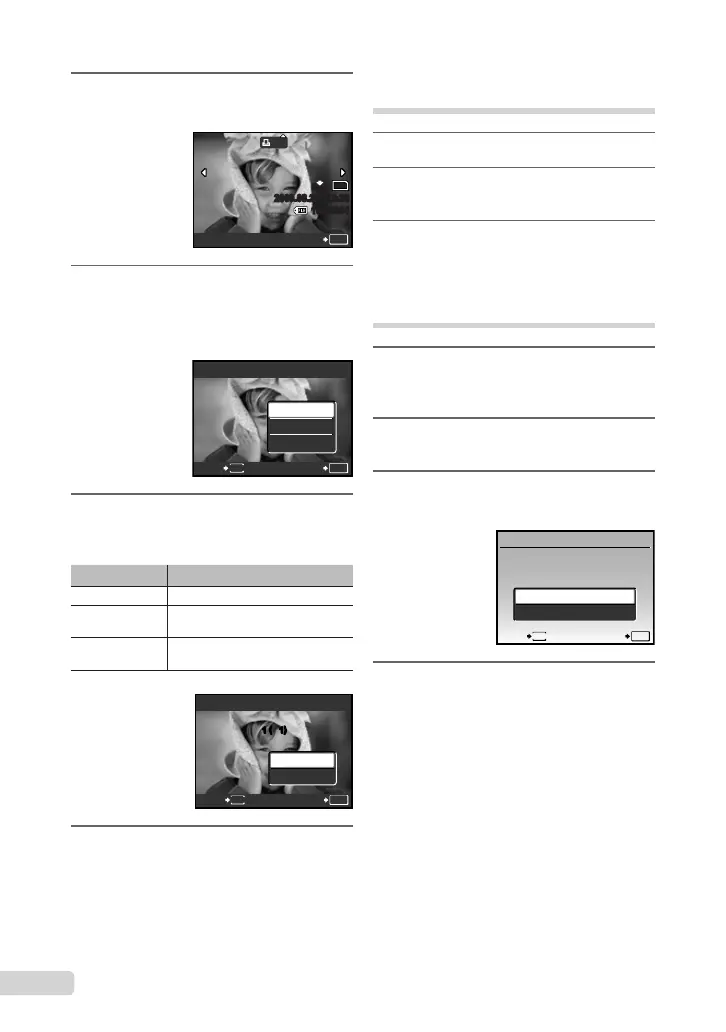
Use ab to select [<], and press
the o button.
x
10
M
2009.08.26 12:30
100-0004
4
0
N
ORM
SET
OK
4
Use cd to select the image
for print reservation. Use ab
to select the quantity. Press the
o button.
5
Use ab to select the [X] (date
print) screen option, and press the
o button.
Submenu 2 Application
NO Thisprintstheimageonly.
DATE
Thisprintstheimagewiththe
shootingdate.
TIME
Thisprintstheimagewiththe
shootingtime.
OK
SETBACK
MENU
PRINT ORDER
SET
CANCEL
1
(
1
)
1
(
1
)
6
Use ab to select [SET], and press
the o button.
Reserving one print each of all
images on the card [U]
1
Follow Steps 1 and 2 in [<] (p. 37).
2
Use ab to select [U], and press
the o button.
3
Follow Steps 5 to 6 in [<].
Resetting all print reservation
data
1
Press the qbutton, and then press
the button to display the top
menu.
2
Use abcd to select [LPRINT
ORDER], and press the o button.
3
Select either [<] or [U], and press
the o button.
OK
SETBACK
MENU
PRINT ORDER SETTING
PRINT ORDERED
RESET
KEEP
4
Use ab to select [RESET], and
press the o button.








 To Next Page