15
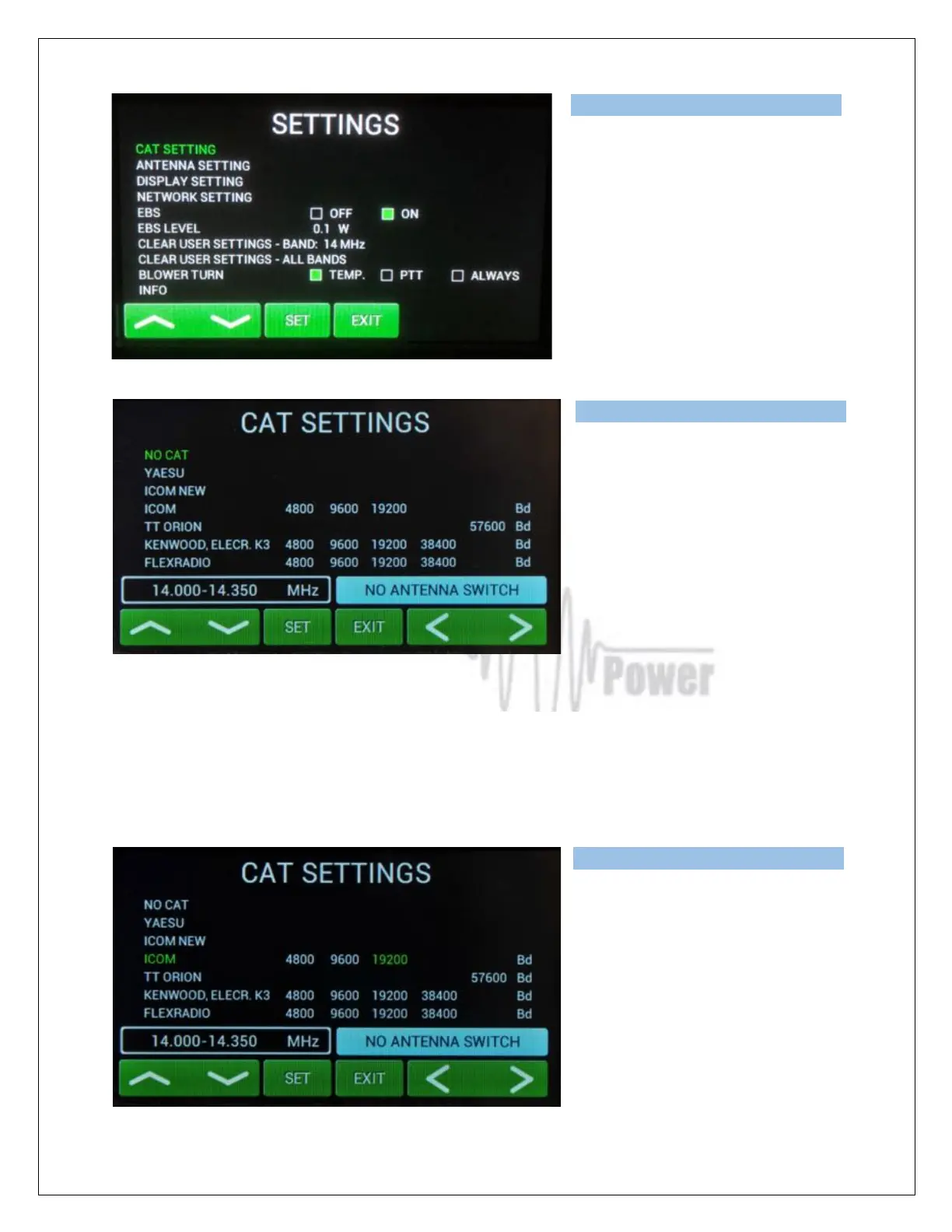
Screen shows settings possibilities for
CAT, ANTENNA, DISPLAY, NETWORK
SETTING, EBS, BLOWER and other
INFO.
Scroll to CAT SETTINGS (up or down)
and
press SET.
Scroll to your TCVR family (up or down)
select appropriate bit rate (left or right)
then press SET.
Or select NO CAT and press SET.
We recommend using the CAT
connection whenever possible because, in such a case, the OM2501A (OM3501A) has permanent
information about the transmit frequency and is immediately ready for transmitting.
With a setting of NO CAT the OM2501A (OM3501A) detects transmit frequency from the input signal.
With the input signal frequency changing the PA automatically reacts and tunes itself to optimal
output parameters.. If NO CAT is used, we recommend using BAND DATA (BCD) information for
much faster band changing.
If you choose YAESU or ICOM NEW,
after SET pressing you will go to deeper
level which allows you to select specific
type of TCVR.ee the following picture for
ICOM NEW selection, for example.



 To Next Page