16
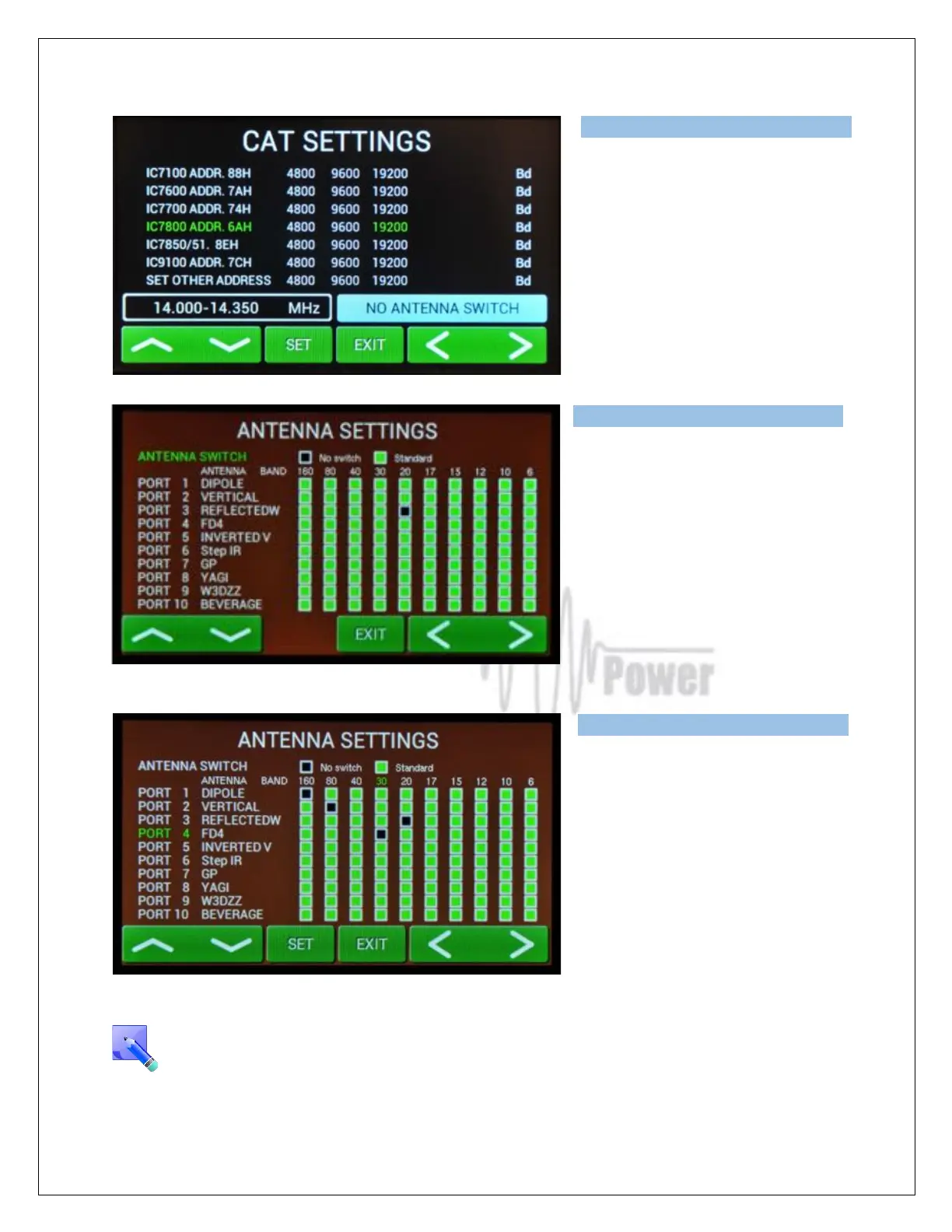
You selected IC7800 addr.6AH and
19200 Bd. Press SET to write to the
memory, then press EXIT to go back to
the SETTINGS possibilities.
“SET OTHER ADDRESS” means that
you must add here a new type of ICOM
TCVR which is not defined in the table
(its address plus bitrate in Bd) to allow
communications with it.
Press ANTENNA SETTINGS. First
select ANTENNA SWITCH (No switch,
Standard). Use left or right arrows. If you
select some switch, 10 ports for different
antennas displays. Generally all of
antennas are allowed in every band
(green squares). To disable some
square select port (up/down), touch SET
for antenna name and then select band
(left/right). Press SET.
Four types of antennas for four different
bands were disabled.
Black square means disabled
combination.
Press EXIT to go back to SETTINGS
menu
BCD code (4 bits) is used for automatic antenna and BPF switching (see Antenna/BPF
connector on the Control panel (rear side of the PA). See section 7.9 for Control and
ANT/BPF connectors pin-out.



 To Next Page