EasyManua.ls Logo

OM POWER OM2501A - Page 24

OM POWER OM2501A
56 pages
Print Icon
To Next Page IconTo Next Page
To Previous Page IconTo Previous Page
Loading...
24
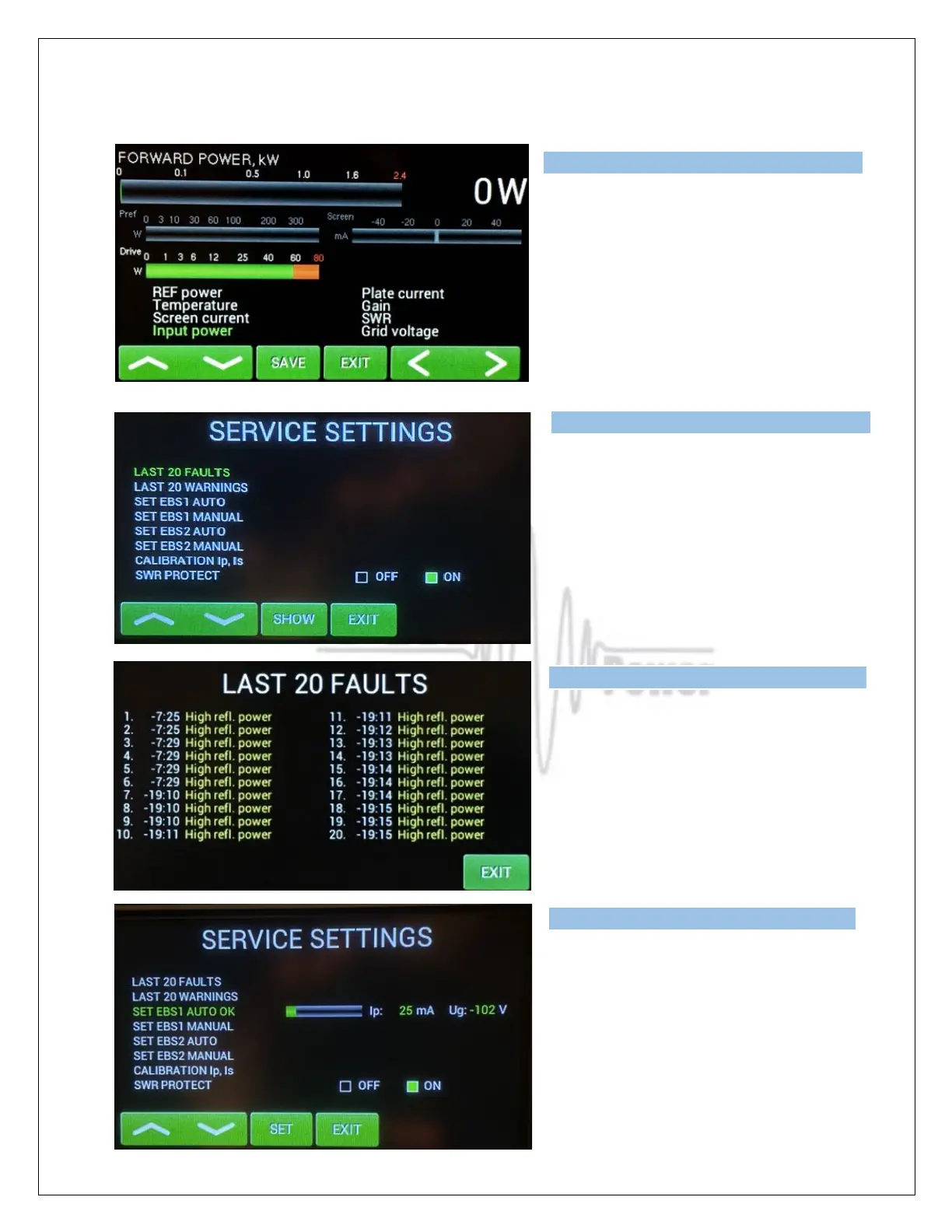
NOTE: Follow these steps to populate BARG2 and BARG3 as desired.
Press EXIT to go back to the Menu display,
then press SERVICE.
Now we are in the SERVICE settings mode.
Scroll to selected line and press SHOW or
SET (depending on the line).
We selected last 20 FAULTS to show.
Press EXIT
Go to SET EBS1 AUTO and press SET.
PA will automatically set 20mA on the tube.
When finished successfully, you will see
SET EBS1 AUTO OK on the screen

Type of supported TCVR and working
frequency are visible on the display.
AUTO LED is ON.
Type of supported TCVR and working
frequency are visible on the display.
AUTO LED is ON.
Type of supported TCVR and working
frequency are visible on the display.
AUTO LED is ON.
Type of supported TCVR and
working
frequency are visible on the display.
AUTO LED is ON.

Related product manuals