710.1760.00.04-05 22/05/2014
37
No.
Device
status
Alarm
code
Alarm description Possible cause Recommended remedy Restore (*)
2
Fans and
compres-
sors are
not work-
ing, pump
is working.
B1AC
B2AC
Antifreeze alarm
Liquid flow too low
Check right rotation of pump
and possible obstruction on
liquid circuit
M
Dirty evaporator
Clean evaporator and in case
contact service
C1OP
……..
C6OP
Compressor oil-
pressure switch alarm
or oil level alarm.
Oil level in the compressor
crank case is too low.
Fill the compressor crank case
with oil or contact service
A
becomes
M after 1
events in 1
hour
C1TR
……..
C6TR
Compressor 1, 2, 3,
4, 5, 6 thermal
switches alarm
Thermal protections of a
new unit are in OFF posi-
tion
Switch MTC in ON
M after reset
MTC
Compressor is having
problem
Reset thermal switch and in
case contact of a persistent
problem contact service
AP1 ……..
AP12
One of the probe is
defective
Probe can be defective or
not well connected
Check connection and in case
change probe
A
3
Unit is
working
AEUN
High liquid tempera-
ture alarm in inlet
line (if P3 or P4 high
temp. alarm is pre-
sent)
Required cooling capacity
is higher than nominal
Decrease the required cooling
capacity
A
becomes
M after 3
events in 1
hour
AEP1
AEP2
Maintenance pumps
1, 2 only on request
Service on unit is required
due to length of work
Contact a refrigerant techni-
cian
M
C1MN
……..
C6MN
Maintenance com-
pressors 1, 2, 3, 4, 5,
6 only on request
Service on unit is required
due to length of work
Contact a refrigerant techni-
cian
M
After fault rectification system is automatically restored
Alarm function restored by settings made on the
control unit, procedure as described below.
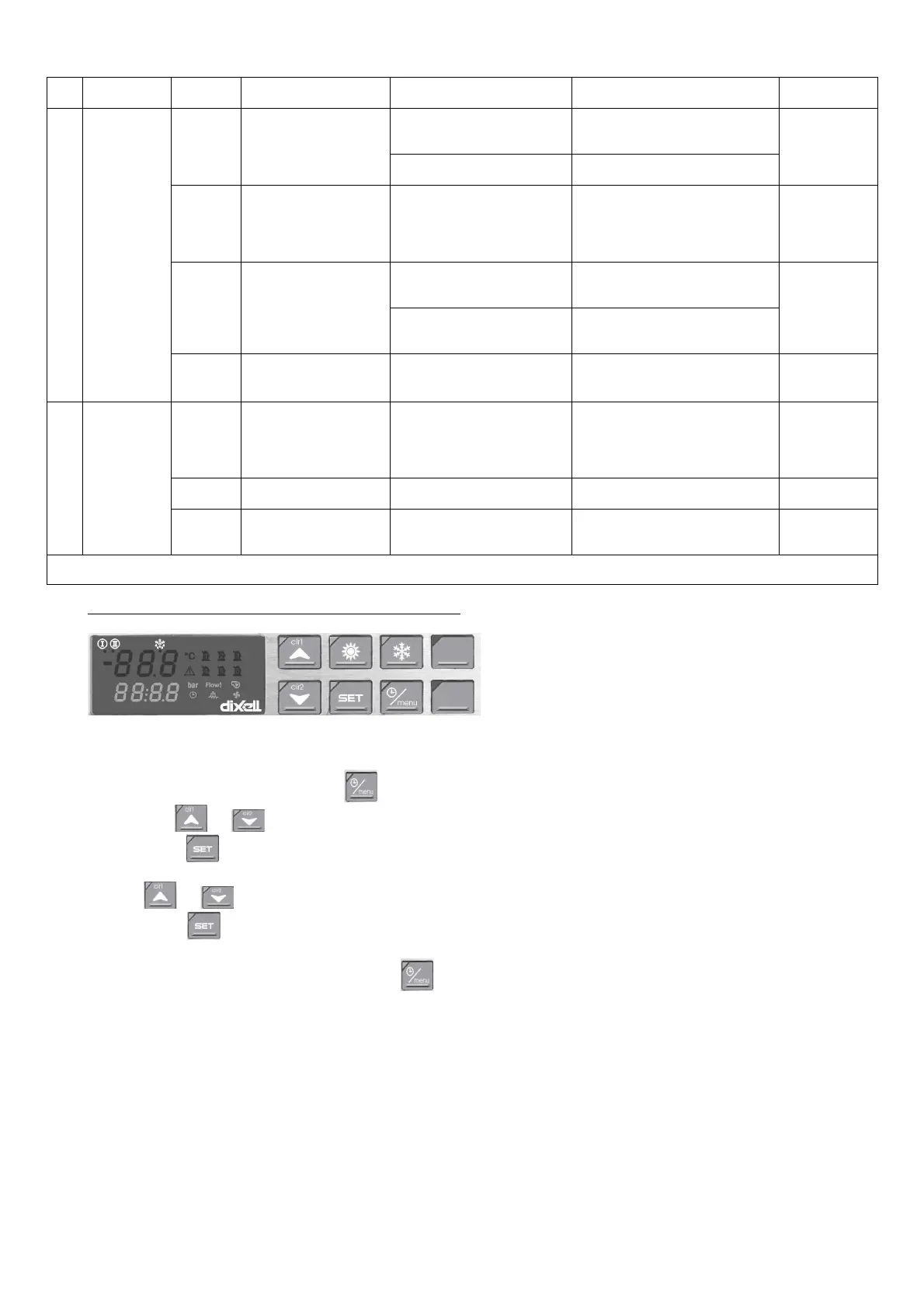
HOW TO RESET AN ALARM EVENT (CONTROLLER TYPE “C”)
Controller Type “C”
(CHW 682 to CHW 3652;
CHG 225 to CHG 365)
2) Enter the menu by pressing the key.
3) Use the or key to show “ALrM” on the display.
4) Press the key and release it; the alarm code will now appear on the lower display.
5) Upper display: rSt will appear in the display if the alarm can be reset, NO if this is not possible. Use
the or key to scroll through the alarm list.
6) Press the key when rSt lights up in order to reset the alarm; after a short time the system will
move on to the next alarm.
7) To exit the function menu, press the key and then release it or wait for the timeout. The
“menu” symbol will disappear.



 To Next Page