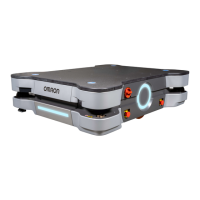
Chapter 10: Maintenance
Callout Description
A Access Panel - covers the maintenance Ethernet port and joystick con-
nector.
B Left side skin - covers the LD left drive train.
C
Right side skin - covers the LD right drive train.
NOTE: Both side skins hold a light disc and cover.
D Battery door skin - covers the battery access door.
E Rear skin - covers the LD rear components, and houses the sonar trans-
ducer pairs.
F Front upper skin - Above the safety scanning laser and speakers.
G Bumper - Above the lower bumper assembly and low front laser.
With the exception of the bumper, no tools are needed for either the removal or installation of
the platform’s skins.
CAUTION: PINCHRISK
The magnets holding the covers in place are strong enough to pinch you if you
are not careful.
Additional Information: In general, it is better to install the payload structure
before installing the skins.
The covers are:
l
Rear Inner (Battery)
l
Access Panel
l
Left Side, Right Side
Both side covers include a light disc and cover.
l
Front Upper
l
Bumper
l
Rear Outer
With the exception of the bumper cover, no tools are needed for either the removal or install-
ation of the covers.
Removing Covers
NOTE: After removing covers, place them inner-side down, so the outer sur-
faces don't get scratched.
14766-000 Rev H LD Cart Transporter User's Manual 159


 To Next Page