Chapter 4: Configuration
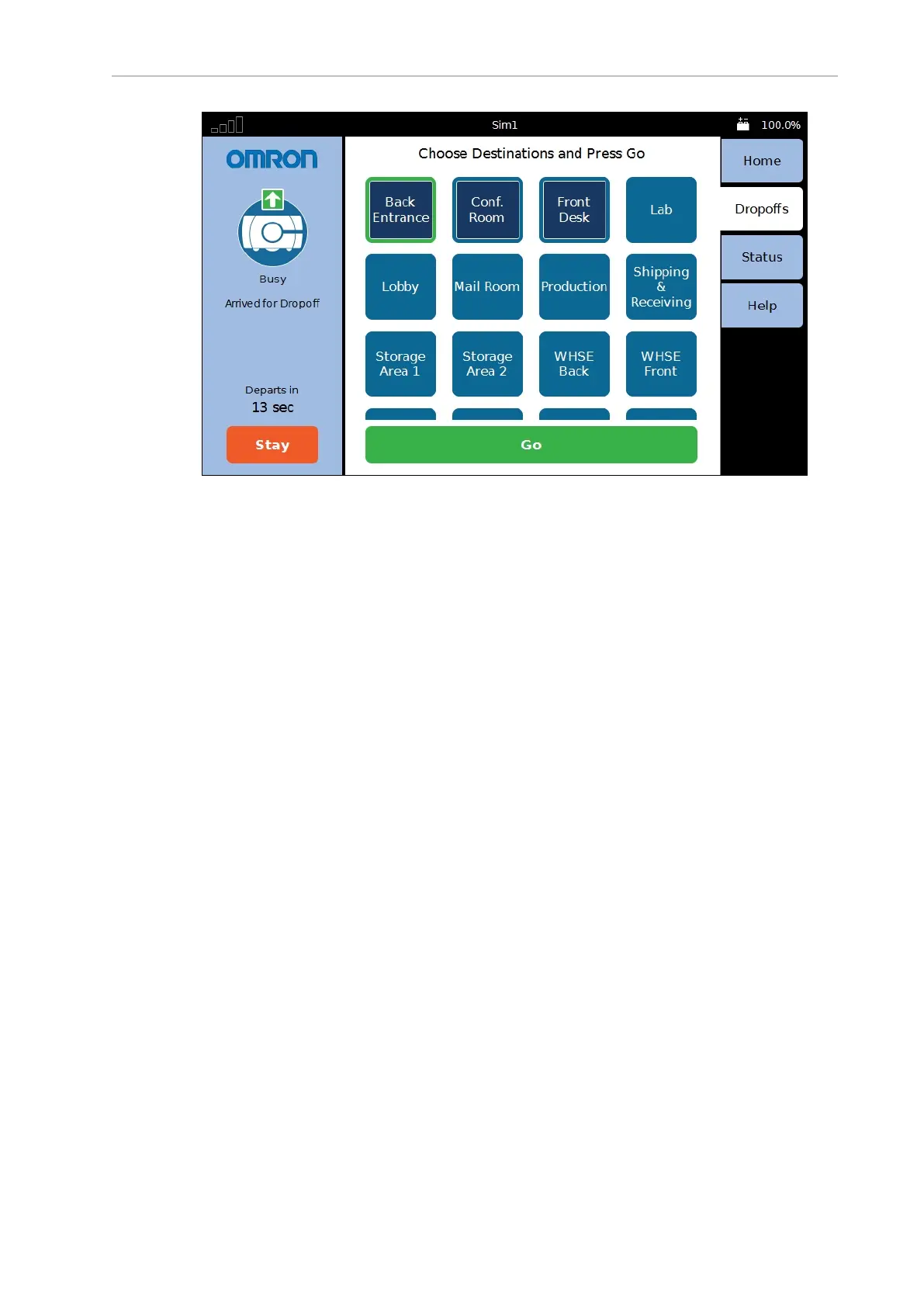
Figure 4-4. Sample Touchscreen, with Omron Logo, in Choose Dropoff Mode
You can customize this with a logo of your choosing using the following steps:
1.
Upload a PNG image file to the AMR using the MobilePlanner software:
File > Download/Upload
2.
Open the Configuration window and choose:
Robot Interface > Touchscreen
3.
Edit the SmallLogo parameter.
a.
Click the file-select button to open the file chooser.
b.
Select the newly-uploaded file.
c.
Click Open.
4.
Click Save, to save the configuration.
NOTE: If the SmallLogo field is left blank, the default Omron logo will be dis-
played.
NOTE: If a different version of the same file name is uploaded to the AMR, you
will need to power cycle the AMR to see the change.
Screensaver
In MobilePlanner, select
Config > Robot Interface > Touchscreen
From there, use Screensaver.
14766-000 Rev H LD Cart Transporter User's Manual 73


 To Next Page