EasyManua.ls Logo

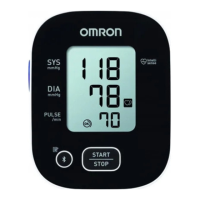
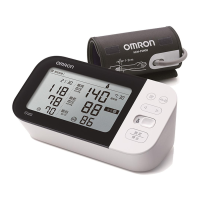
Omron M7 Intelli IT - User Manual

Omron M7 Intelli IT
140 pages
Print Icon
To Next Page IconTo Next Page
Loading...
Automatic Upper Arm
Blood Pressure Monitor
M7 Intelli IT (ALRU)
Instruction Manual
EN
RU
2895901-4A_HEM-7361T-ALRU_IM_M01_221028.pdf
2895901-4A_HEM-7361T-ALRU_IM.fm Page 0 Wednesday, October 26, 2022 10:46 AM

Table of Contents

Questions and Answers

  • L
    laurenrossSep 23, 2025
    What to do if the batteries are low in my Omron M7 Intelli IT Blood Pressure Monitor?
    • D
      dhartSep 23, 2025
      If the batteries are low in your Omron Blood Pressure Monitor, it's recommended to replace all 4 batteries with new ones.
  • B
    Breanna EllisSep 23, 2025
    What to do if I move during measurement with my Omron M7 Intelli IT?
    • C
      Christine ThomasSep 23, 2025
      If you move during measurement with your Omron Blood Pressure Monitor, carefully read and repeat the measurement steps.
  • D
    David GuzmanAug 31, 2025
    Why is the measurement result extremely high or low on my Omron M7 Intelli IT Blood Pressure Monitor?
    • A
      Adam RushAug 31, 2025
      An extremely high or low measurement result on your Omron Blood Pressure Monitor could be due to several factors: the arm cuff being applied too loosely, movement or talking during measurement, or clothing interfering with the arm cuff. Make sure the arm cuff is applied tighter, remain still and do not talk during measurement, and remove any clothing interfering with the arm cuff.
  • S
    sjuarezAug 25, 2025
    Why Omron M7 Intelli IT Blood Pressure Monitor arm cuff does not inflate?
    • E
      Eric PatrickAug 25, 2025
      If the arm cuff of your Omron Blood Pressure Monitor doesn't inflate, it might be due to several reasons: * The [START/STOP] button was accidentally pressed without the cuff being applied. Press the [START/STOP] button again to turn the monitor off. Then, securely insert the air plug and correctly apply the arm cuff before pressing the button again. * The air plug isn't fully inserted. Make sure to insert the air plug securely. * The arm cuff isn't correctly positioned. Apply the arm cuff correctly before taking another measurement. * There's an air leak in the cuff. If air is leaking, replace the arm cuff with a new one.
  • R
    Rachel GreenAug 25, 2025
    What to do if Omron M7 Intelli IT Blood Pressure Monitor displays or the arm cuff does not inflate?
    • J
      josephmcneilAug 26, 2025
      This issue may occur due to several reasons: 1. The [START/STOP] button was pressed before the arm cuff was applied. Press the [START/STOP] button again to turn the monitor off, then after correctly applying the arm cuff and inserting the air plug, press the [START/STOP] button. 2. The air plug is not fully inserted. Ensure the air plug is securely inserted. 3. The arm cuff is not correctly applied. Apply the arm cuff correctly, then take another measurement. 4. There is an air leak from the arm cuff. Replace the arm cuff with a new one.
  • K
    Kathy TateAug 26, 2025
    Why does Omron M7 Intelli IT Blood Pressure Monitor display or a measurement cannot be completed after the arm cuff inflates?
    • J
      juan69Aug 26, 2025
      This can occur because you moved or talked during the measurement, or the arm cuff did not inflate sufficiently. Remain still and do not talk during measurements. If "E2" appears repeatedly, manually inflate the arm cuff until the systolic pressure is 30 to 40 mmHg above your previous readings. This can also happen if your systolic pressure is above 210 mmHg.
  • M
    Maria VaughnAug 27, 2025
    Why does Omron M7 Intelli IT Blood Pressure Monitor flash?
    • J
      Jeffrey BaxterAug 27, 2025
      This indicates that the monitor is ready to transfer your readings to the smart device. Open the “OMRON connect” app to transfer your readings.
  • P
    Patrick MillsAug 27, 2025
    What to do if Omron M7 Intelli IT Blood Pressure Monitor displays or the monitor is turned off unexpectedly during a measurement?
    • R
      Robert HowellAug 27, 2025
      This happens when the batteries are depleted. Replace all 4 batteries immediately with new ones.
  • A
    Amber BriggsAug 28, 2025
    What to do if the Omron M7 Intelli IT detects an irregular heartbeat?
    • K
      Kathryn McgeeAug 28, 2025
      If your Omron Blood Pressure Monitor detects an irregular heartbeat, remove the arm cuff, wait 2-3 minutes, and then take another measurement. If this error continues, it is recommended to contact your physician.
  • I
    idavilaAug 28, 2025
    What to do if Omron Blood Pressure Monitor shows E2 error?
    • D
      David MatthewsAug 29, 2025
      If your Omron Blood Pressure Monitor displays the “E2” error, it means that you moved or talked during the measurement, and the arm cuff did not inflate sufficiently, or the systolic pressure is above 210 mmHg and a measurement cannot be taken. Remain still and do not talk during the measurement. If “E2” appears repeatedly, inflate the arm cuff manually until the systolic pressure is 30 to 40 mmHg above your previous readings.

Summary

Introduction

Safety Instructions

General safety guidelines for proper and safe use of the blood pressure monitor.

Important Safety Information

General Warnings

Crucial warnings about device usage, medication, environmental conditions, and data transmission.

Know Your Monitor

Display and Symbols Guide

Explains the meaning of various symbols and indicators on the monitor's display.

Preparation

Using Your Monitor without a Smart Device

Taking a Measurement

Step-by-step guide to performing a blood pressure measurement without a smart device.

Afib Mode Operation

Instructions on how to use the monitor's Afib detection mode.

Using Your Monitor with a Smart Device

Pairing with Smart Device

Steps to connect the monitor to a smartphone via Bluetooth.

Using Memory Function

Error Messages and Troubleshooting

Cuff Inflation Errors

Explains causes and solutions for errors related to cuff inflation or non-application.

Measurement Process Errors

Troubleshooting errors occurring during measurement like movement, pressure, or pulse issues.

Maintenance

General Maintenance and Storage

Guidelines for maintaining the monitor's condition and safe storage.

Specifications

Guidance and Manufacturers Declaration

Omron M7 Intelli IT Specifications

General IconGeneral
TypeAutomatic
Cuff size22 - 42 cm
CompatibilityiPhone, Android
Product colorBlack, Grey, White
Number of users2 user(s)
Placement supportedUpper arm
Mean arterial pressureYes
Diastolic blood pressure-
Package weight1380 g
Weight and Dimensions IconWeight and Dimensions
Depth180 mm
Width120 mm
Height220 mm

Related product manuals