Version 1.03 Page 7
6.
PROJECT SETUP
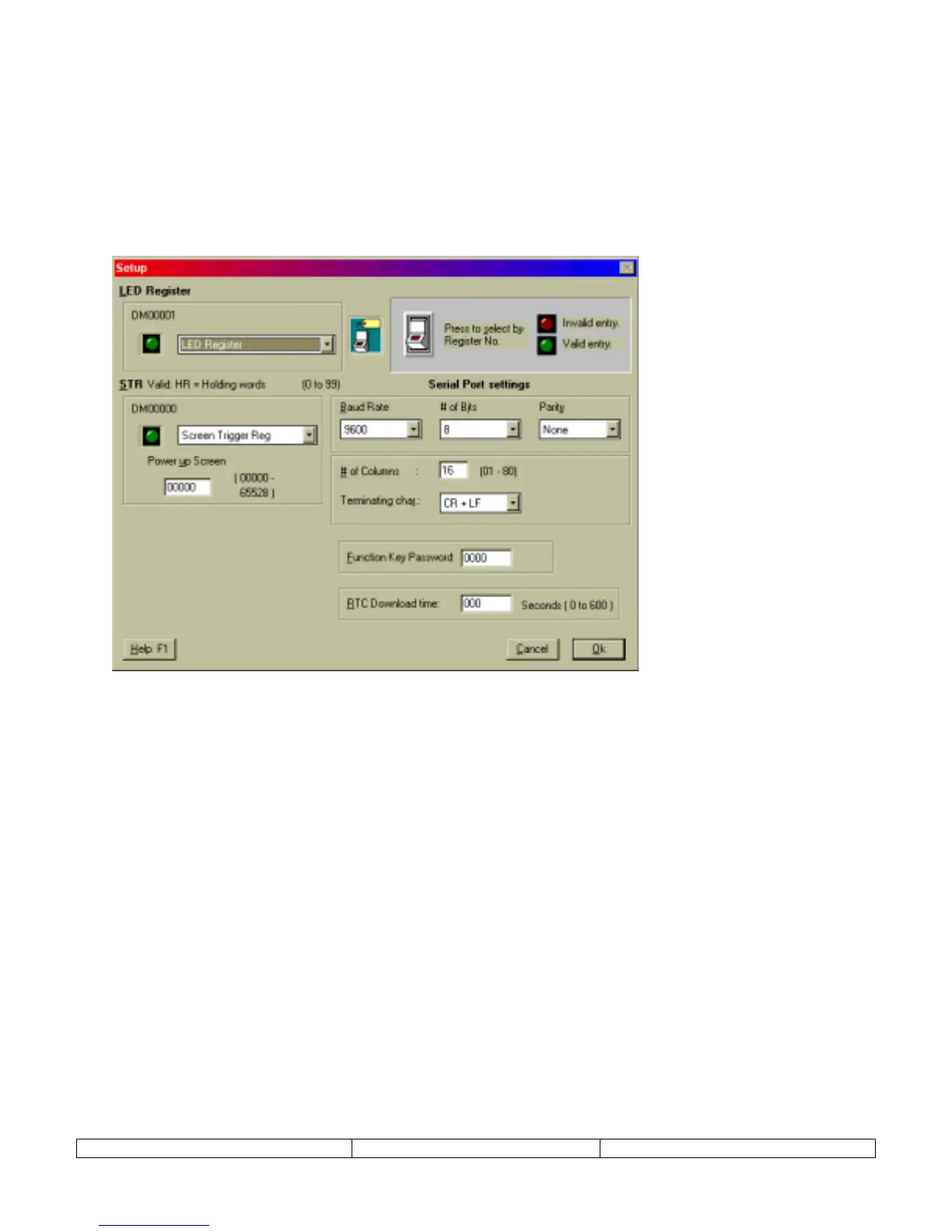
The Setup dialog is used to configure the NT2S operation parameters. Specify the LED register,
screen trigger register, power up screen, serial port settings, function key password, and real time
clock download time. The project setup dialog is accessed from the
Edit
menu,
Setup
menu
item.
Generally, there is no need to change the default settings. The only parameters that need to be
set by the user are Power up screen number and the function key password settings.
LED Register –
This setting tells the NT2S which TAG to reference for the LED Register. Any TAG of the proper
type can be referenced for this setting. The default TAG is labeled “LED Register”.
STR –
This setting tells the NT2S which TAG to reference for the Screen Trigger Register. Any TAG of the proper
type can be referenced for this setting. The default TAG is labeled “Screen Trigger Reg”.
Power Up Screen –
Enter the screen number for the screen that should appear at system start-up. This screen
number is only referenced internally from the NT2S and is not written down to the STR in the PLC.
Serial Port settings:
Set the serial port parameters for serial printer connection. The communication is Serial
RS232, Selectable 7 or 8 bit, Odd, Even or No Parity, No handshake, 300, 600, 1200, 2400, 4800, 9600 or 19200
Baud.
NOTE: Serial Communications specifications apply to the Unit - printer setup and do not affect PC to Unit
communications.
Function Key Password –
This password will be applied to any function key that has the password activated. The
password will be used throughout the project.
RTC Download Time (NT2S-SF121B-E only) –
Enter the time interval for downloading the RTC tags to the PLC
here. The values range from 0 to 600 ( seconds ). 0 means the values will be downloaded as fast as possible. Any
other interval will mean that NT2S will wait for the specific time interval before downloading the value into the
PLC.


 To Next Page