Version 1.03 Page 8
7.
TAG DATABASE
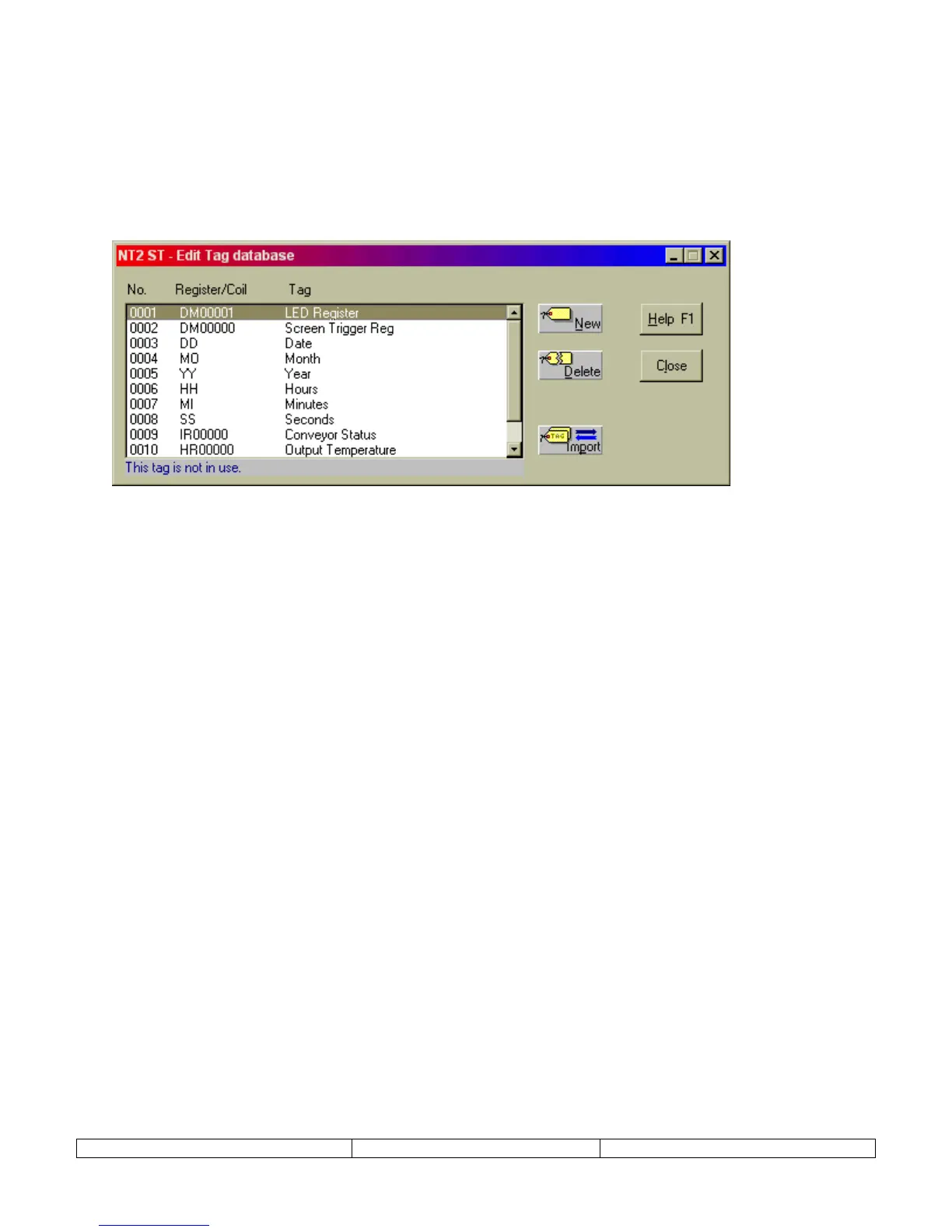
Once the project has been created, the very first step should be to define the TAG DATABASE.
The tag database is a list of names (tags) that reference PLC registers or coils (bits). When
programming screens, reference is made to this tag database. Users can choose to reference the
tags either by name or PLC address.
Tags will be referenced while creating the NT2S screens are created. Tags can always be edited
or modified later in the project.
New projects are created a set of default TAGS. For instance, NT2S-SF122B-E has the
following tags:
0001 LED Register |DM00001|
0002 Screen Trigger Reg |DM00000|
NT2S-SF121B-E projects are created with 8 tags. Tags 0003 through 0008 are associated with
the RTC and cannot be directly addressed in NT2ST. Their addresses are offset from the LED
Register address. The tags are defined as follows:
0001 LED Register |DM00001|
0002 Screen Trigger Reg |DM00000|
0003 Date
LED Register + 2 (Lower byte) ---- Date (DD)
0004 Month
LED Register + 3 (Higher byte) ---- Month (MO)
0005 Year LED Register + 3 (Lower byte) ---- Year (YY)
0006 Hours LED Register + 1 (Higher byte) ---- Hours (HH)
0007 Minutes LED Register + 1 (Lower byte) ---- Minutes (MI)
0008 Seconds LED Register + 2 (Higher byte) ---- Minutes (MI)


 To Next Page