Version 1.03 Page 9
CREATE A REGISTER
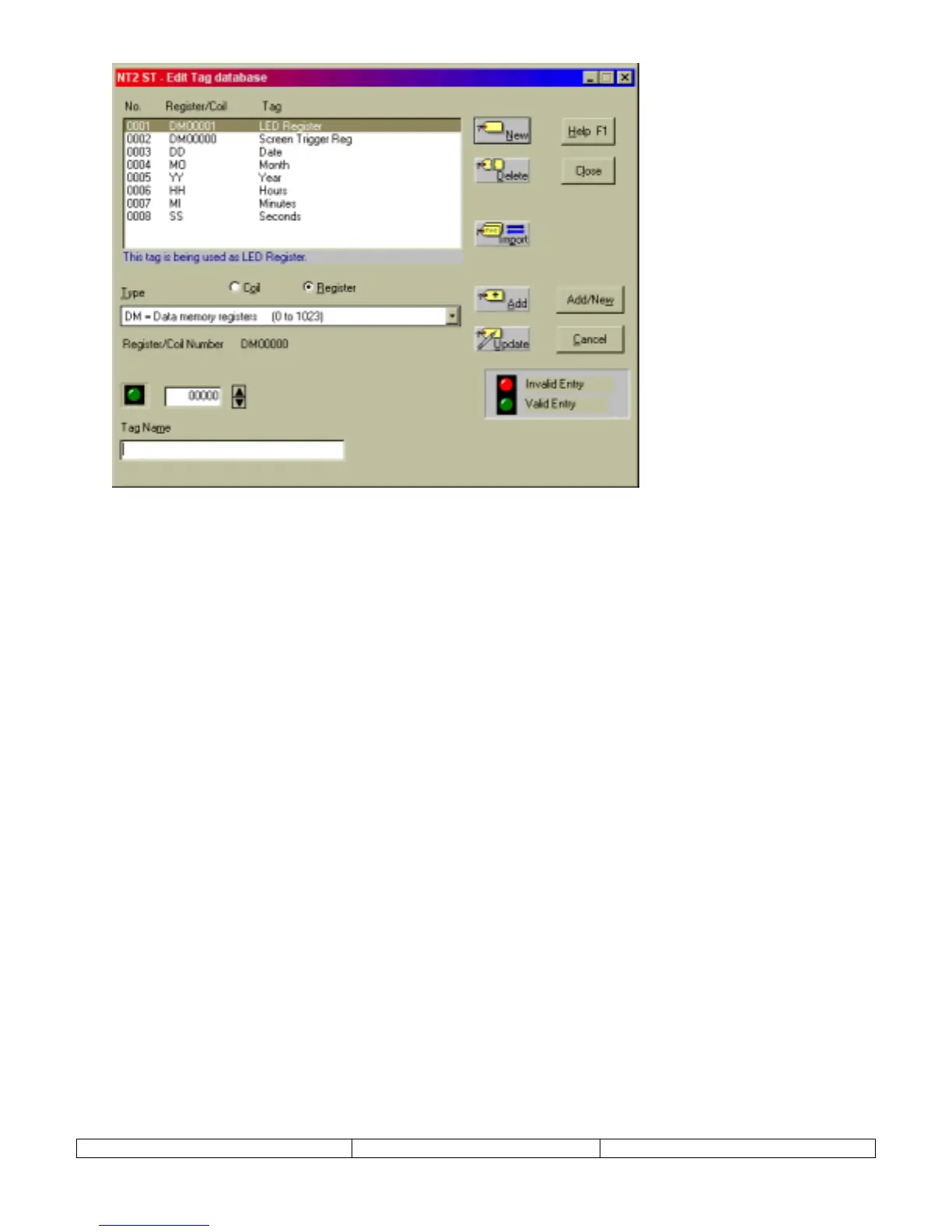
A tag can reference an entire word in PLC memory, called a register. Use the following steps to
create a tag for a register:
1.
Select
Tag Database
from the
Edit
menu.
2.
From the Tag Database editor dialog (shown above), choose NEW.
3.
Select the Register button.
4.
Choose the PLC memory location from the provided list box.
5.
Select the specific register number in the address box provided.
6.
Enter a tag name in the lower text box.
7.
Select ADD button to complete the creation of the register tag.
CREATE A COIL
A tag can reference a bit in PLC memory, called a coil. Use the following steps to create a tag
for a coil:
1.
Select
Tag Database
from the
Edit
menu.
2.
From the Tag Database editor dialog, choose NEW.
3.
Select the Coil button.
4.
Choose the PLC memory location from the provided list box.
5.
Select the specific register and bit number in the address box provided.
6.
Enter a tag name in the lower text box.
7.
Select ADD button to complete the creation of the coil tag.


 To Next Page