66
Special Settings and Communications Settings Section 4-8
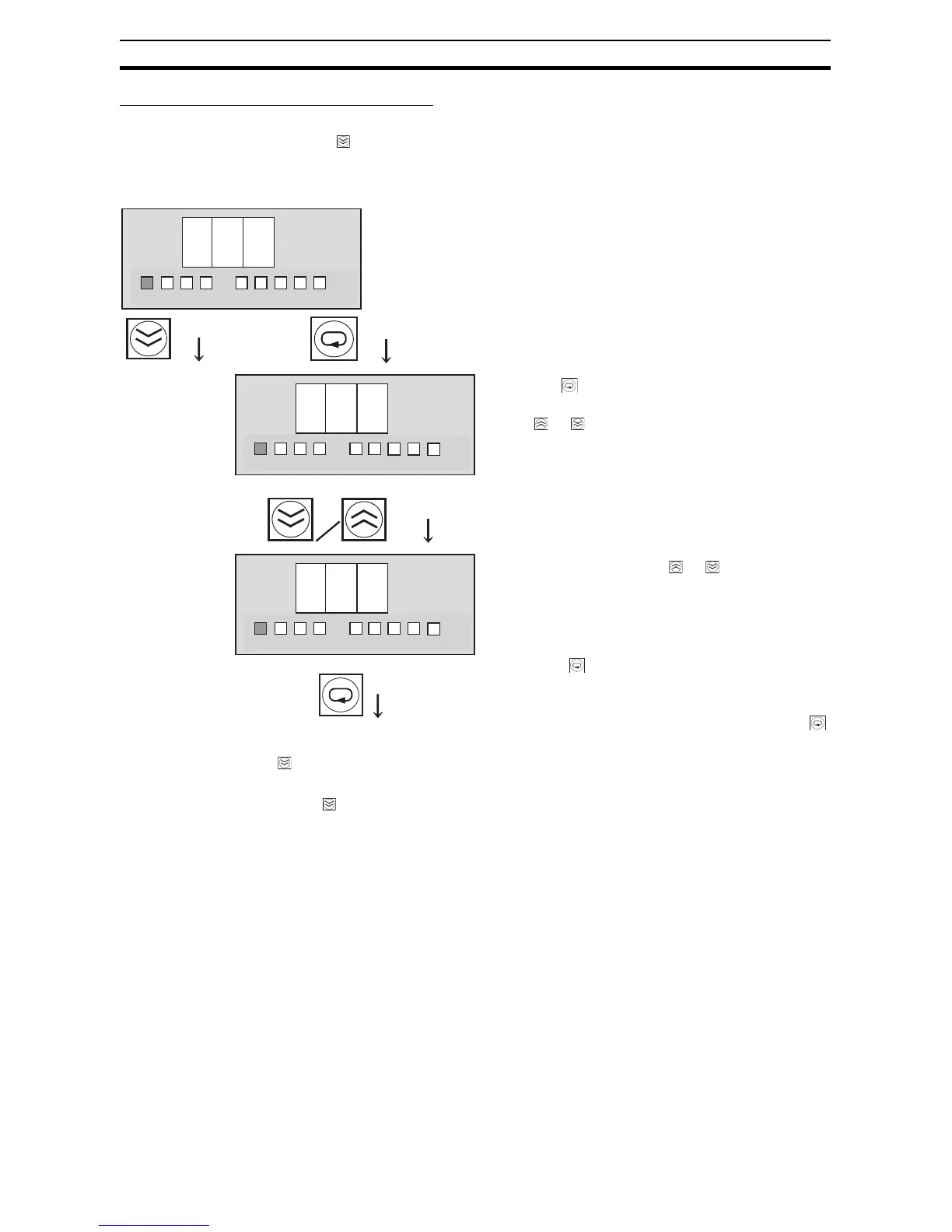
External Tripping Input: TRG (Trigger)
The external tripping input setting (TRG) will be displayed when the Down Key
( ) is pressed from the shutdown sequence setting display (DWS) for branch
output 4.
Note (1) If the External Tripping Input (TRG) is enabled for any branch outputs,
those outputs will be cut off within 20 ms when the TRG input is ON for
more than 10 ms.
(2) The shutdown delays specified by the shutdown sequence times will be
applied before disconnecting each output.
(3) When the TRG input goes ON, the seven-segment display will indicate
“TRG.”
(4) Once the TRG input goes OFF, the cut-off branch outputs can be recon-
nected by pressing the Reset Key for 3 s or longer.
(5) When all outputs are cut off simultaneously in Test mode or the shutdown
sequence operation is executed via communications, the branch outputs
will be cut off regardless of the external tripping input setting.
t r
g
o n
o f f
(Return to TRG display.)
23
4
°C
kh
V
A
s
1
23
4
°C
kh
V
A
s
1
23
4
°C
kh
V
A
s
1
The external tripping input (TRG) can be enabled and disabled
independently for each branch output.
Press the Key to display the external tripping
input setting. The setting can be changed by press-
ing
the or Key.
ON (enabled/valid): The corresponding branch out-
put will be cut off when the TRG input is ON.
OFF (disabled/invalid): The TRG input has no effect
on the corresponding branch output.
Switch to the
external trip-
ping input set-
ting for branch
output 2.
Change the setting with
the or Key.
The S8M will automatically return to the TRG dis-
play if no key is pressed within 3 s.
Press the Key to switch to the external tripping input settings for branch outputs 2, 3, and 4.
Enable/disable the external tripping input for those branch outputs as required.
If the Down Key ( ) is pressed from the external tripping input setting display (TRG) for branch
output 4, the display will switch to the unit number setting display (UNO).
When the Key is pressed, the SV display will
flash. When the flashing stops, the new setting will
be saved and the S8M will return to TRG display.
If you want to confirm the new setting, press the
Key again from the TRG display.



 To Next Page