7. Connection Procedure
43
firm that correct data are sent/received.
7.1.3. Checking the Trace Data
Check the trace data of the CX-Protocol and con
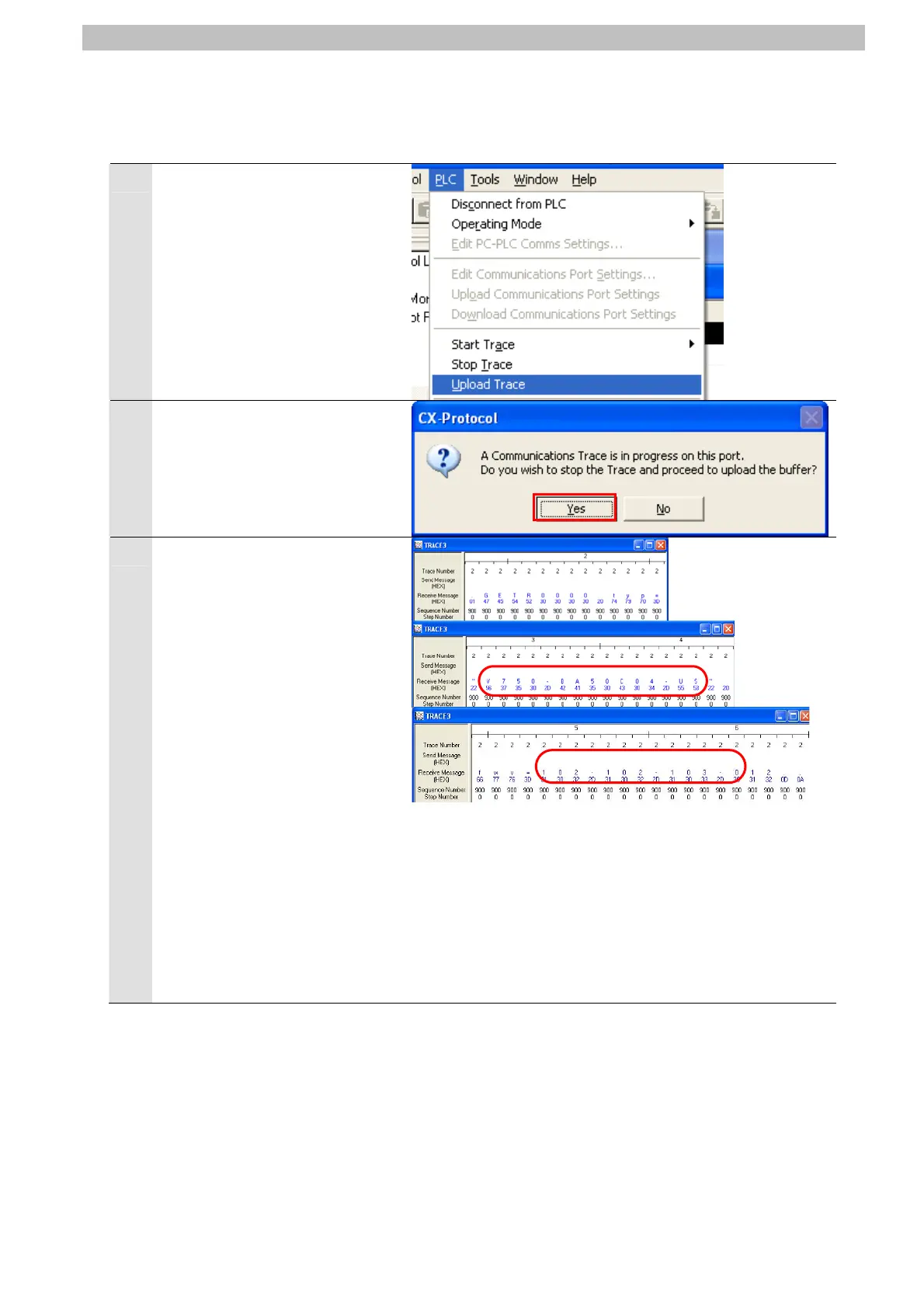
1
Select Upload Trace from the
PLC Menu of the CX-Protocol.
2
The dialog box on the right is
displayed. Click the Yes Button.
3
Check the receive message on
t n the
right figure.
(In the right example,
GETR0000[]typ=”V750-BA
50C04-US”[]fwv=102-102-103
-0 ([] indicate a space) is
received as the RFID
Reader/Writer product type and
version.
prod
RFID Reader/Writer that were
received. The codes received
differ depending on the RFID
Reader/Writer used.
he trace data file shown i
*The right figure shows the
uct type and version of the
Product type of receive message:
“V750-BA50C04-US” (First row: String)
“56 37 35 30 2D 42 41 35 30 43 30 34 2D 55 53”
Second row: ASCII (Hex) code)
Version of receive message:
“102-102-103-0” (First row: String)
“31 30 32 2D 31 30 32 2D 31 30 33 2D 30” (Second
row: ASCII (Hex) code)








 To Next Page