26
SECTION 2
FL Remote ID
RFID System
User's Manual
SECTION 2
Installation, Connections, and Wiring
FL Remote ID
Installation
To ensure full functionality of the V680-HAM42-FRT FL Remote ID, follow the instructions provided in
this section for installation.
■ Installation Site
Do not install the ID Controller in the following locations.
• Locations exposed to ambient temperatures that are not between 10 and 55C or where there are
radical temperature changes resulting in condensation
• Locations exposed to humidity that is not between 25% and 85%
• Locations subject to corrosive gas, flammable gas, dust, salt, or metal powder
• Locations that will expose the ID Controller to direct vibration or shock
• Locations exposed to direct sunlight
• Locations exposed to spray of water, oil, or chemicals
• Locations more than 2,000 m above sea level
■ Mounting in a Panel
The FL Remote ID Unit can be used at an ambient temperature range of 10 to 55C. Be sure to
observe the following precautions.
• Make sure that the Unit is provided with sufficient ventilation space.
• Do not install the Unit close to heaters, transformers, or large-capacity resistors that radiate excessive
heat.
■ Installation Method
OFF
FSM RFID
0
9
8
7
6
5
4
3
2
1
0
9
8
7
6
5
4
3
2
1
0
9
8
7
6
5
4
3
2
1
V680-HAM42-FRT
OMRON
OMRON Corporation
SOURCE : 24VDC 0.3A
MADE IN JAPAN
X10
1
X10
0
DEV
RMT
TR
NORM/ERR
8
4
7
3
6
2
5
1
NODE No. MODE
A
B
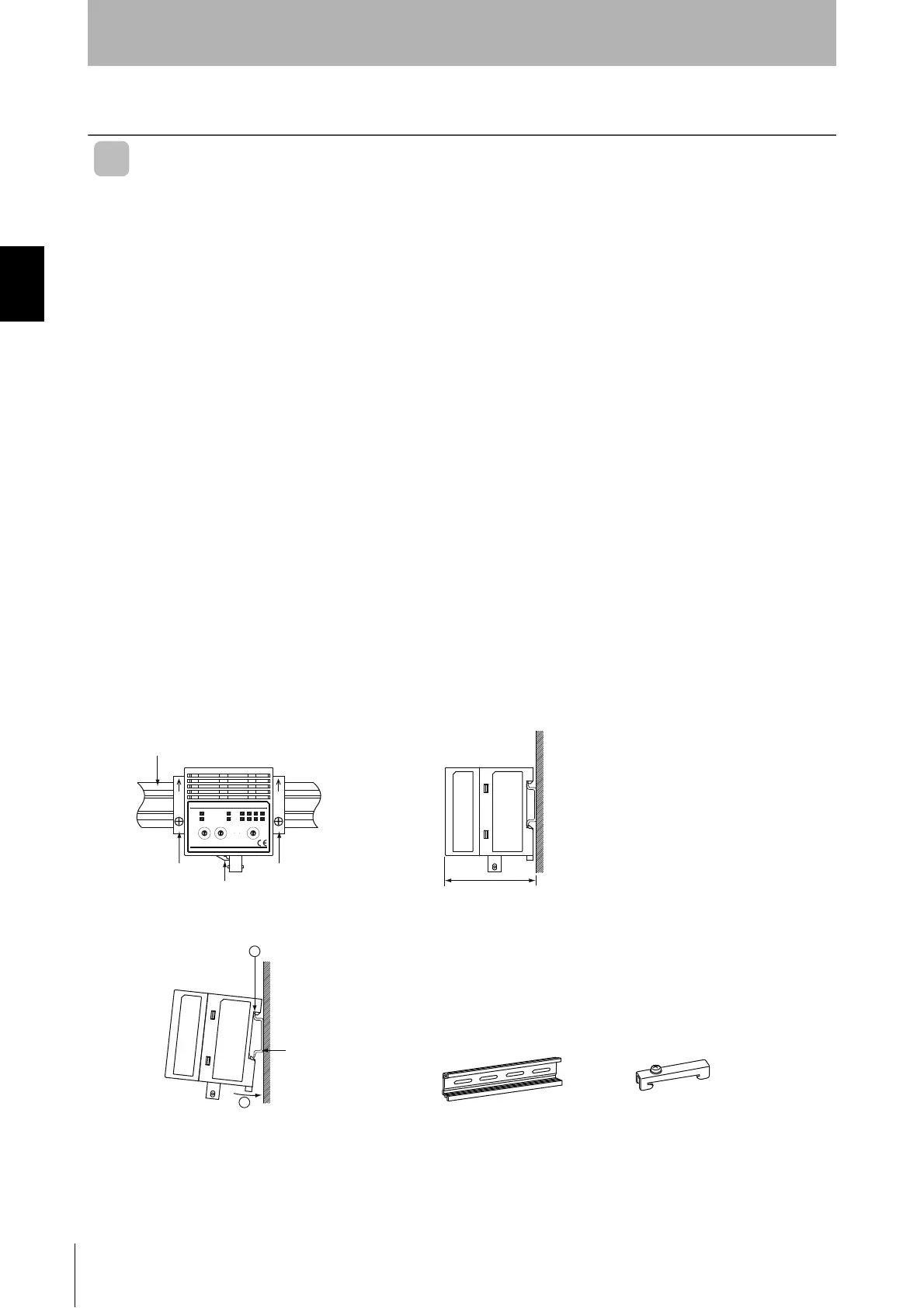
DIN Track
End Plate
End Plate
Mounting Hook
65
DIN Track
PFP-100N
End Plate
PFP-M
OMRON PFP-100N
(track length: 1 m)
is recommended.
1. First hook the FL Remote ID Unit to part A, then press it in direction B to mount it to the DIN Track.
2. To disconnect the FL Remote ID Unit from the DIN Track, pull the mounting hook downwards, and
then lift the Unit upwards.


 To Next Page