72
SECTION 6
Handling Errors
RFID System
User's Manual
SECTION 6
Troubleshooting
Handling Errors
Check the error status by looking at the LED indicators and the error output, and then take suitable actions.
FL Remote-related Errors
Check the DEV and RMT indicators for errors relating to the FL Remote network and hardware.
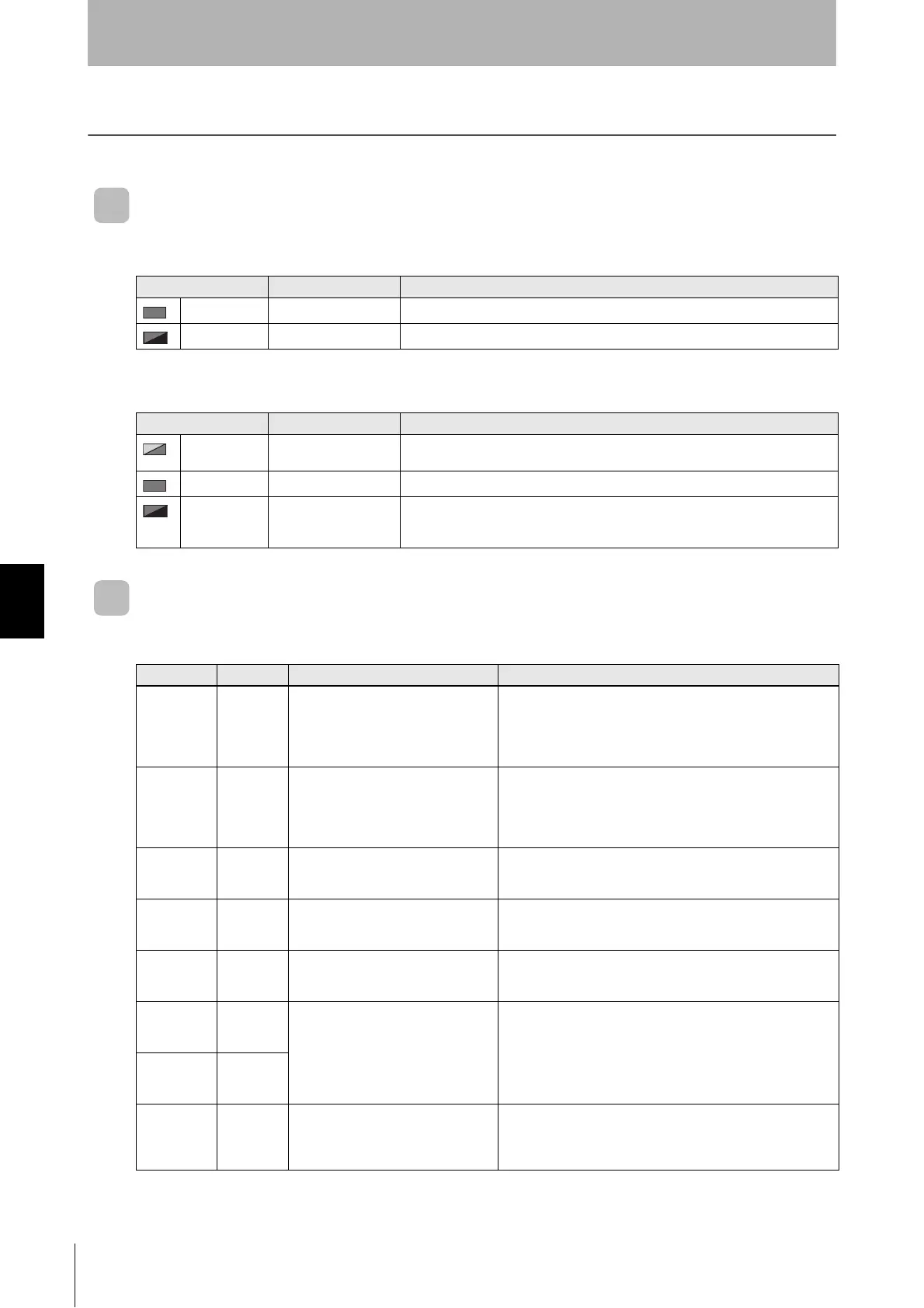
■ DEV (Device Status)
■ RMT (Remote Status)
RFID-related Errors
When the ERROR indicator lights, check the LED indicators from bit 7 to bit 0 or the error output for
errors relating to RFID, and then take suitable actions.
Error Corrective action
Lit red Hardware error If the error continues after resetting the power, replace the FL Remote ID.
Flashing red Settings error Set the node address switches within the correct range.
Error Corrective action
Flashing green
and red
Adding to link/Setting
error
Review the link parameter settings.
Lit red Duplicate node address Assign unique node addresses to all nodes within the same network.
Flashing red Leaving link Check whether the communications cable is connected correctly. If noise enters on
the communications cable, the node made leave the link. Take suitable noise coun-
termeasures.
LED Output bit Error Corrective action
Bit 0
Flashing red
Error End +
RF Tag
Missing
Error
An RF Tag could not be detected in
trigger mode.
Change the control timing so that communications can be
started while the RF Tag is within the Antenna's communications
range. Measure the noise and take suitable noise countermea-
sures. Check the effect of surrounding metal and make sure that
the desired communications range can be obtained.
Bit 1
Flashing red
Error End +
RF Tag
Communi-
cations
Error
RF Tag was detected in trigger mode
but communications could not be
ended normally.
Change the control timing so that communications can be
started while the RF Tag is within the Antenna's communications
range. Measure the noise and take suitable noise countermea-
sures. Check the effect of surrounding metal and make sure that
the desired communications range can be obtained.
Bit 2
Flashing red
Error End +
Address
Error
The command specified a memory
area outside the RF Tag memory
range.
Set the command memory area within the RF Tag memory
range.
Bit 3
Flashing red
Error End +
Protection
Error
The command specified data to be
written to the write-protected area of
RF Tag.
Set the command memory area to outside the write-protected
area.
Bit 4
Flashing red
Error End +
Mismatch
Error
Data was not correctly written to RF
Ta g.
Retry the writing process.
If the error persists, replace the RF Tag.
Bit 5
Flashing red
Error End +
ID System
Error 1
RF Tag used is not supported by the
FL Remote ID.
Change the RF Tag to one supported by the FL Remote ID.
Bit 6
Flashing red
Error End +
ID System
Error 2
Bit 7
Flashing red
Normal End
+ RF Tag
Service Life
Warning
The number of RF Tag overwrites
exceeded the maximum number of
overwrites.
Replace the RF Tag that had the RF Tag service life warning.


 To Next Page