52
SECTION 4
Noise Measurement
RFID System
User's Manual
SECTION 4
Functions
Noise Measurement
You can check whether noise that affects communications with RF Tags exists in the surroundings where the
Antenna and Reader/Writer are installed.
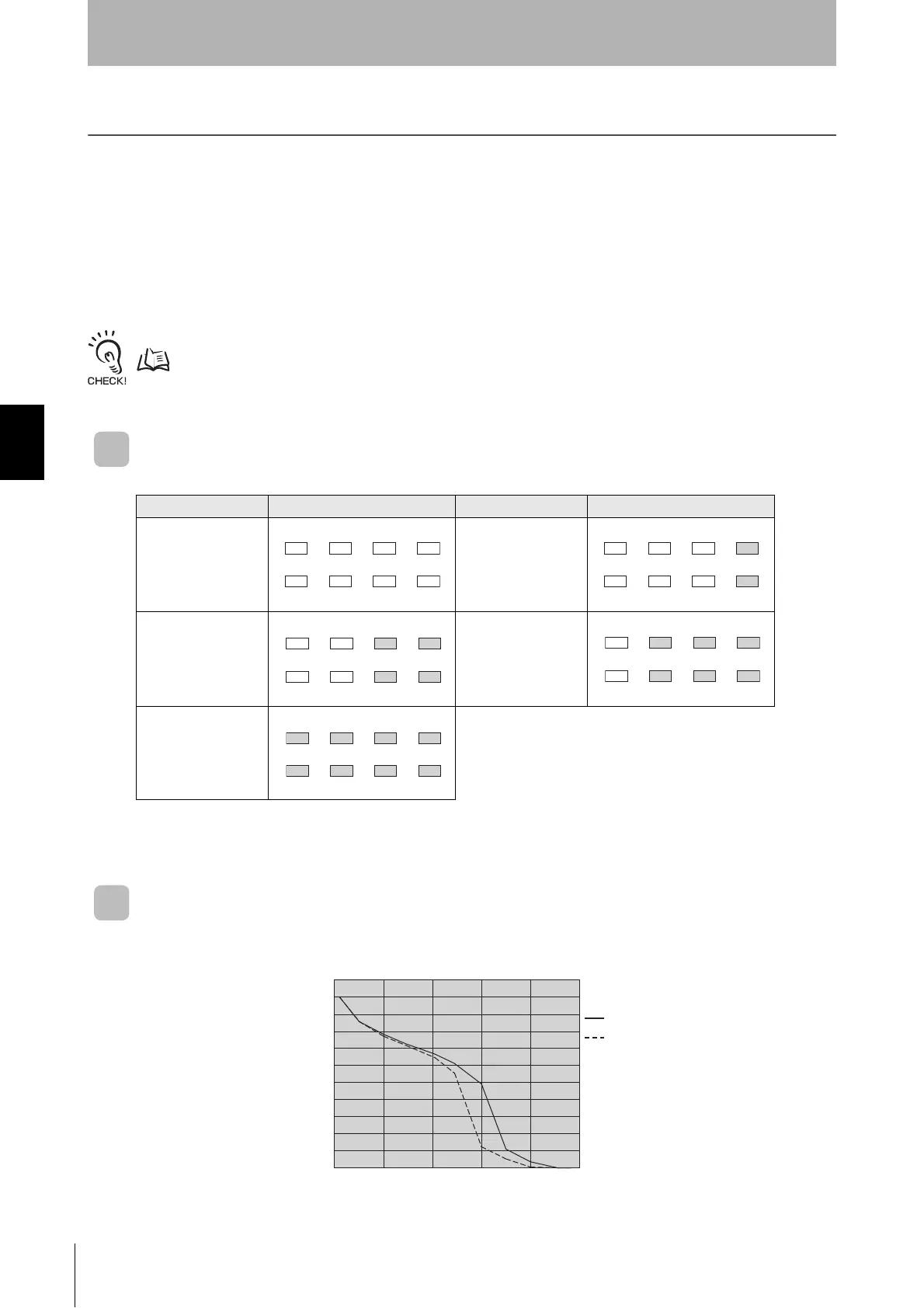
When a noise measurement command is sent from the PLC, the noise strength received by the Antenna is
output in a value from 00 to 63.
To start in Noise Level Measurement Mode, set the mode switch to 3, and then start the Unit. The noise
strength will be displayed in five levels on the data display. It can be checked directly from the FL Remote ID.
Refer to NOISE MEASUREMENT for details of the noise measurement command.
p.66
Relationship between Result Output and Display
Note: The result is output as a decimal value.
Example of Effect on Result Output and Communications
Range (Reference Data)
Result output DATA display status Result Output DATA display status
00 to 09 10 to 19
20 to 29 30 to 39
40 to 99
765
4
321
0
765
4
321
0
765
4
321
0
0
10
20
30
40
50
60
70
80
90
100
20 40 60 80 100
(%)
Noise level
Read
Write
Communications distance (setting 0 noise to 100%)


 To Next Page