OMS LINEA ESSE S.T.01/3S ED.0 REV.14 03/2017
40
Read careful the “intensive decontamination set up”.
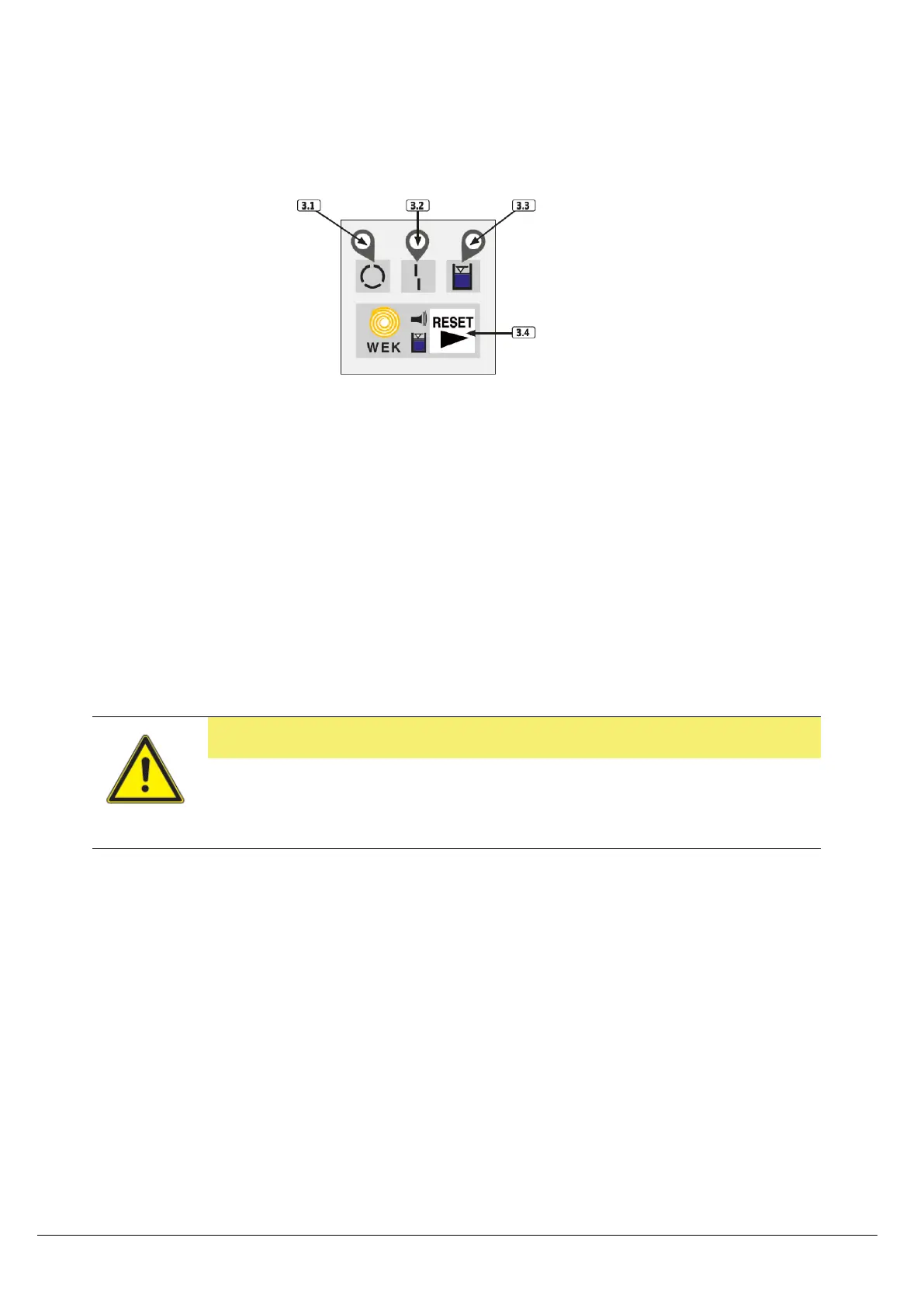
• Keep pressed 4 second the button RESET 3.4 (the LED 3.1 will blink) up to the first sound signal.
During this phase the LED 3.1 and LED 3.3. will be ON.
• The intensive decontamination mode now is activated.
• Drive all instrument installed on the doctor console and doctor and assistant console at least for
30 seconds or more
• Pay attention the “intensive decontamination mode” is activated for 500 ml of water. Then the
WEK or WEK Light go back to normal use phase, the LED 3.3 will blink 3 times and short sound
signal.
• NOTE: IF the flushing has not been done on all instrument, repeat the intensive mode set up.
• As soon as flushing has finished, check the amount of peroxide using the stick 464441, Green and
Clean WK.
CAUTION
In case that the verification of the peroxide fail, repeat the process of “intensive
decontamination set up”. If the test fail again call an authorized technician O.M.S..
Is strongly recommend perform the Maintenance KIT METASYS WEK (Cod. 511448 o 463329)


 To Next Page