6
AA
BB
CC
C1C1
C3C3
C4C4
C2C2
C5C5
EE EE
FF
DD
Rear View
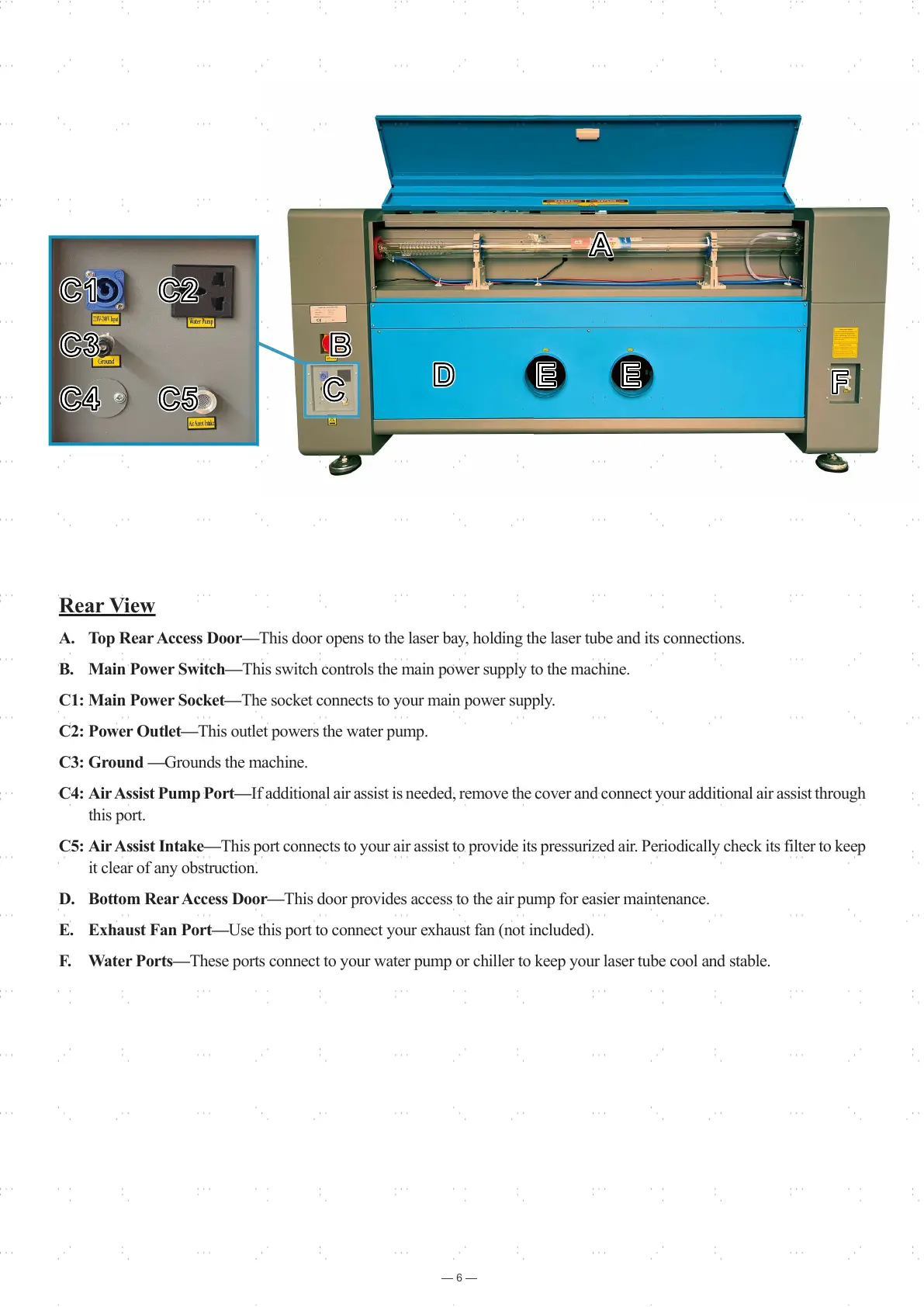
A. Top Rear Access Door—This door opens to the laser bay, holding the laser tube and its connections.
B. Main Power Switch—This switch controls the main power supply to the machine.
C1: Main Power Socket—The socket connects to your main power supply.
C2: Power Outlet—This outlet powers the water pump.
C3: Ground —Grounds the machine.
C4: Air Assist Pump Port—If additional air assist is needed, remove the cover and connect your additional air assist through
this port.
C5: Air Assist Intake—This port connects to your air assist to provide its pressurized air. Periodically check its filter to keep
it clear of any obstruction.
D. Bottom Rear Access Door—This door provides access to the air pump for easier maintenance.
E. Exhaust Fan Port—Use this port to connect your exhaust fan (not included).
F. Water Ports—These ports connect to your water pump or chiller to keep your laser tube cool and stable.



 To Next Page