10
AAA
BB
CC
EE
FF GG HH
DD
II
When the system is idle or the work is finished, all the buttons can be used. Users can process the file, set the
parameters, preview their file, etc. When the work is running or paused, some buttons will not work (e.g.,
Origin and Frame).
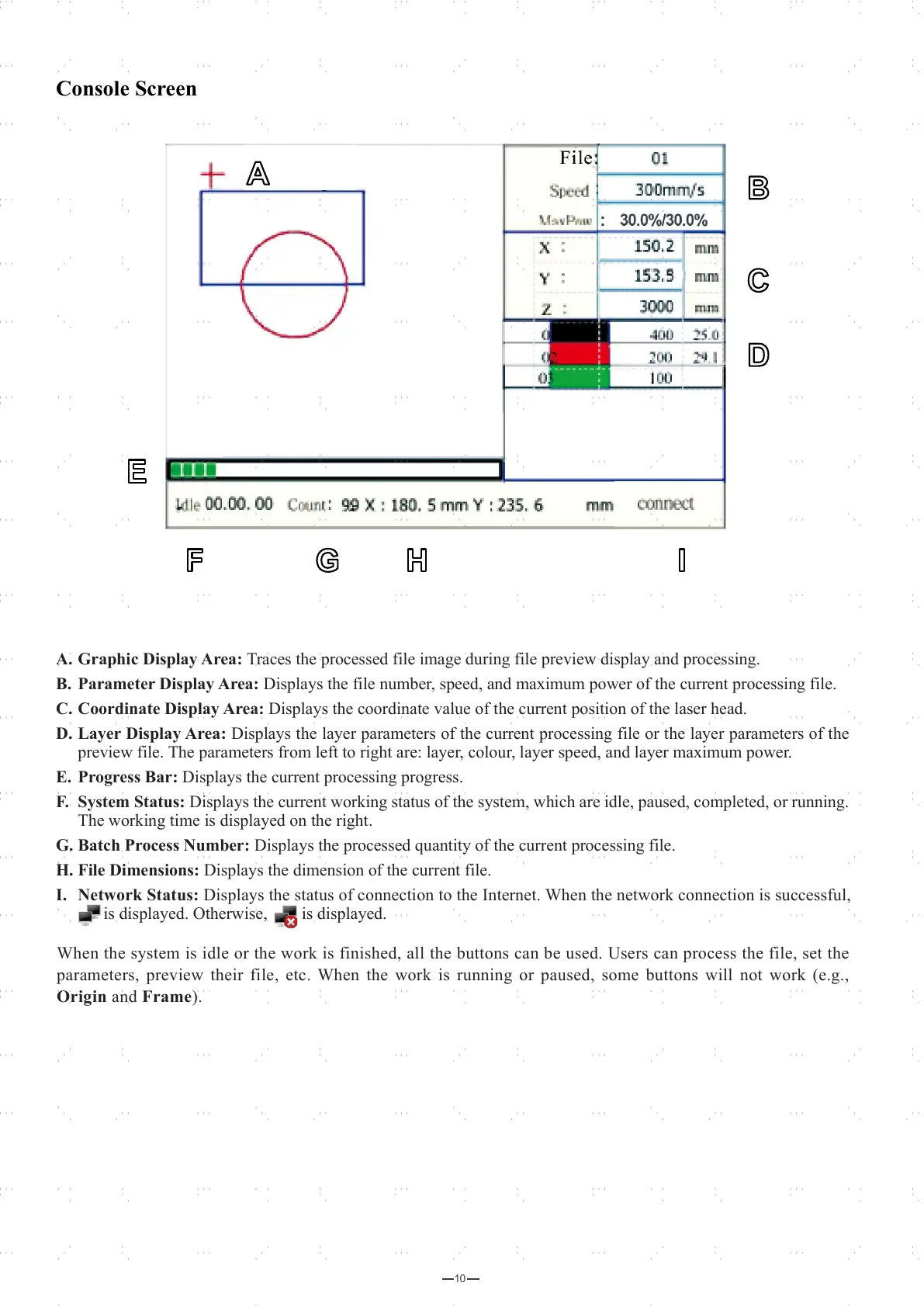
A. Graphic Display Area: Traces the processed file image during file preview display and processing.
B. Parameter Display Area: Displays the file number, speed, and maximum power of the current processing file.
C. Coordinate Display Area: Displays the coordinate value of the current position of the laser head.
D. Layer Display Area: Displays the layer parameters of the current processing file or the layer parameters of the
preview file. The parameters from left to right are: layer, colour, layer speed, and layer maximum power.
E. Progress Bar: Displays the current processing progress.
F. System Status: Displays the current working status of the system, which are idle, paused, completed, or running.
The working time is displayed on the right.
G. Batch Process Number: Displays the processed quantity of the current processing file.
H. File Dimensions: Displays the dimension of the current file.
I. Network Status: Displays the status of connection to the Internet. When the network connection is successful,
is displayed. Otherwise, is displayed.
Console Screen



 To Next Page