Using the XYZ Touch Probe
Z-Axis Probing
To start probing the Z-Axis, rst ensure that your bit is positioned over the XYZ Touch Probe.
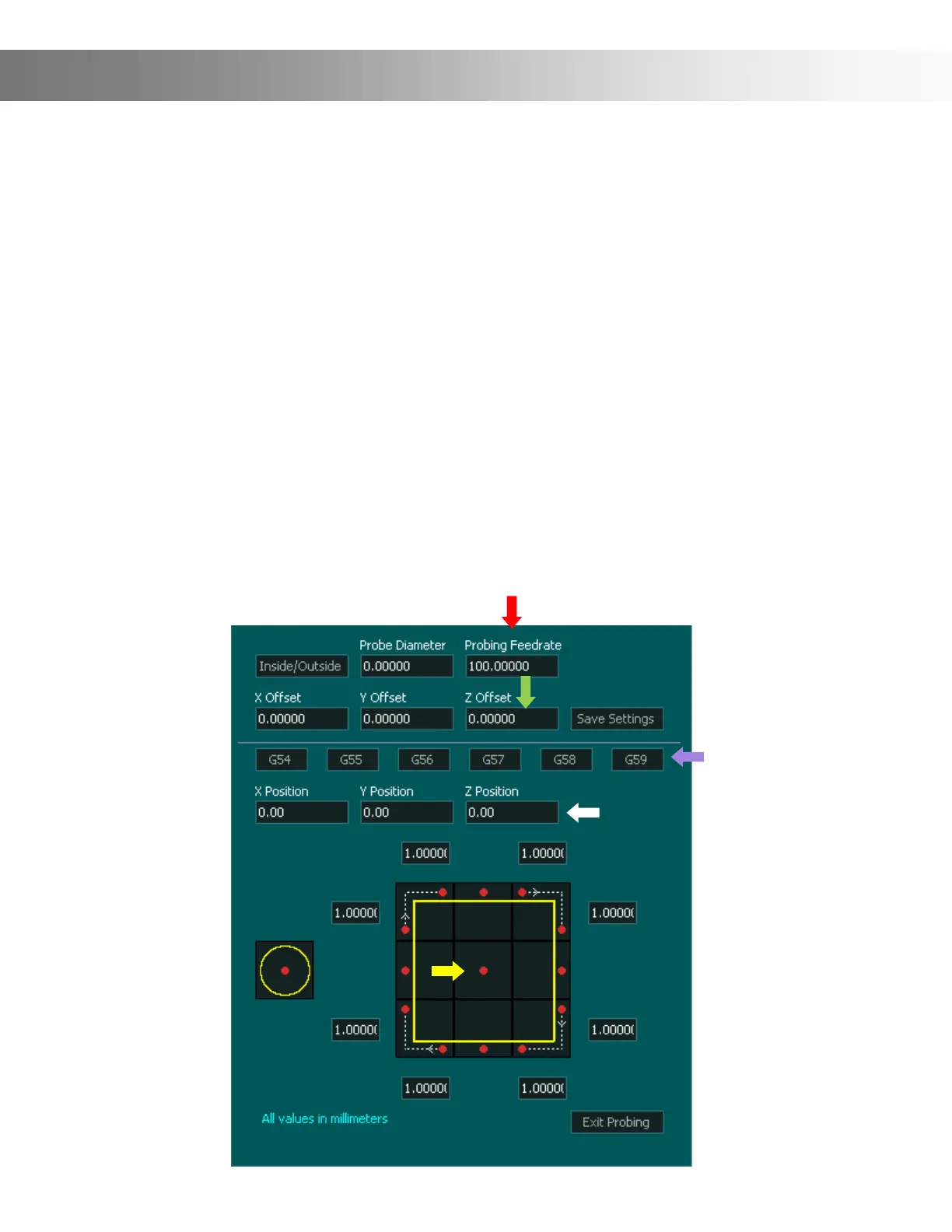
Once your bit is over top of the probe press the center square (Yellow Arrow) This will start the
Z axis
probing down at the rate specied in the Probing Feedrate box (Red Arrow)
When the probe nds the surface the Z axis DRO coordinate will be updated with the value
specied in the Z Position box (White Arrow)
The Z axis will then return to the starting position where probing began and display it's new
coordinate based on its relative position to the probed surface.
The Z probe oset value (Green Arrow) indicates the XYZ Touch Probe thickness. This setting
will be preset to the correct size from the factory. However, if you nd that your Z-Axis is o
slightly you can adjust this value accordingly.
Note: The probing cycle can be stopped by pressing the same or a dierent probing cycle
button.


 To Next Page