Using the XYZ Touch Probe
XY Probing
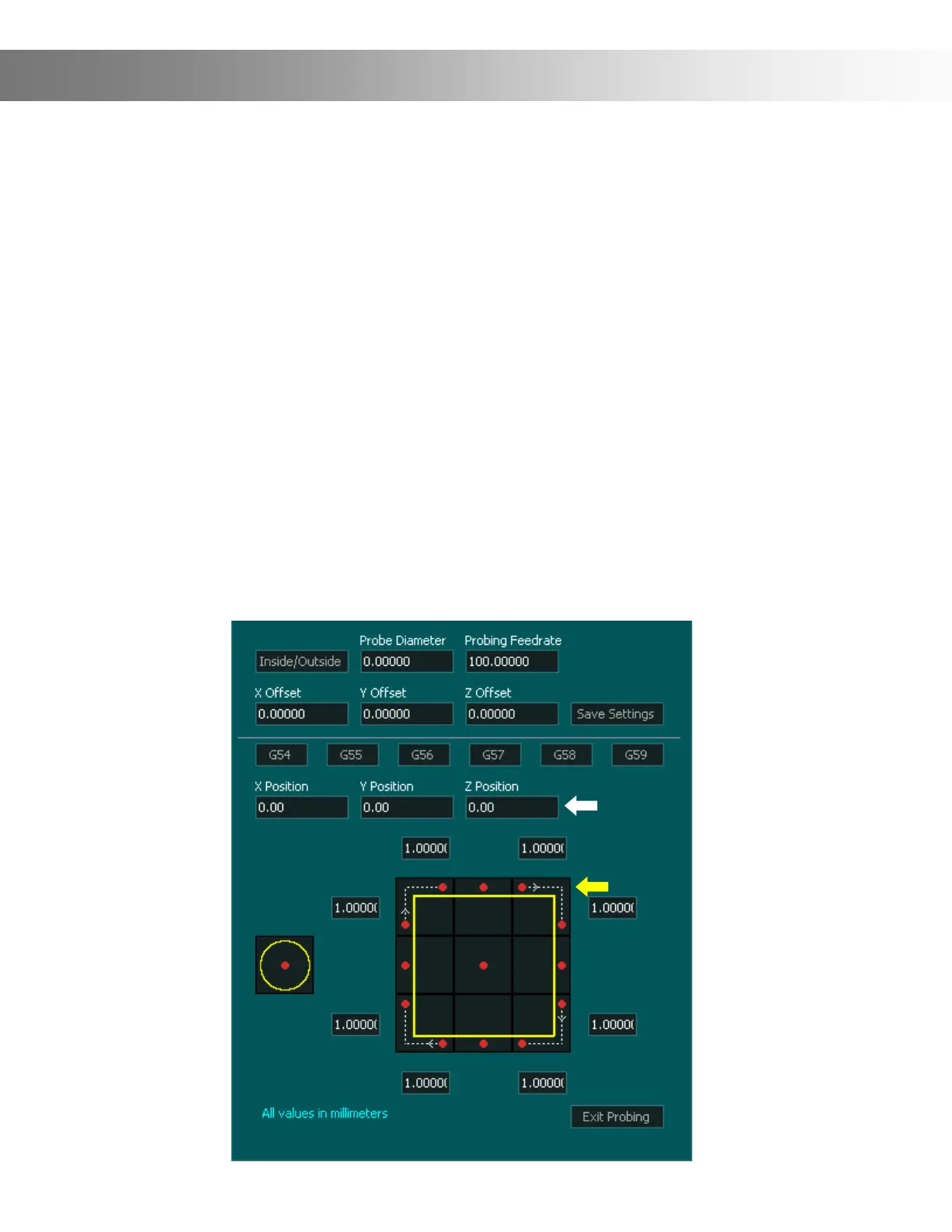
To start probing the XY-Axis, rst ensure that your bit is positioned on the correct side of the
Probe illustrated by the red dots and ensure the bit is low enough to contact the Probe. Once
your bit is in the correct position press the top right Probe button (Yellow Arrow) This will start
the XY Probing sequence.
When the probe nds the surface the DRO coordinate will be updated with the value specied
in the X and Y Position box (White Arrow)
The machine will then return to the starting position where probing began and display it's new
coordinate based on its relative position to the probed surface.
Note: The probing cycle can be stopped by pressing the same or a dierent probing cycle but-
ton.
Important Note: The white dotted line shown between the red dots illustrates the path the
machine will travel while probing. When probing the top right corner, the machine will rst
probe the back, them move to the right and towards the front and probe the right side.


 To Next Page