Listening
to
the
Radio-Continued
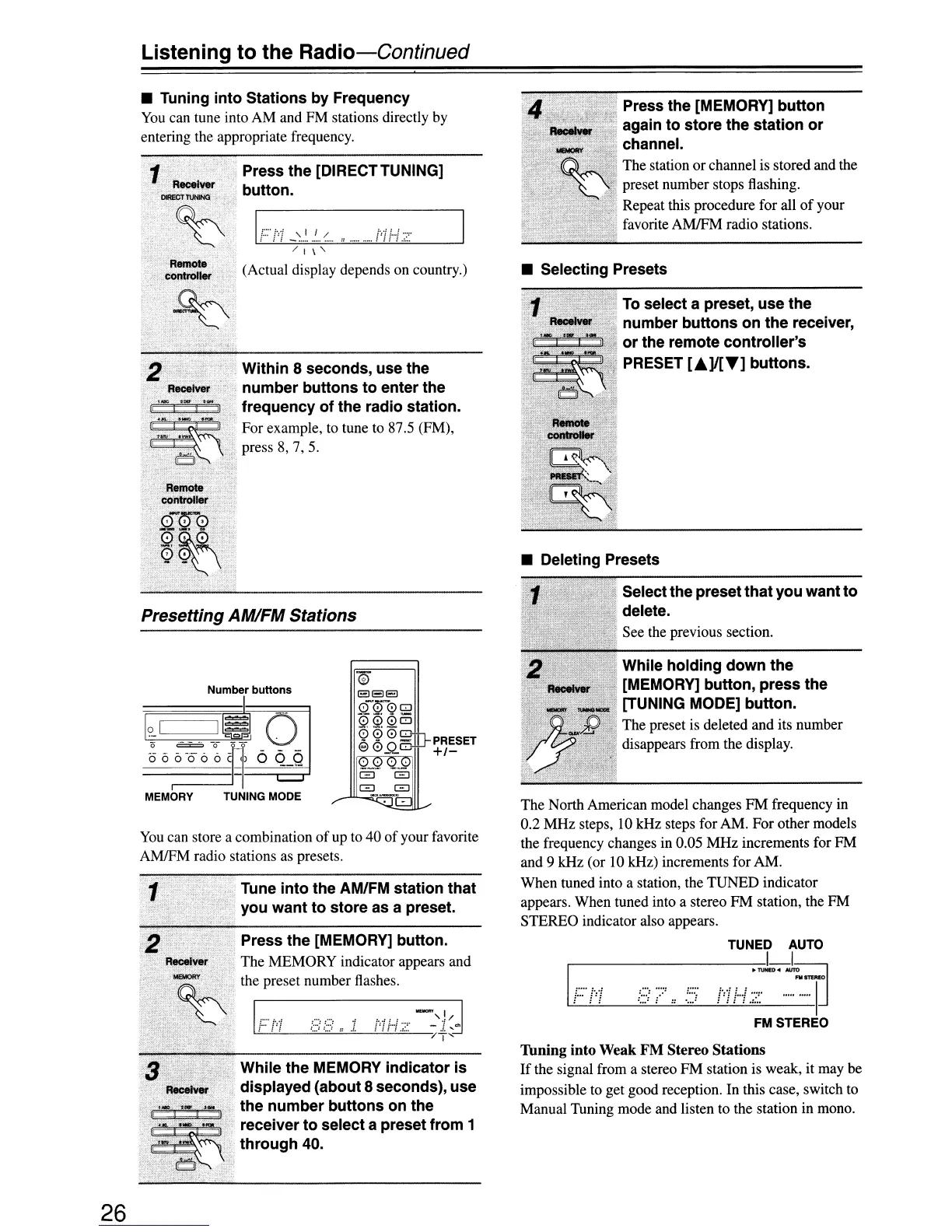
• Tuning
into
Stations by Frequency
You
can tune into AM and FM stations directly by
entering the appropriate frequency.
R8I1Iot8i
conti'oller '
Press
the
[DIRECTTUNING]
button.
IF':'!"!
_'..'
'
..
/.
..
"
",
, .
/ I
\'
(Actual display depends on country.)
Press the [MEMORY]
button
again
to
store the station
or
_ channel.
",'~,',
.
.1".
The station or channel is s.tored and the
·~;~i~).'
preset number stops flashmg.
,
'.
'.
Repeat this procedure for all
of
your
. favorite
AMJFM radio stations.
• Selecting Presets
To
select a preset, use the
number
buttons
on
the
receiver,
or
the remote
controller's
PRESET
[.]1["']
buttons.
While
holding
down
the
[MEMORY] button,
press
the
[TUNING MODE] button.
The preset is deleted and its number
disappears from the display.
" Selectthe preset
that
you
want
to
delete.
See the previous section.
• Deleting Presets
FMSTEREO
TUNED
AUTO
--------1
I
I.
:
.....
:
...
:
:::.,:
..
:
.....
:
...
~
....
~..
.
'~I
;:::;(::
...
=-IJ
The North American model changes FM frequency in
0.2 MHz steps,
10kHz
steps for AM. For other models
the frequency changes in 0.05 MHz increments for FM
and 9 kHz (or 10 kHz) increments for AM.
When tuned into a station, the TUNED indicator
appears. When tuned into a stereo FM station, the FM
STEREO indicator also appears.
TIming into
Weak
FM
Stereo
Stations
If
the signal from a stereo FM station
is
weak, it may be
impossible to get good reception. In this case, switch to
Manual Tuning mode and listen to the station in mono.
PRESET
+1-
o
elSE!
0-000
0006
99
0
':"1
€l0..Q.GJ
-:.......:.
:.....:
I
G G
G
c=:::J
Within 8 seconds, use the
number
buttons
to
enter the
frequency
of
the radio station.
For example,
to
tune
to
87.5 (FM),
press 8, 7, 5.
Tune
into
the AM/FM station
that
you
want
to
store
as a preset.
Remote
co'ntroller
',~.'
'.~\
.Q"'~G.>
0~"',':".",,,"
Q'~~
\
Number buttons
I~I
~-;_()l
06,6-066CI~I~
MEMORY
TUNING
MODE
Press the [MEMORY] button.
R8cetver
The MEMORY indicator appears and
. .
~
iliepreset numbecflashes
_,
,,
:;;':."
Ii..
·'i '
..
' '
..
'
::
;">,:'
.Z·
;4-J
Presetting AM/FM Stations
You
can store a combination
of
up
to 40
of
your favorite
AMJFM radio stations
as
presets.
While the MEMORY
indicator
is
displayed (about 8 seconds), use
,";:,...'o.i.
the
number
buttons
on the
.
Iii'
n
.
::::1~-
receiver
to
select
a preset from 1
"
.'
through
40.
l'%4i;\~'·~·/§?·\
26


 To Next Page