Naming
Preset
Channels
(other
than
European
model)
While receiving a preset
FM
or
AM
station, a maximum
of
8 characters consisting
of
letters, numbers and some symbols
can be stored, for example to represent the station name.
You cannot assign a name to the RDS station (for European model).
Characters
which
can
be
entered:
ABC
D E F G H I J K L M N 0 P Q R
STU
V W X Y Z I 2 3 4 5 6 7 8 9 0 - u */
Note: u indicates a space.
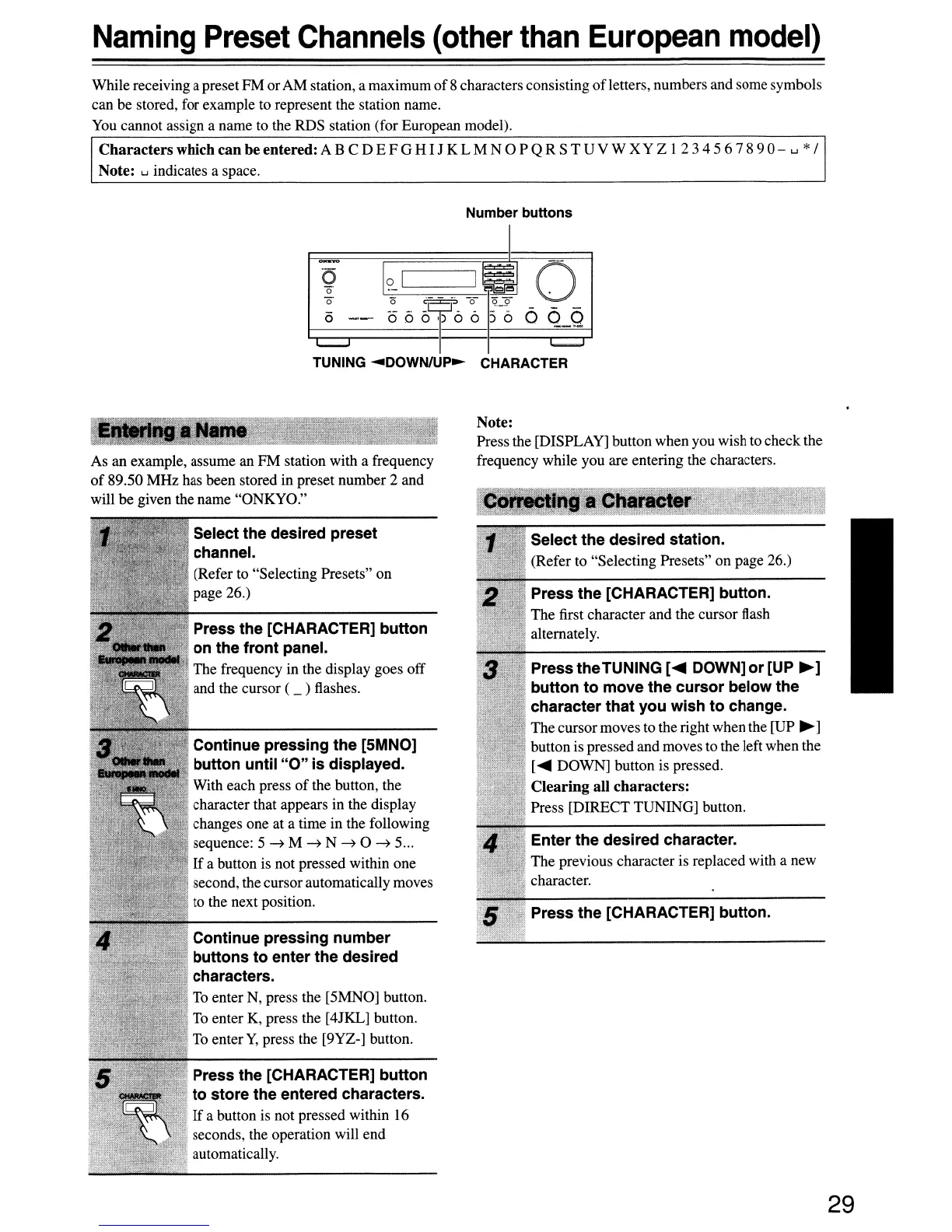
Number buttons
?
[?~I
~,;I
0
i5
<5
°
Of
6 6 5-6 6
Q.Q
TUNING
.....
DOWN/UP~
CHARACTER
As an example, assume an
FM
station with a frequency
of
89.50
MHz
has been stored in preset number 2 and
will be given the name "ONKYO."
Select the desired preset
channel.
(Refer to "Selecting Presets"
on
page 26.)
Press the [CHARACTER] button
on the front panel.
The frequency in the display goes off
and the cursor ( _ ) flashes.
Continue pressing the [5MNO]
button until
"0"
is
displayed.
With each press
of
the button, the
character that appears in the display
changes one at a time in the following
sequence: 5
~
M
~
N
~
0
~
5...
If
a button is not pressed within one
second, the cursorautomatically moves
to the next position.
Continue pressing number
buttons
to
enter the desired
characters.
To enter N, press the [5MNO] button.
To enter K, press the [4JKL] button.
To enter
Y,
press the [9YZ-] button.
Press the [CHARACTER] button
to
store the entered characters.
If
a button is not pressed within 16
seconds, the operation will end
automatically.
Note:
Press the [DISPLAY] button when you wish to check the
frequency while you are entering the characters.
Select the desired station.
(Refer to "Selecting Presets"
on
page 26.)
Press the [CHARACTER] button.
The first character and the cursor flash
alternately.
Press theTUNING
[~
DOWN]
or
[UP
~]
button
to
move the cursor below the
character that you wish
to
change.
The cursormoves to the right when the [UP
~
]
button is pressed
and
moves
to
the left when the
[~
DOWN] button is pressed.
Clearing
all
characters:
Press
[DIRECT
TUNING] button.
Enter the desired character.
The
previous character is replaced with a new
character.
Press the [CHARACTER] button.
29


 To Next Page