Connecting
Components
not
Reached
by
the
Remote
Controller
Signals
(IR
IN/OUT)
In
order
to use the remote controller to control the
receiver from a remote location, you will need to
prepare
a multiroom kit (sold separately)such as one
listed below:
• Multiroom AJV distribution and control system such
as those from Niles® and Xantech®
*Xantech
is
a registered trademark
of
Xantech Corporation.
* Niles is a registered trademark
of
Niles Audio Corporation.
If
BeiJic.teControlier.Slg
.~
·~!!'F~l!~~.¥fI~l~er
Rem.
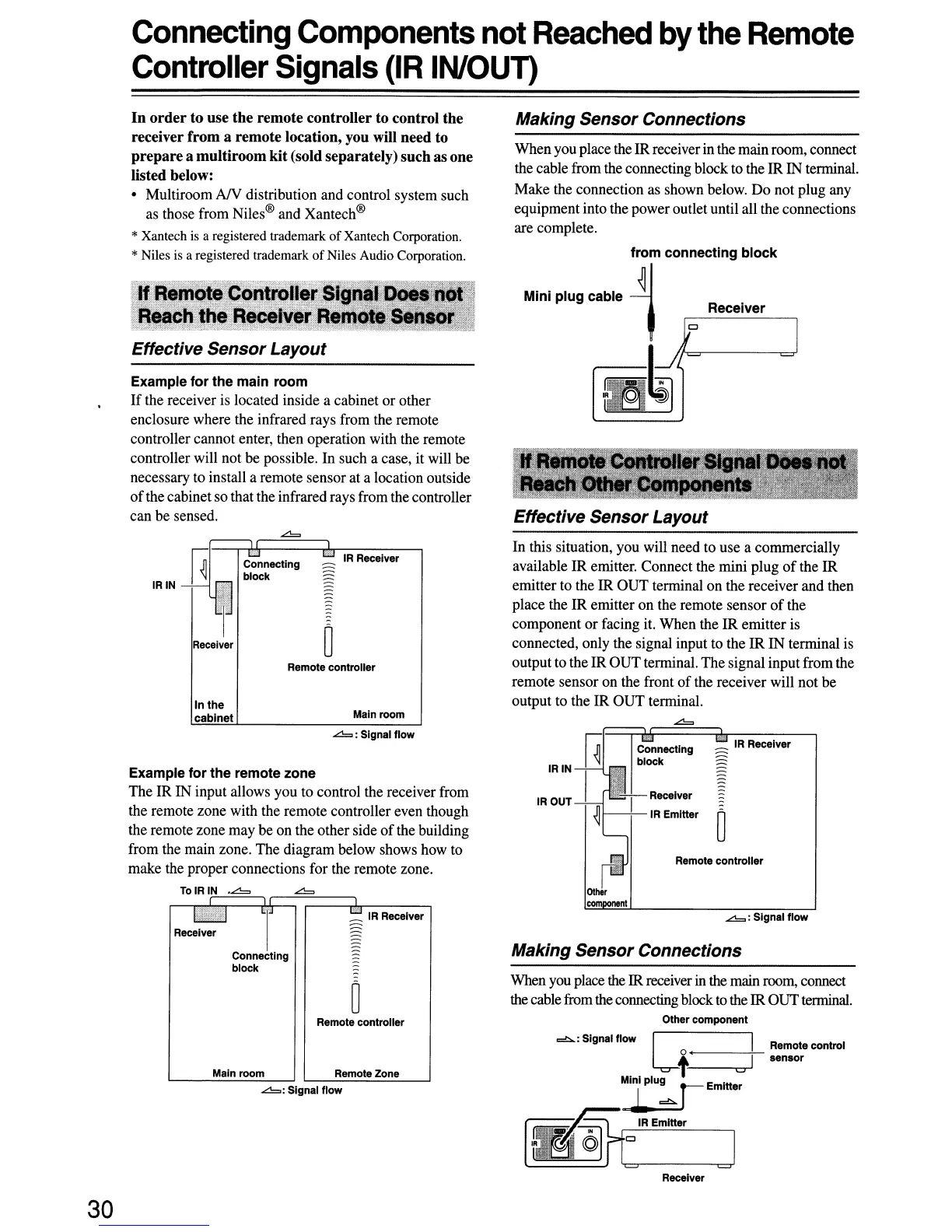
Effective Sensor Layout
Example for the main room
If
the receiver is located inside a cabinet
or
other
enclosure where the infrared rays from the remote
controller cannot enter, then operation with the remote
controller will not be possible. In such a case, it will be
necessary to install a remote sensor at a location outside
of
the cabinet so that the infrared rays from the controller
can be sensed.
Making Sensor Connections
When you place the IRreceiver in the main room, connect
the cable from the connecting block to the IR IN terminal.
Make the connection as shown below.
Do
not plug any
equipment into the poweroutlet until all the connections
are complete.
Receiver
Effective Sensor Layout
In
the
cabinet
IR
Receiver
Remote controller
Main room
In this situation, you will need to use a commercially
available IR emitter. Connect the mini plug
of
the
IR
emitter to the IR
OUT
terminal
on
the receiver and then
place the
IR
emitter
on
the remote sensor
of
the
component
or
facing it. When the
IR
emitter is
connected, only the signal input to the
IR
IN terminal is
output to the IR
OUT
terminal. The signal input from the
remote sensor on the front
of
the receiver will not be
output to the IR
OUT
terminal.
~
Making Sensor Connections
Remote control
sensor
:;:
IR
Receiver
Remote controller
~:
Signal flow
Receiver
IR
Emitter
Connecting
block
IRIN
IROUT
When you place the IR receiver
in
the main room, connect
the cablefrom the connecting block
to
the IROUTterminal.
Other component
cb.:Slgnalflow
C I
o I
t u
~Emltter
IR
Emitter
~:
Signal flow
bLJ
T
~
IR
Receiver
Receiver
Connecting
block
~
Remote controller
Main room
Remote Zone
~:
Signal flow
Example for the remote zone
The IR IN input allows you to control the receiver from
the remote zone with the remote controller even though
the remote zone may be
on
the other side
of
the building
from the main zone. The diagram below shows how to
make the proper connections for the remote zone.
TolRIN
.~
~
Receiver
30


 To Next Page