GSM/3G User Manual
27 | 82
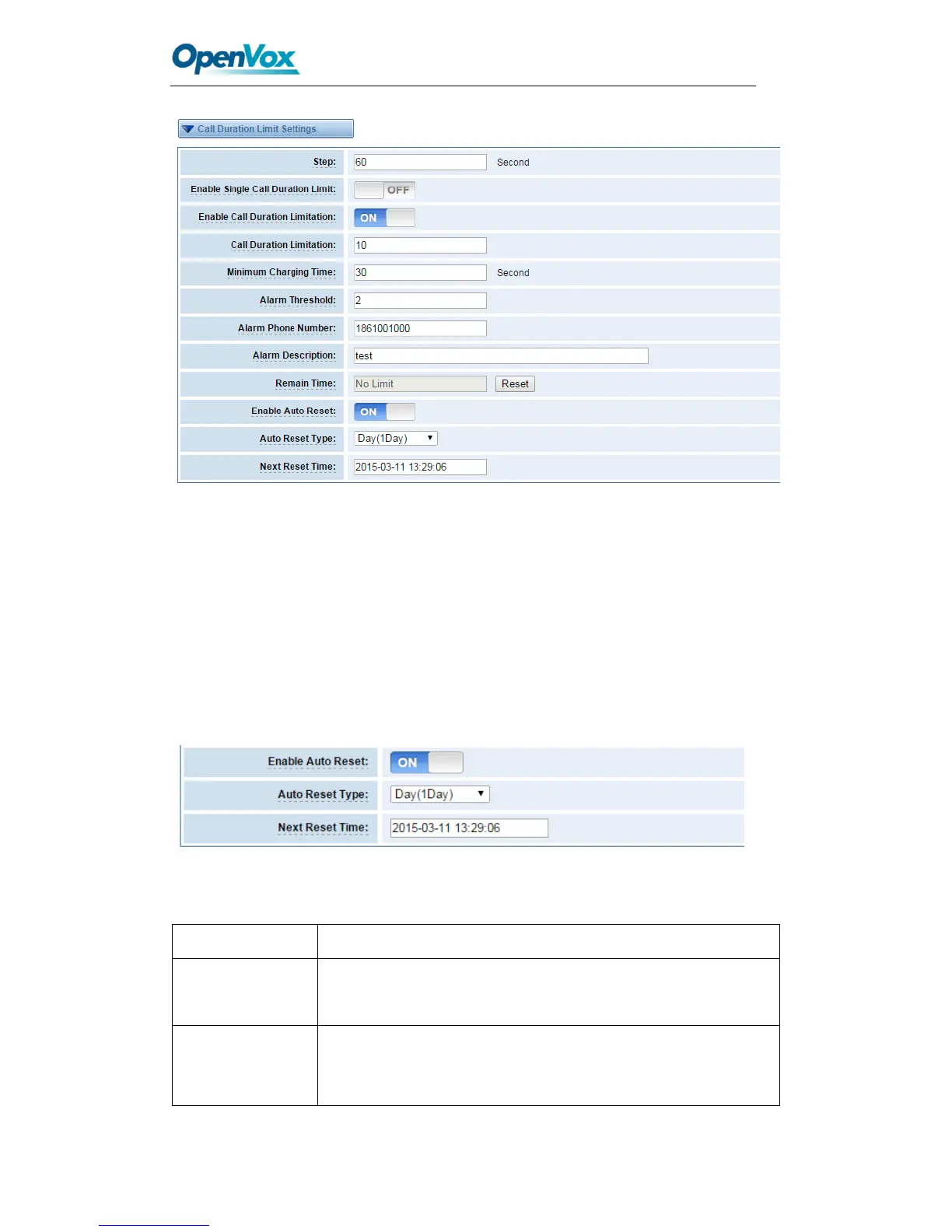
Figure 3-12 Call Duration Limitation Settings
The same algorithm with single time limitation, the total calling time of this port can’t
beyond the product of “Step” and “Call Duration Limitation”.
If the duration of a call is less than “Minimum Charging Time”, it will be not included in
“Call Duration”.
You can set a digit for “Alarm Threshold”, when the call minutes less than this value, the
gateway will send alarm info to designated phone.
You can enable your Auto Reset, then choose by day, by week, or by month.
Figure 3-13 Auto Reset Settings
Table3-2 Description of Call Duration Limit Settings
Step length value range is 1-120 s, step length multiplied by time
of single call just said a single call duration time allowed.
Definite maximum call duration for single call. Example: if Time of
single call set to 10, the call will be disconnected after talking
10*step seconds.



 To Next Page