36
EN
6.4 Remove liquids from the appliance
The water collector catches any liquids that flow into the
appliance through the inlet opening.
For a quick removal of the liquids, unscrew the cap on the
bottom of the water collector by hand or with the help of a
screwdriver or a knife; place a bucket below to collect the
liquids.
For a thorough cleaning, do the following:
1 Switch off the fan and deactivate the after-run function
(see Operation chapter).
2 Remove the air inlet nozzle and the grease.
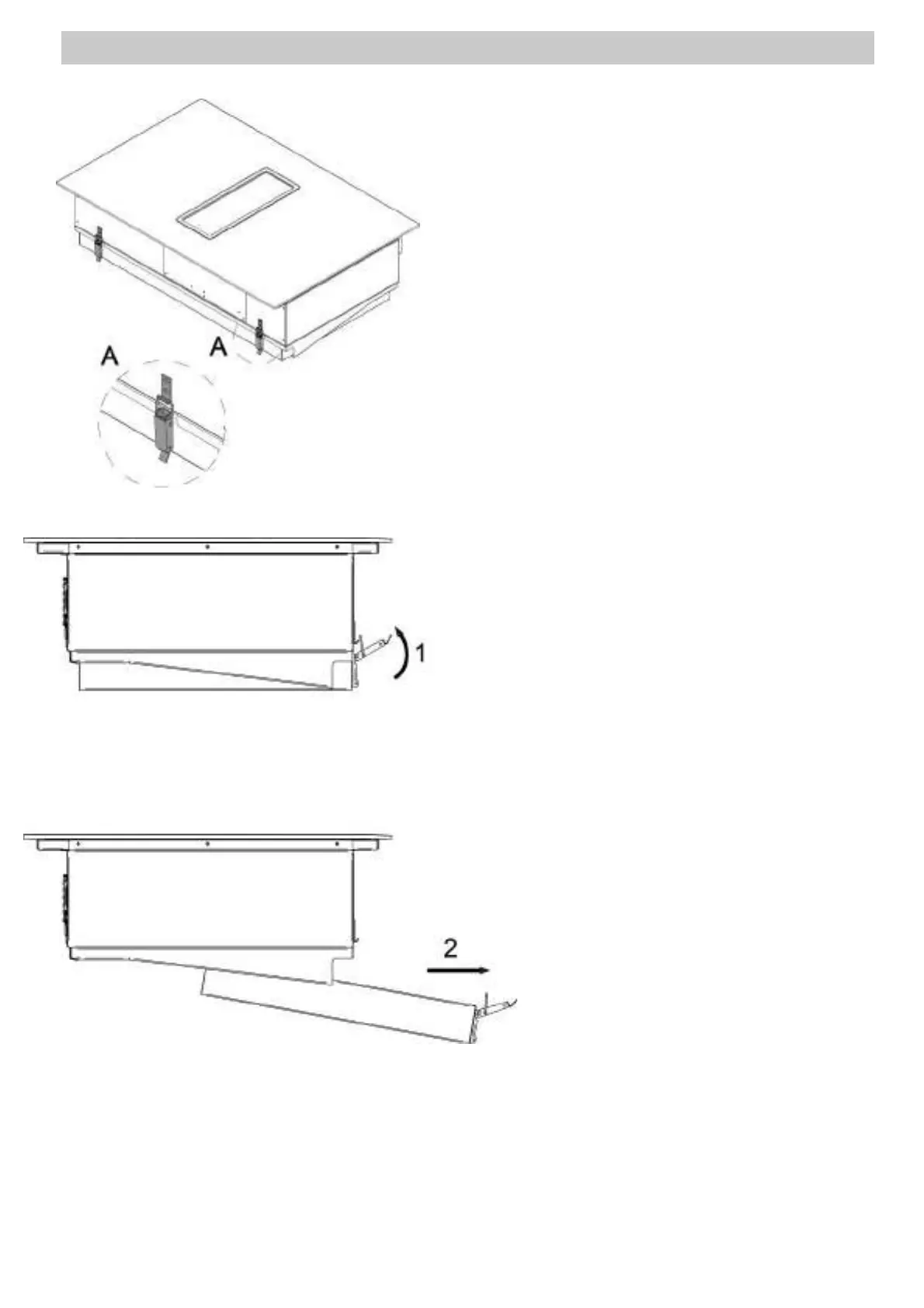
3 Remove the water collector which is positioned in the
bottom part of the appliance using both hands and being
cautious to not let it fall. There are two lever latches
which have to be opened. See picture below – A parts
Be careful! Hold the water collector with one
hand be
fore opening the lever latches!
4 Remove the water and clean the water collector by using
a soft brush and a cleaner and degreaser in one.
5 Rinse the water collector with hot water
6 Dry the water collector with a tea towel
7 Fit the water collector to the appliance and close the
lever latches.


 To Next Page