Connection to converter C4000
- 25 -
optek-Manual--1004-2001-02--AF16-US-2011-01-04
www.optek.com
7 Connection to converter C4000
For connecting the sensor cables, observe the following basic conditions:
• Bring the sensor cable to the cable entry from underneath.
• Form a loop with the sensor cable close to the cable entry.
• Do not lay sensor cables in ducts of current-carrying lines.
• Observe cable specifications (s. technical data).
• To lay sensor cables underground without protection is prohibited.
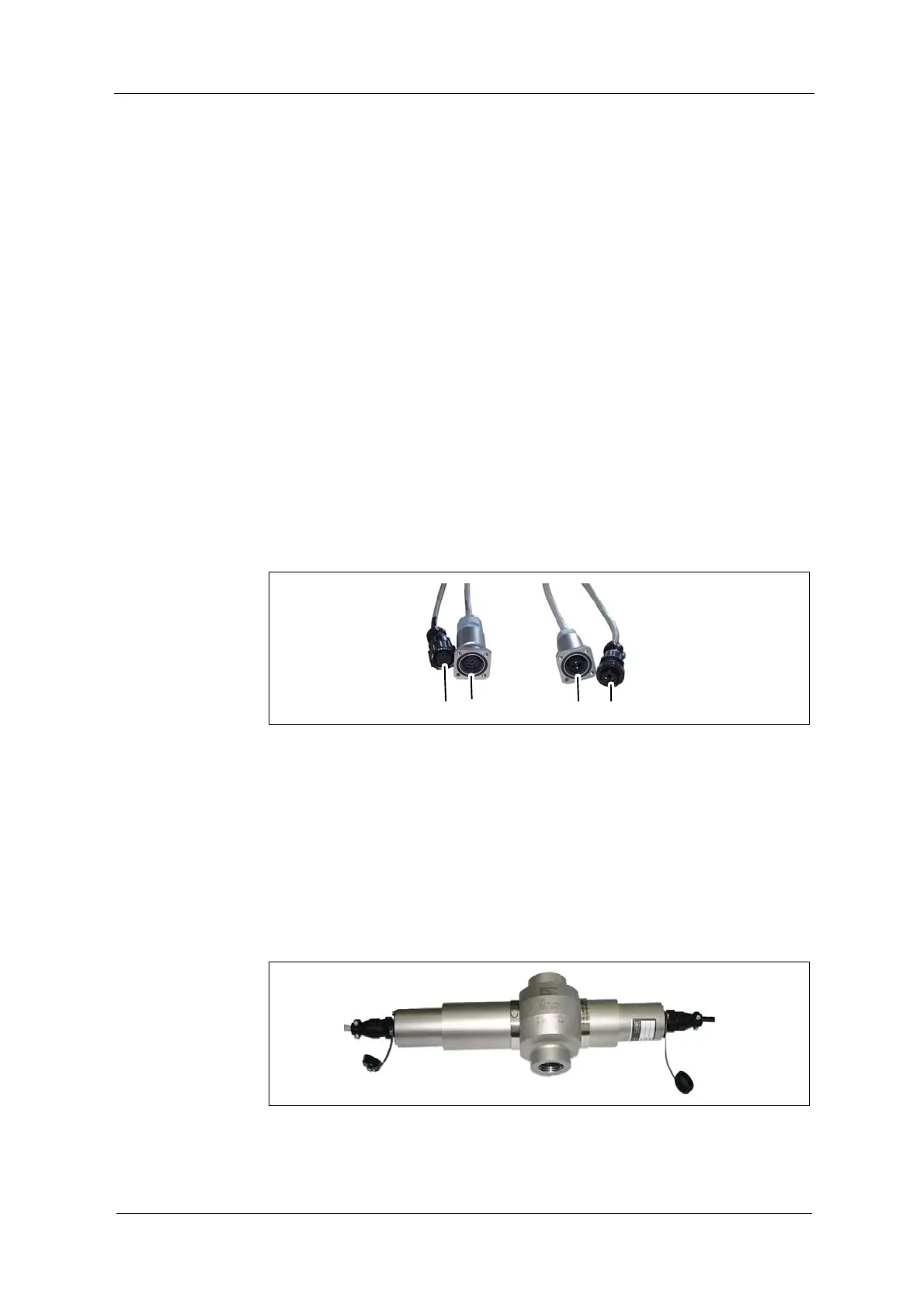
For the connection of the sensor to the converter, there are sensor cables with
plug protector on the sensor side (15, 17; fig. 18) or without plug protector
(11, 14).
Connection to the
sensor
On the sensor side, mixing up sensor cables is not possible, as connectors are
distinctive:
• 9-pin connector on the detector side (11, 17),
• 4-pin connector on the lamp side (14, 15)
Fig. 18 Connector with and without plug protector
Tool
• not needed
Connection of the sensor cable without plug protector on the detector and lamp
side:
1. Loosen the connection cover of the sensor.
2. Plug in the sensor cable.
3. Screw-tighten the protection cover.
Fig. 19 Connection of the sensor cable without plug protector


 To Next Page