OPTIMUM
MASCHINEN - GERMANY
Operation
Version 1.0 dated 2015-05-27 Page 57Original operating instructions
F3 GB
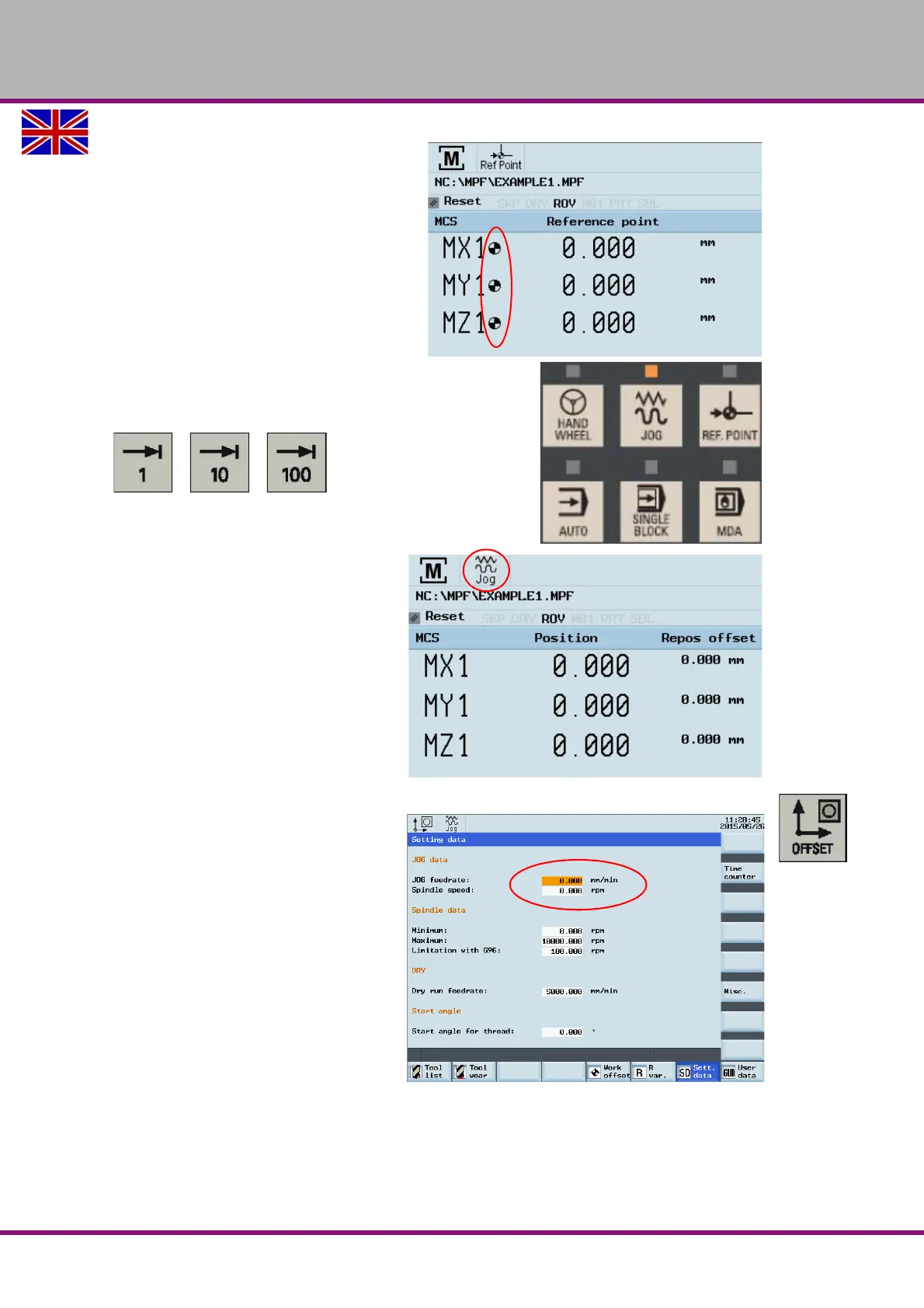
Traverse each axis to the machine
zero point until the referenced sym-
bol is shown on the respective axis.
Once the axis approaches the refer-
ence point, the referenced symbol must
shown next to the axis.
After returning to the "JOG" mode, the
axes can be moved manually. Use the Increment button to
specify the increment, or press the <JOG> button again to
stop the increment again.
If possible, read the upcoming mes-
sages on the display, remove the
error messages, such as e.g. insuffi-
cient compressed air, ....
Default values for example should
apply for the feed rate in the "JOG"
mode, be entered on the side of the
standard values .
Press the button <OFFSET> to get
to the settings.
For the following working steps,
please proceed as described in
„Operation and programming“ of the
Siemens SINUMERIK 808D Opera-
tion instructions.















 To Next Page