EasyManua.ls Logo

Optoma HD82 - Backup Remote and Battery Replacement

Optoma HD82
52 pages
Print Icon
To Next Page IconTo Next Page
To Previous Page IconTo Previous Page
Loading...
10
Introduction
Power
OnOff
MENU
Re-Sync
Source
Image Shift
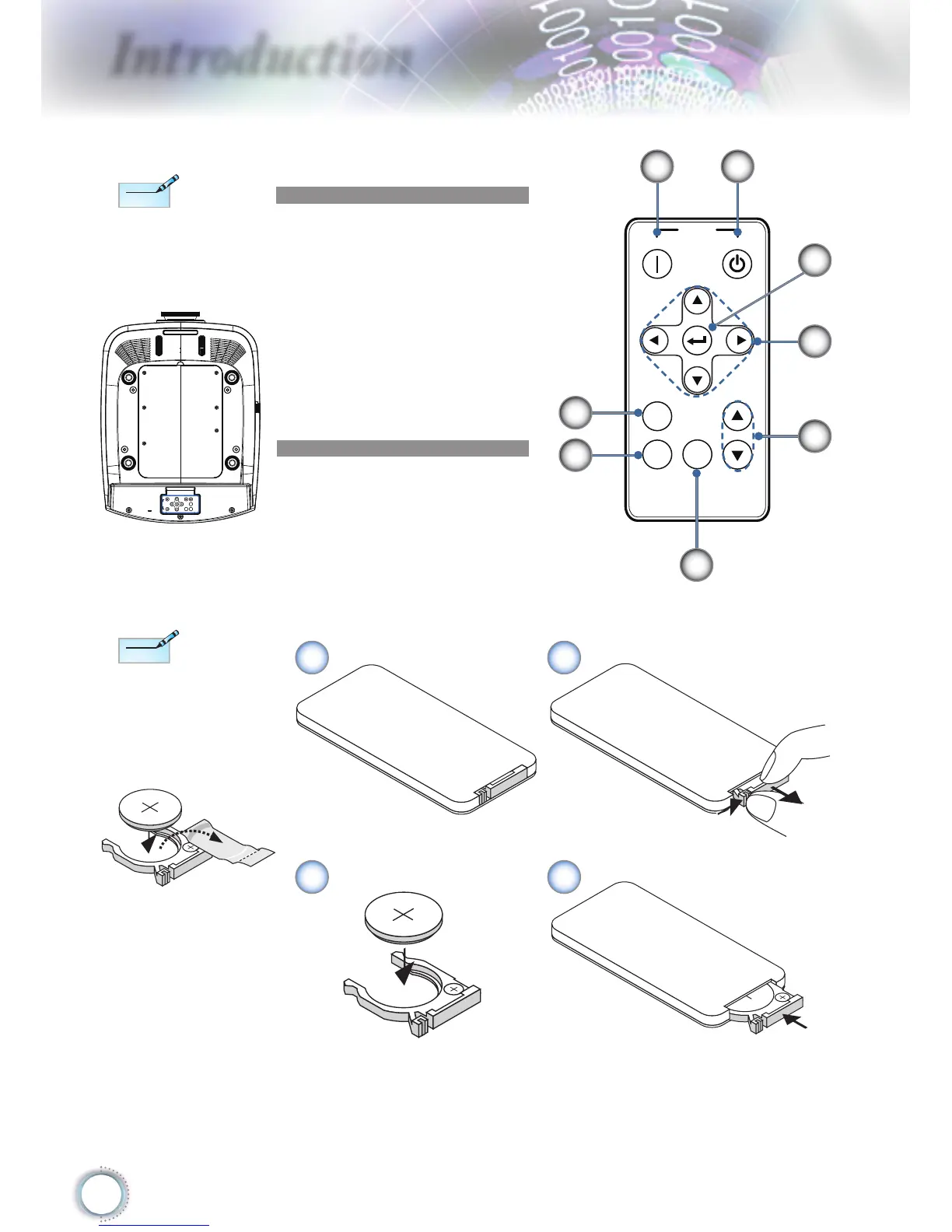
Backup Remote Control
1. Power Off
2. Power On
3. Enter
4. Four Directional Select
Keys
5. Image Shift
6. Source
7. Re-Sync
8. Menu
1
3
5
6
8
7
2
4
Before using the
remote control for the
rst time, remove the
transparent insulation
tape.
Note
Note
3
V
O
L
T
S
C
R
2
0
2
5
Coin Cell Battery Replacement
M
n
O
2
-
L
i
C
E
L
L
3
V
O
L
T
S
J
A
P
A
N
H
CR2025
3
V
O
L
T
S
C
R
2
0
2
5
M
3
V
O
L
T
S
CR2025
1 2
3 4
Note
Note
Backup remote con-
trol is magnetically at-
tached to the bottom
of the projector.
Power
OnOff
MENU
Re-Sync
Source
Image Shift

Other manuals for Optoma HD82

Related product manuals