23
OrionWelders.com
ch.2
welder. A longer discharge time will lead to a smoother weld surface and less internal stress
within the weld spot. e length settings are split up into three ranges, which are short, medium,
and long. Some users have found it helpful to use short or medium length with metals like gold
(*see quick settings sheet for suggestions on when to do this). *Remember to touch the “Restore
All Defaults” button (found in the “System Tab”) after welding with an adjusted length in order to
have its value returned back to factory default value.
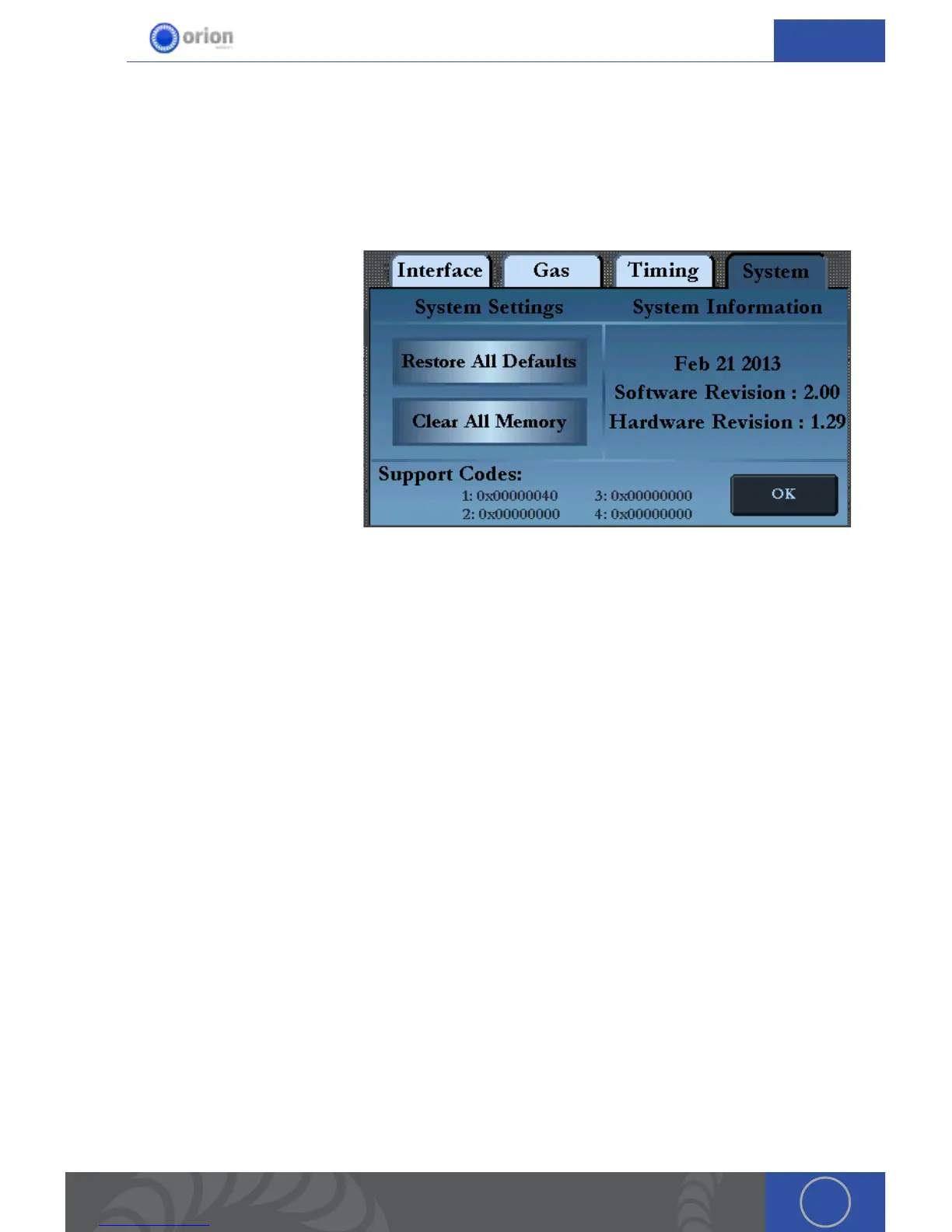
SYSTEM TAB
Here users can see system
information. ey’re also able to
restore their system back to its
factory default settings and clear
their saved settings.
Restore All Defaults - is will
reset all welder settings back to
their factory default settings (ie
Weld Energy, Agitation, Trigger
Type, Pre-Flow Delay, Post-Flow
Delay, Accelerator, Pre-Weld,
Retract Delay, and Weld Time/
Duration). is will not affect saved settings.
Clear All Memory - is button will erase all the users Saved settings. *is can take up to 45
seconds after touching the ok button.
Troubleshooting
Welder is not welding.
1. Touch the reset button.
2. Is it on play?
3. Is it on foot pedal?
4. Is the alligator clip attached?
5. Is the electrode clean?
Welder is not welding like it used to.
1. Touch the reset button.
2. Is the electrode clean?


 To Next Page