Operator Manual
Chapter: Operator interface
Operator interface
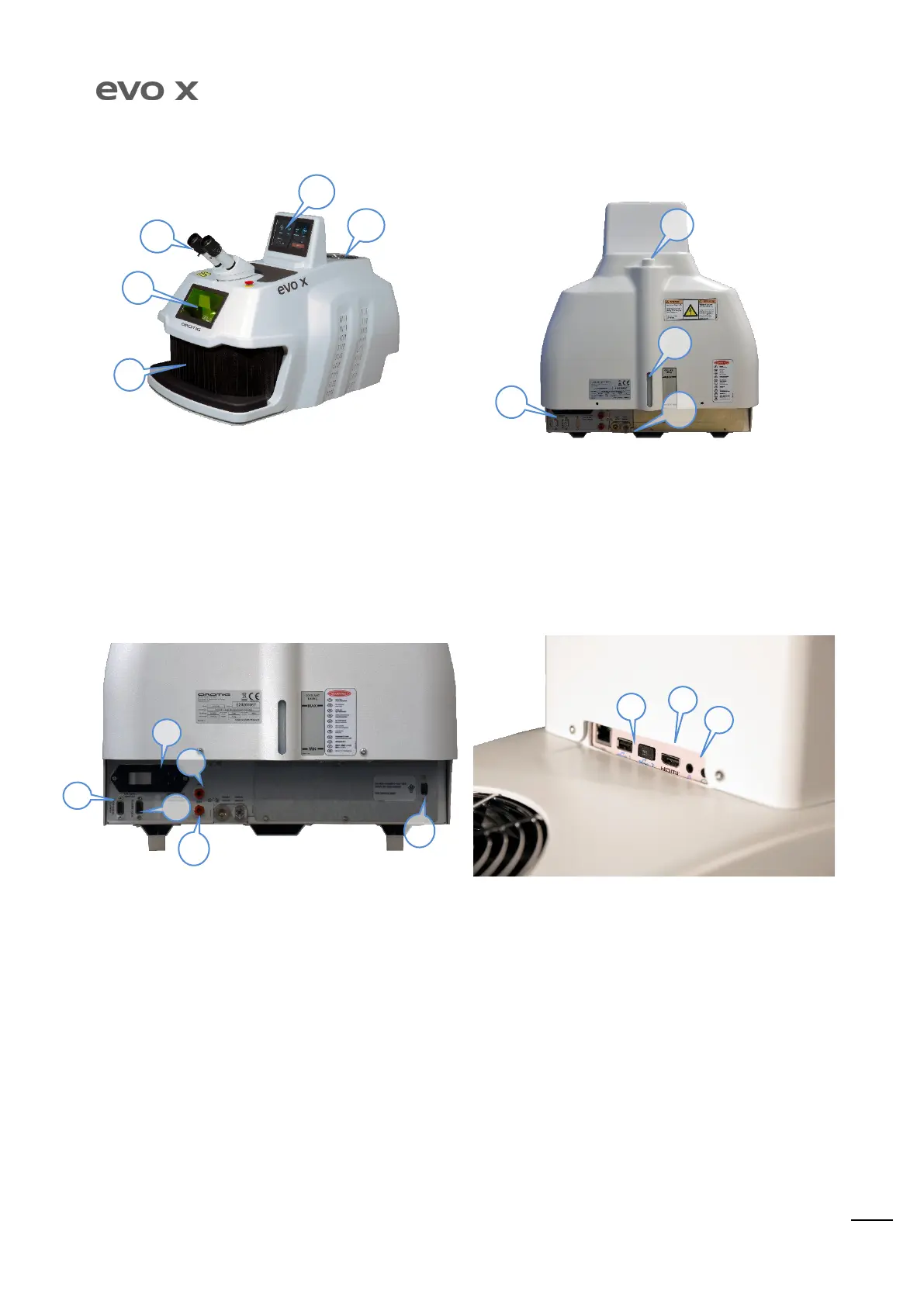
Controls and signals
2) Inspection window with filter for LASER beams at 1064 nm.
3) Hands entrance.
4) Touch-screen display for setting welding parameters.
5) Liquid cooling system; do not cover the vent, leave at least 5
cm between the vent and the wall.
6) Rear connections (see “Rear Connectio ns” paragraph)
7) Coolant level, for correct efficiency of the equipment: the
level MUST always be at maximum mark. Use double-
distilled water only for top-up/re place ment .
8) Quick coupling for coolant drain pipe attachment.
9) Cooling water input.
Rear connections
1) Power supply socket, with master switch.
3) Protection GAS inlet with solenoid valve.
9) Connection for microphone and headsets
5) Interlock remote connection (see paragraph)
6) USB port for microprocessor board updates (for exclusive
use by SERVICE).
WARNING! Always refer to the operating voltage indicated near to the power supply outlet. Check the electric conditions before connecting the
equipment.
1
3
2
4
7
8
9
6


 To Next Page