Need help?
Do you have a question about the OROTIG EVO X and is the answer not in the manual?
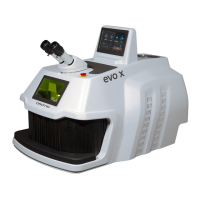
Details manufacturer and specific equipment models.
Outlines essential safety precautions for operation and handling.
Safety switch preventing operation with open access.
Protective leather strips at the welding chamber aperture.
Internal shutter cutting off the laser beam path.
Describes microscope/chamber filters and the emergency stop button.
Covers enabling key/PIN and hazardous area definitions.
General rules, pre-use checks, and transportation safety.
Instructions for safe packing and handling of the equipment.
Guidelines for moving and unboxing the laser welder.
Recommendations for placement and initial checks before use.
Details proper electrical hookup and grounding.
Specifies acceptable voltage and frequency variations.
Lists performance metrics and physical attributes of the welder.
Covers compliance, approved applications, and restricted materials.
Identifies and explains various warning and information labels.
Describes UV light hazards and lists key equipment components.
Identifies physical controls and visual indicators.
Details the ports and connectors on the back of the machine.
Pre-use advice, setup for comfort, and microscope use.
Covers powering on, emergency procedures, and basic operation.
Explains the various screens and user navigation.
How to use the rotary switch and save welding programs.
Accessing firmware info, IP address, and security settings.
Managing passwords, standby timers, and date/time.
Configuring wired or wireless network connections.
Using USB for music and video playback.
Managing music tracks and changing the interface language.
Contacting support and viewing system parameters.
Creating, saving, and applying welding programs.
Capturing, saving, and managing video sessions.
Modifying camera image settings like brightness and contrast.
Adjusting viewfinder shape, colors, and position.
Connecting and using gas/air supply for welding.
Information on adding an optional handrail door accessory.
Daily and semi-annual checks of safety components and labels.
Procedures for checking, removing, and topping up coolant.
Cleaning procedures for rear and internal machine filters.
Instructions for vacuuming air vents and fan grids.
Checking, replacing, and cleaning the focal lens protective glass.
Steps for checking and correcting the laser spot position.
Conditions for major repairs and tips for optimal performance.
How to use the integrated air purification and sanitisation system.
Explains error/warning screens and initial troubleshooting steps.
Lists document revisions and issue dates.
 General
| Brand | OROTIG |
|---|---|
| Model | EVO X |
| Category | Welding System |
| Language | English |

 To Next Page