Operator Manual
Display
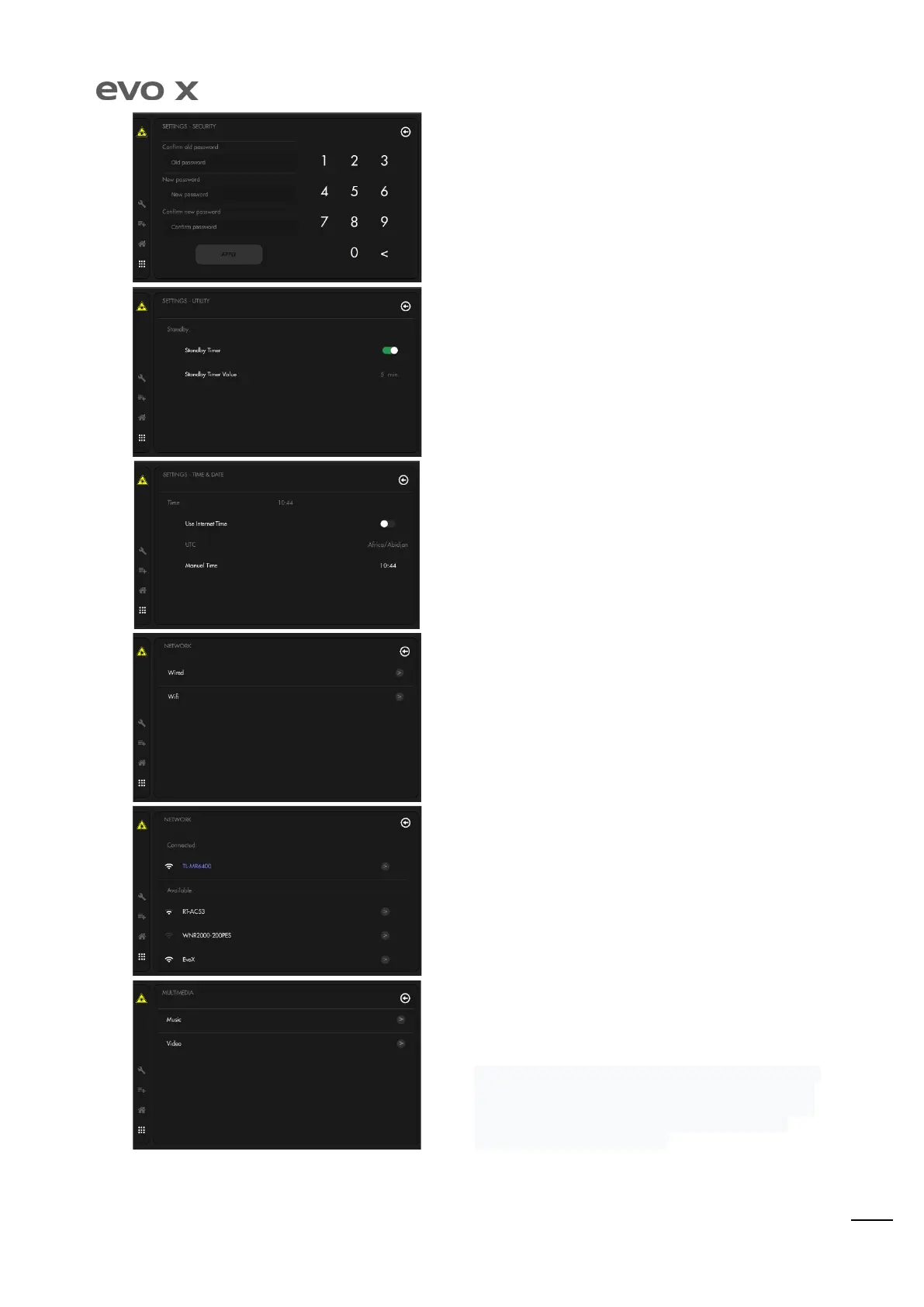
By pressing the “Change application password” button, it is possible
to modify the PIN by introducing the old code and the new code
desired.
The automatic Stand-by function allows the laser to disarm if not
used and go back to the HOME page after a period of time set by
the user.
The time, date and time zone can be modified manually, or that
supplied by the network can be kept (if connected).
The equipment can be connected to WI-FI. This screen allows the
method of connection to be selected, if wired, or WI-FI.
If WI-FI mode is selected, connect on this screen by introducing the
password (if envisioned).
Entering Music section, it will be possible to play tracks
previously loaded inside the USB flash of the EVO X. USB must be
plugged on the back side of the display slot.
After pressed Video section, customer can access to
folder in which EVO X video training is available, inside
section instead, all the video saved by the camera record feature.
From here, customer can send and save the files on the USB
connected on the back of the display.


 To Next Page