1107231N / 082020 4. DETECTIVE X APPLICATION
53
2. With the Detective X in Data (Microsoft Mobile Center) Mode (see Section 4.10) connect its USB port to
the PC. If this is the first time the unit has been connected to this PC, Windows may display a series of
“new hardware” messages indicating a mobile device (e.g., the Detective X embedded computer) has
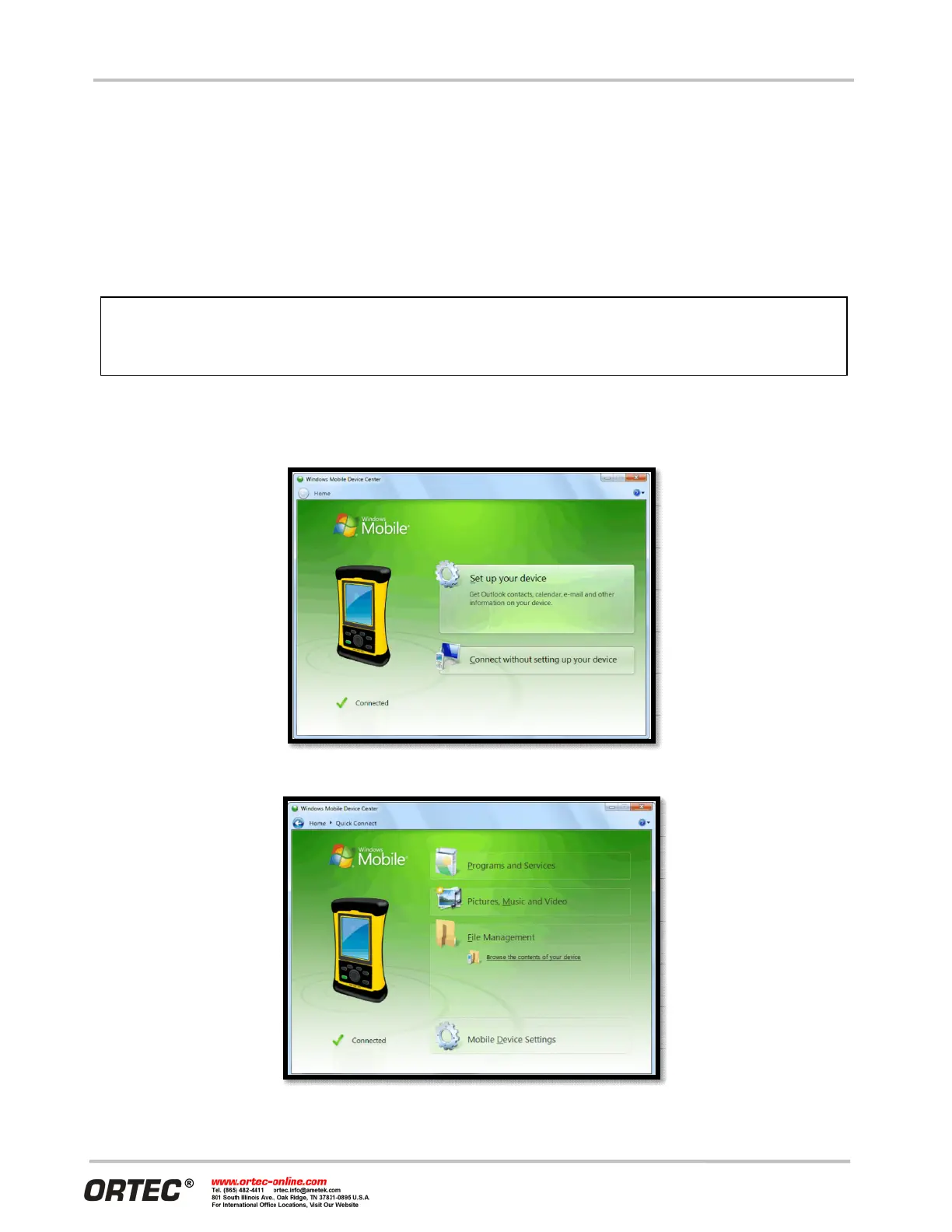
been detected and its driver installed. Windows Mobile Device Center will then take several seconds to
communicate with the Detective X and indicate the its integrated computer is Connected (Figure 64).
3. Click on Connect without setting up your device. This will prevent the host PC and Detective X from
automatically synchronizing (i.e., exchanging files). Do not modify the Program and Services, transfer
graphics or music to the Detective X computer, or change the Mobile Device Settings.
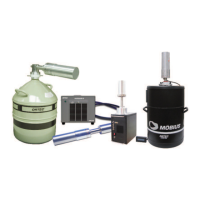
4. Hover over File Management to expand its topics and click on Browse the contents of your device (Figure
65).
Figure 64. The Unit is Connected to the PC
Figure 65. Choose the File Management Browse Option
Remember that the Detective X is not to be used for purposes beyond the monit
tasks described in the user manual, and no changes should be made to the operating
system settings. Doing so could void the warranty.


 To Next Page