1107231N / 082020 5. SLEUTH APPLICATION
81
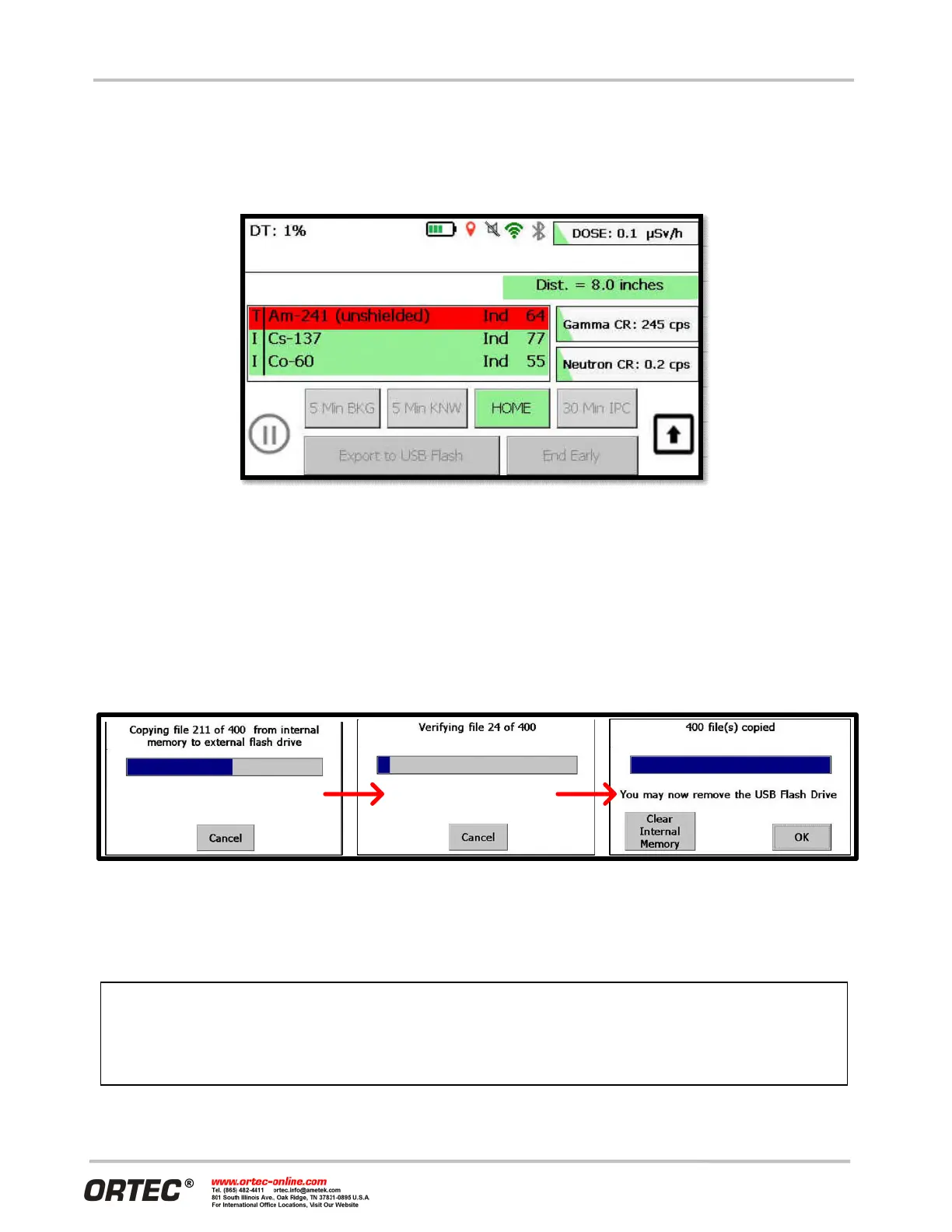
Once a measurement is complete, nuclide identification results remain on the screen. The button that was
used to begin the acquisition now becomes a “Home” button and once that button is pressed, the operator
can initiate the next measurement (as shown in Figure 106).
Figure 106. Measurement Complete
5.5 EXPORTING AND DELETING DATA
Unlike the traditional Detective X software application where storage location of data files is user selectable,
Sleuth always stores the data files it generates in internal memory. The operator can copy data files stored
in internal memory to a USB flash placed in the rear of the instrument with the “Export to USB Flash” button.
Note that the export functionality is disabled when a measurement is in progress. Also note that only Sleuth
data is exported in this process. No other data (i.e., acquired via the ‘traditional’ Detective X user interface)
on the unit is exported.
Figure 107. Export in Progress
Data files remain in internal storage following an export until they are specifically deleted by the operator.
After an export is complete, the Operator is shown a confirmation screen (Figure 107) that also contains a
button to delete all files in the internal storage (“Clear Internal Memory”).
cases, “Clear Internal Memory” is almost always the correct choice following a
file export. Clearing the internal memory serves to remove old and irrelevant data collected
for a different purpose (perhaps by a different operator, on a different day, or at a different
location).


 To Next Page