1107231N / 082020 4. DETECTIVE X APPLICATION
63
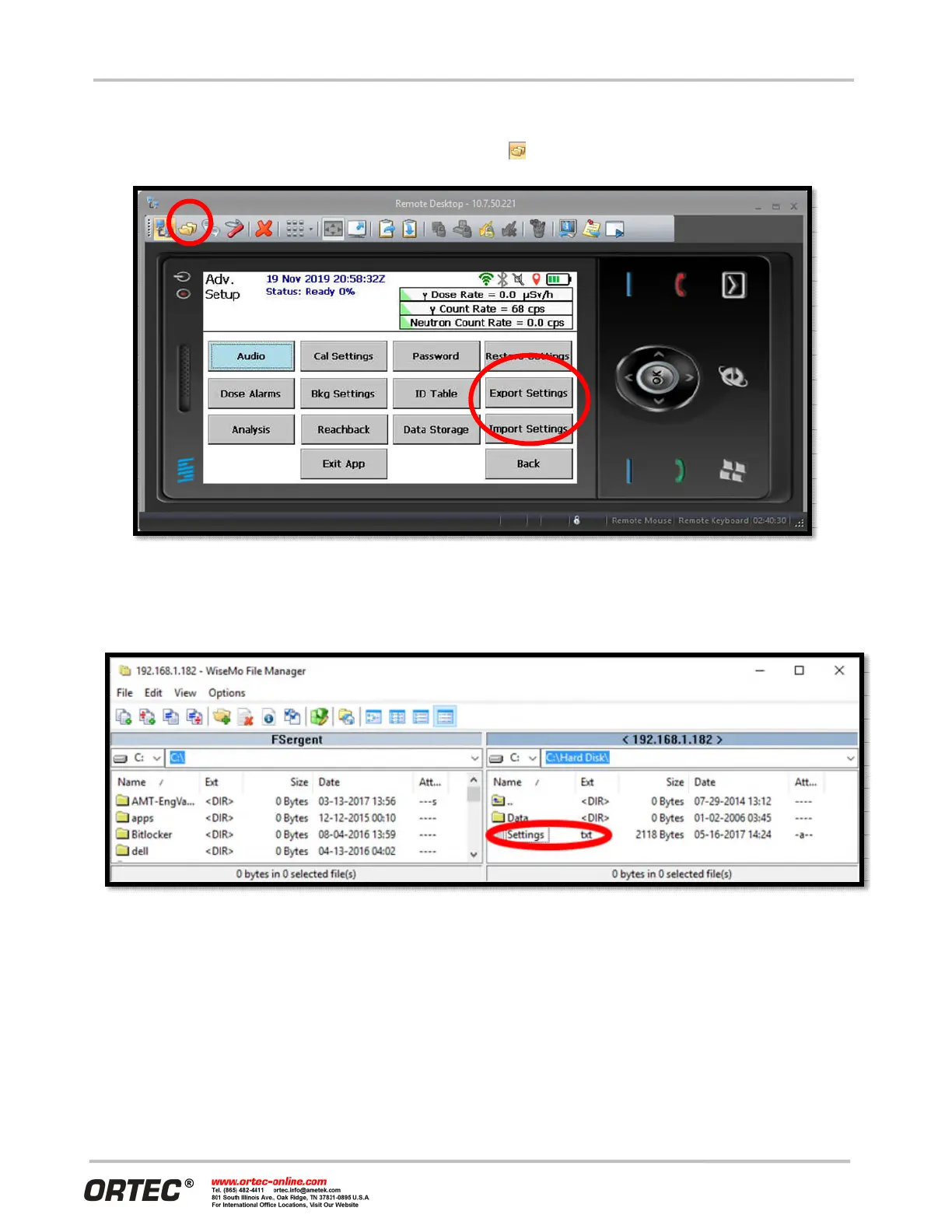
The easiest way to modify these settings is to start a PC-based remote-control session. Then select the Expt.
Settings button on the Advanced Setup page to save a current settings file to the Detective X flash drive. In
the remote-control window, click the File Transfer button ( ) on the left side of the toolbar.
Figure 78. Remote Control Window
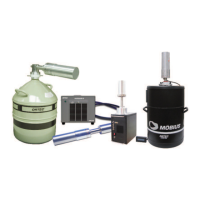
Find the Setting.txt file located in the C:\Hard Disk\ folder (Figure 79). Double-click the file to open it in
Notepad and enter relevant values for the new SMTP server. Close the Notepad window and save changes.
Figure 79. WiseMo File Manager
Select the Impt. Settings button to import the modified settings. Cycle power so the new settings will take
effect and manually send a file to Reachback to test operation.
4.13 RECALLING PREVIOUSLY COLLECTED DATA FILES
The Recall page accessible from Settings allows the user to sort through all of the data. Key data can be
manually sent to Reachback from here, and data collected in error can be deleted.


 To Next Page