1107231N / 082020 4. DETECTIVE X APPLICATION
65
of the unit (neutron detector, collimators, passive detector cover). If an accessory is mounted to the front of
the unit with which no background data has been collected, the unit will show a “No Background!” error and
status will be NOT READY until background is collected with the particular accessory mounted. Note that
Detect Mode will continue to function in this instance, but ambient background could be misinterpreted as
NORM. Identify Mode cannot be entered without applicable ambient background data.
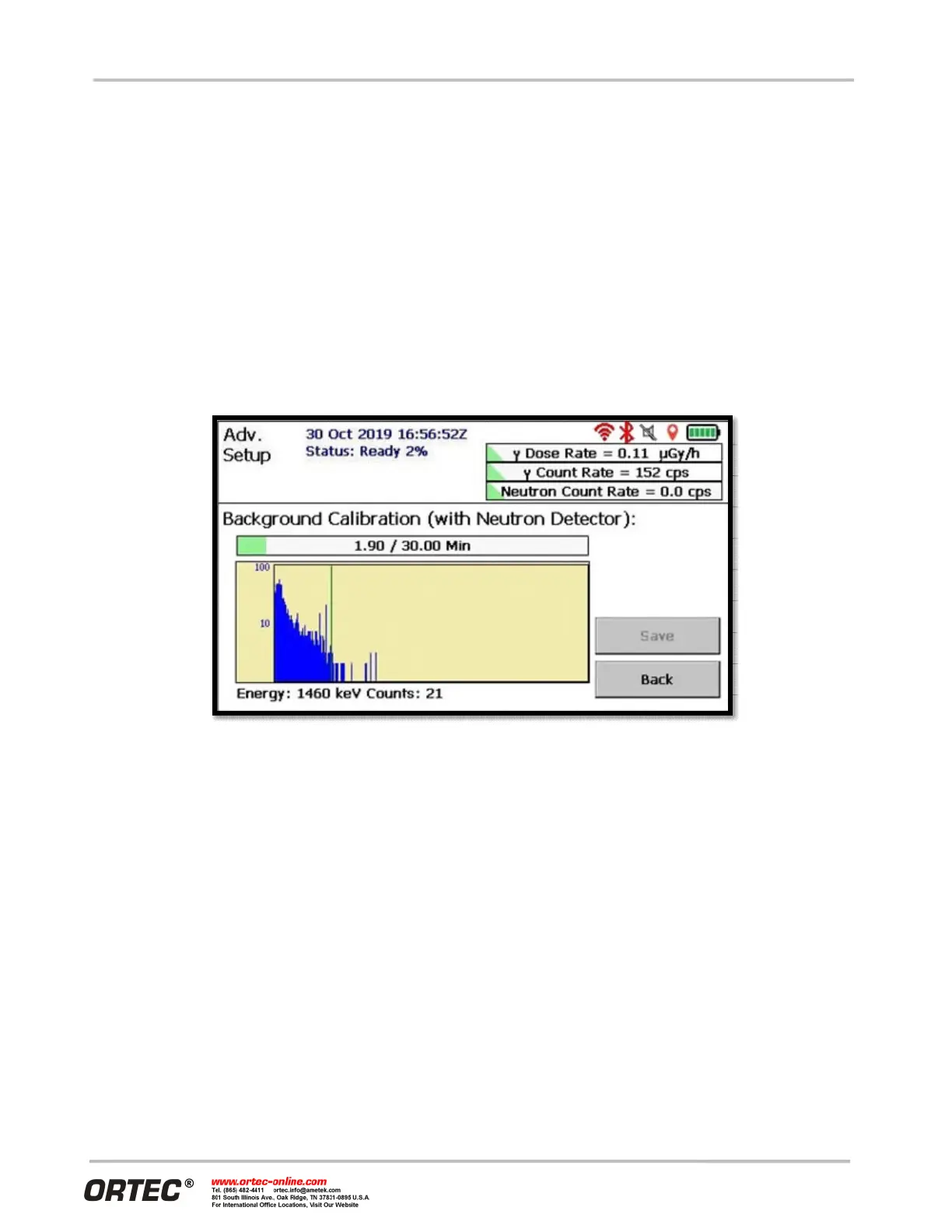
The Background Calibration screen is accessed from the Settings screen, and data collection begins
immediately (see Figure 82). The screen displays a simple histogram output of the live spectra. The operator
may touch the screen to select a given channel which results in the channel number and channel counts being
displayed on the bottom of the screen. To abort the background collection, just tap the Back button and
confirm. Background data from a previously completed collection will continue to be used in this case. By
default, background data must be collected for at least 30 minutes before it can be saved; and data collection
will continue beyond 30 minutes until the measurement is ended and saved. In general, the longer
background data are allowed to accumulate, the better.
Figure 82. Background Collection for Use in Analysis
When the background collection is complete, the system analyzes the spectrum to determine if there is
enough K-40 in the background to enable the system gain stabilizer. This will be the case for most all
situations with maritime applications presenting the potential exception. If sufficient K-40 is not found in the
background spectrum, the gain stabilizer will be disabled.
Background collection can be customized on the Background Settings page accessible from Advanced Setup
(see Figure 83).
For some applications, a 30-minute background collection is impractical, and a shorter time can be specified
here. Realize that shorter background times carry with them a risk in that ambient background may not be
optimally characterized. Short background times may not allow optimization of detection probability and
false alarm probability for naturally occurring nuclides (including uranium). Also, very short background times
may not allow accurate determination of K-40 activity and so the gain stabilizer may not be enabled in
instances where it really should be enabled.


 To Next Page