ORTEC
®
Detective
®
X Handheld Radioisotope Identifier 1107231N / 082020
68
1. Place the source in front of the instrument to obtain a gamma count rate of approximately 500 cps.
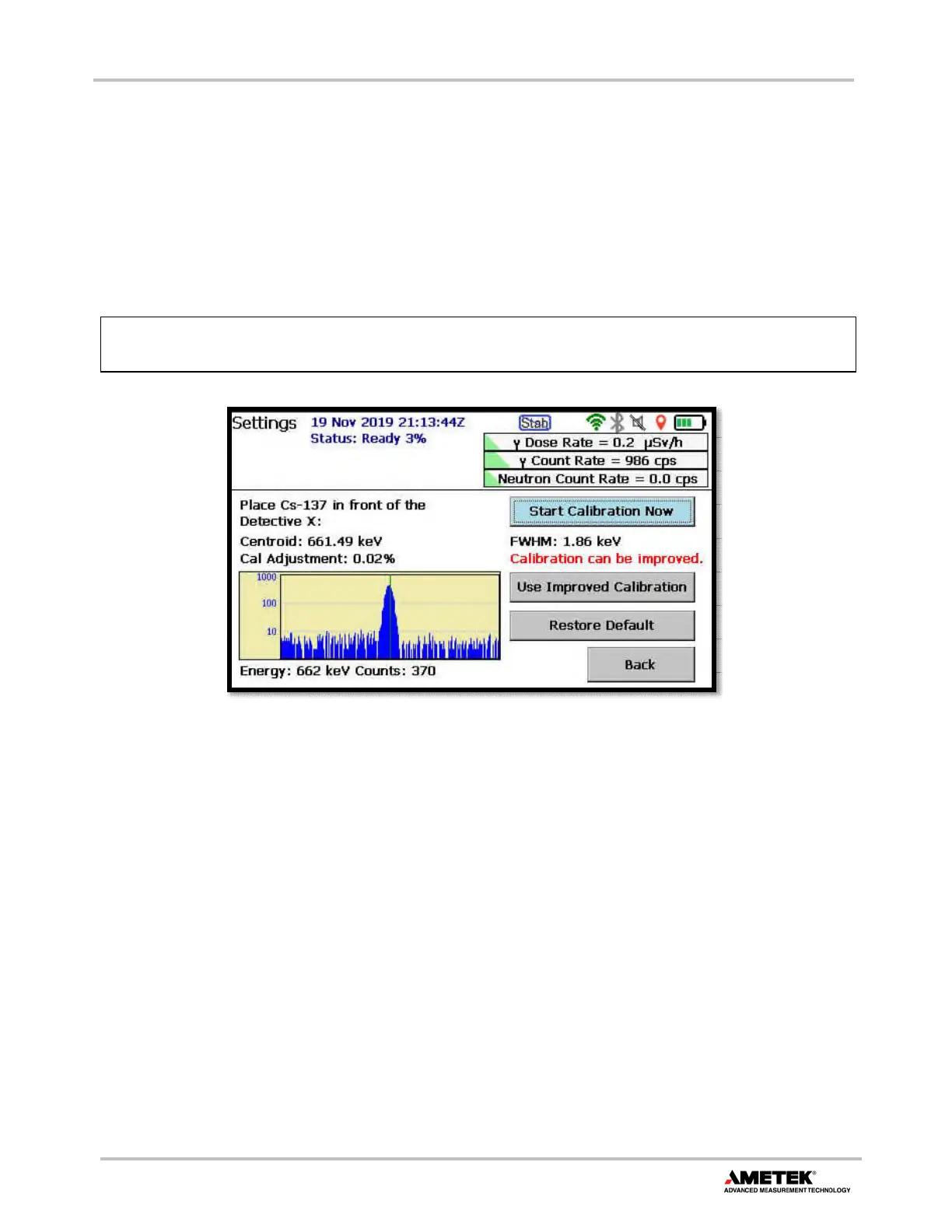
2. Tap Settings to open the Settings screen, then tap Calibrate to display the screen shown in Figure 86.
3. Tap Start Calibration Now. The stabilizer will turn off and the current stabilizer adjustment (if any) will
be reset to zero. The acquisition will begin, and the spectrum will be displayed on the lower left of the
screen.
4. When enough counts have been accumulated to accurately determine the centroid of the Cs-137 peak,
the system will report the degree of adjustment necessary. Tap Use Improved Calibration to complete
the process.
Figure 86. Calibrate Screen
The stabilizer will turn back on after calibration is complete.
The Restore Default button reinstalls the factory calibration, which is useful for diagnostic purposes;
however, the factory calibration is typically not optimum for an instrument once it leaves the factory.
4.15.2.1 Using Alternate Calibration Sources
Other sources can be used to energy calibrate the system as well. In fact, environmental K-40 can be used to
calibrate the instrument. This is useful when no Cs-137 check source is available. Calibrating with K-40 can
take a long time in some environments (note that seawater contains essentially no K-40), therefore, the user
may wish to purchase an inexpensive potassium chloride “salt substitute” from a grocery. From the Advanced
Setup screen, tap Cal Settings to open the screen shown in Figure 87. Select the desired source from the
Calibration sources list.
4.15.2.2 Require New Background After Calibration
Although not necessary for the onboard nuclide identification algorithm, it may be desired to force collection
of a new background spectrum each time a new energy calibration is performed. Tap the Require background
will be retained and the new one will be discarded.


 To Next Page