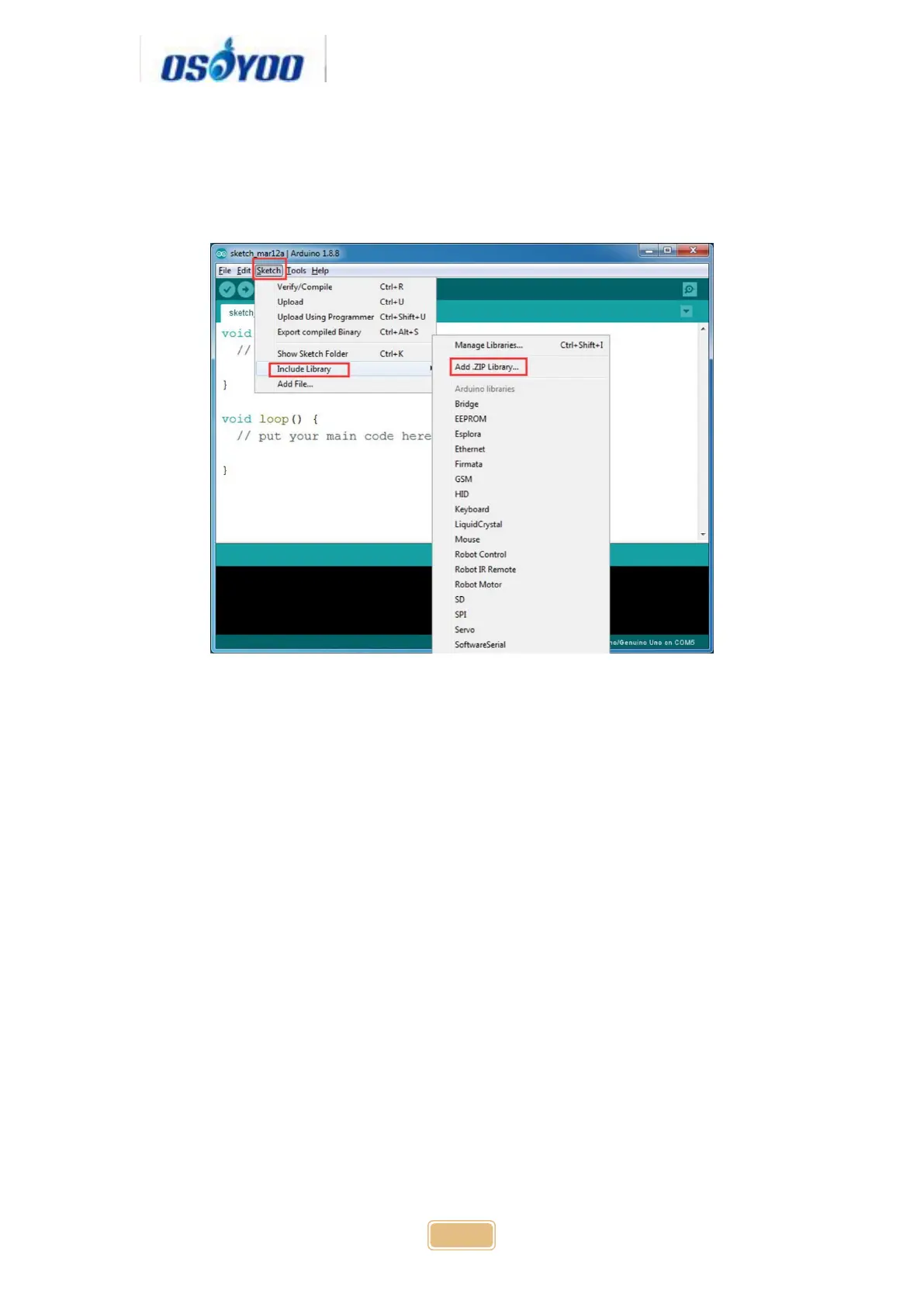
Step 2: Install IRremote library into Arduino IDE (If you have already installed
IRremote library, please skip this step) Download IRremote library
from https://osoyoo.com/wp-content/uploads/samplecode/IRremote.zip, then
import the library into Arduino IDE(Open Arduino IDE-> click Sketch->Include
Library->Add .Zip Library)
Step 3: Download Lesson 2 IRremote smart car sample code
fromhttps://osoyoo.com/driver/v2smartcar-lesson2.zip and unzip the download
zip file smartcar-lesson2.zip, you will see a folder called smartcar-lesson2
Step 4: Connect UNO R3 board to PC with USB cable, Open Arduino IDE ->
click file -> click Open -> choose code “smartcar-lesson2.ino” in smartcar-
lesson2 folder, load the code into arduino.


 To Next Page