Step 2: Download Lesson 4 tracking smart car sample code
from http://osoyoo.com/picture/V2.1_Arduino_Robot_Car/code/v2smartcar-
lesson4.zip, unzip the download zip file smartcar-lesson4.zip, you will see a
folder called smartcar-lesson4.
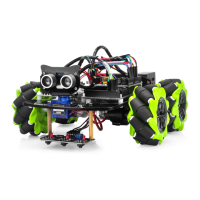
Step 3: Connect UNO R3 board to PC with USB cable, Open Arduino IDE ->
click file -> click Open -> choose code “smartcar-lesson4.ino” in smartcar-
lesson4 folder, load the code into arduino.
Step 4: Choose corresponding board/port for your project, upload the sketch
to the board.


 To Next Page