• Replace the strap as required. Refer to Replacing the strap ► 17.
7.2.2 Replacing the strap
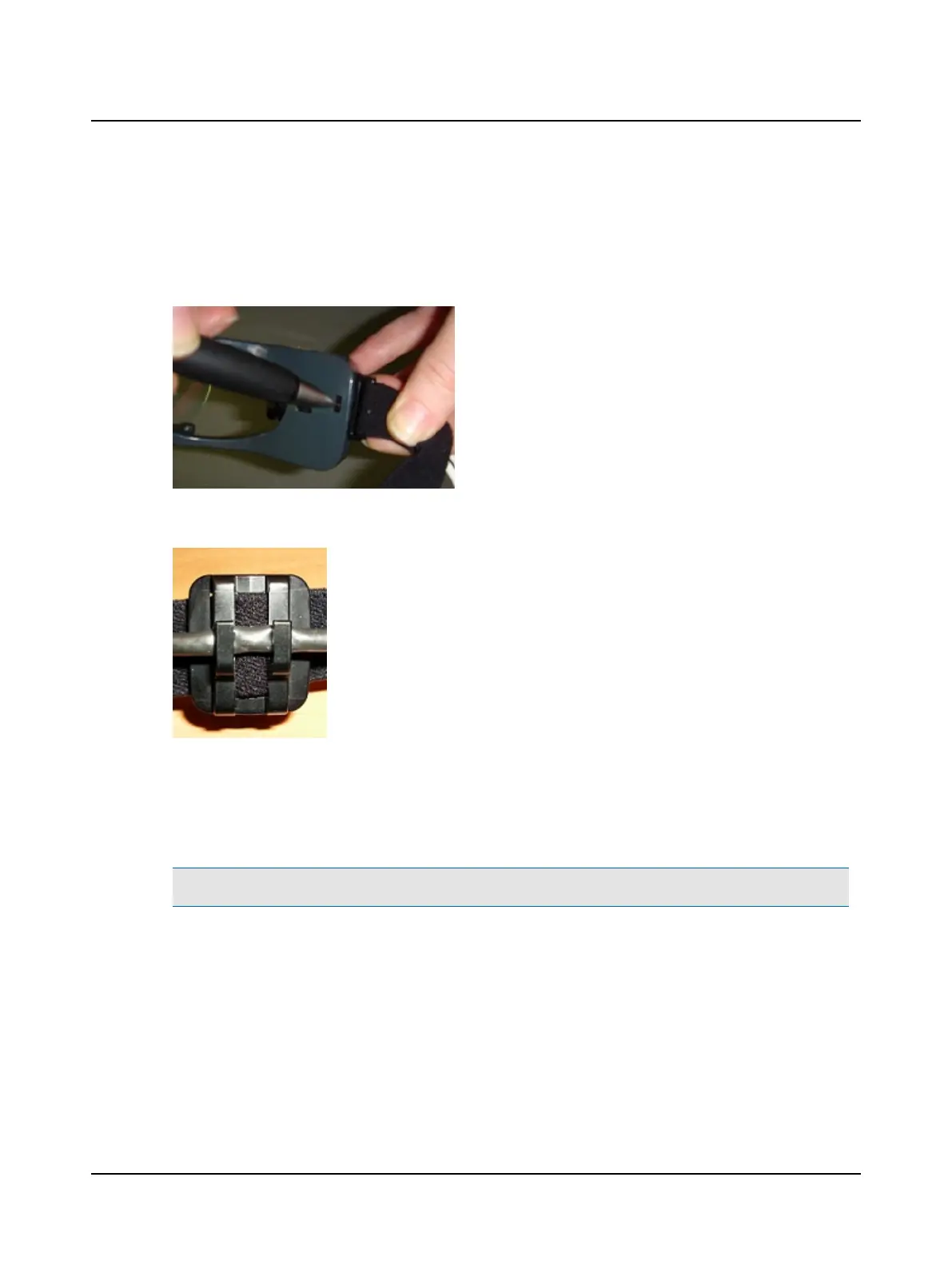
1. Remove the face cushion.
2. Use a pen to push the plastic clip down and pull out the strap clip attached to the goggles.
3. Repeat on the other side.
4. Remove the cable from both clips on the strap.
5. Obtain a new strap assembly
6. Clip the strap clips into each side of the goggles.
7. Attach the cable to both clips on the strap.
7.2.3 Replacing the face cushion
Note• The single-use, disposable face cushion should be replaced for each new patient.
1. To remove the face cushion, slightly flex the goggles out at the side opposite of the camera side and snap out the face
cushion. Release the face cushion from the other side.
2. Properly dispose of the used face cushion.
3. Obtain a new face cushion.
4. Align the tab of the face cushion with the hole on the camera side of the goggles.
5. Ensure the face cushion is inside the nose piece.
6. Slightly flex the goggles at the opposite side, align the tab of the face cushion with the hole on this side of the goggles.
7. Double check both sides are fully inserted by pressing in at each side.
Otometrics - ICS Impulse USB
17
7 Pre-testing setup












 To Next Page