Oxitone 1000M
User Manual Rev. 1.
Page 16 of 39
6. MONITORING
6.1. MONITORING SCREEN AND DISPLAY SYMBOLS
Note: After 30 seconds, the screen display will automatically turn off. To switch display on,
press the button. Alternatively, you may turn your wrist in the natural motion of viewing a
watch, and the display will become visible.
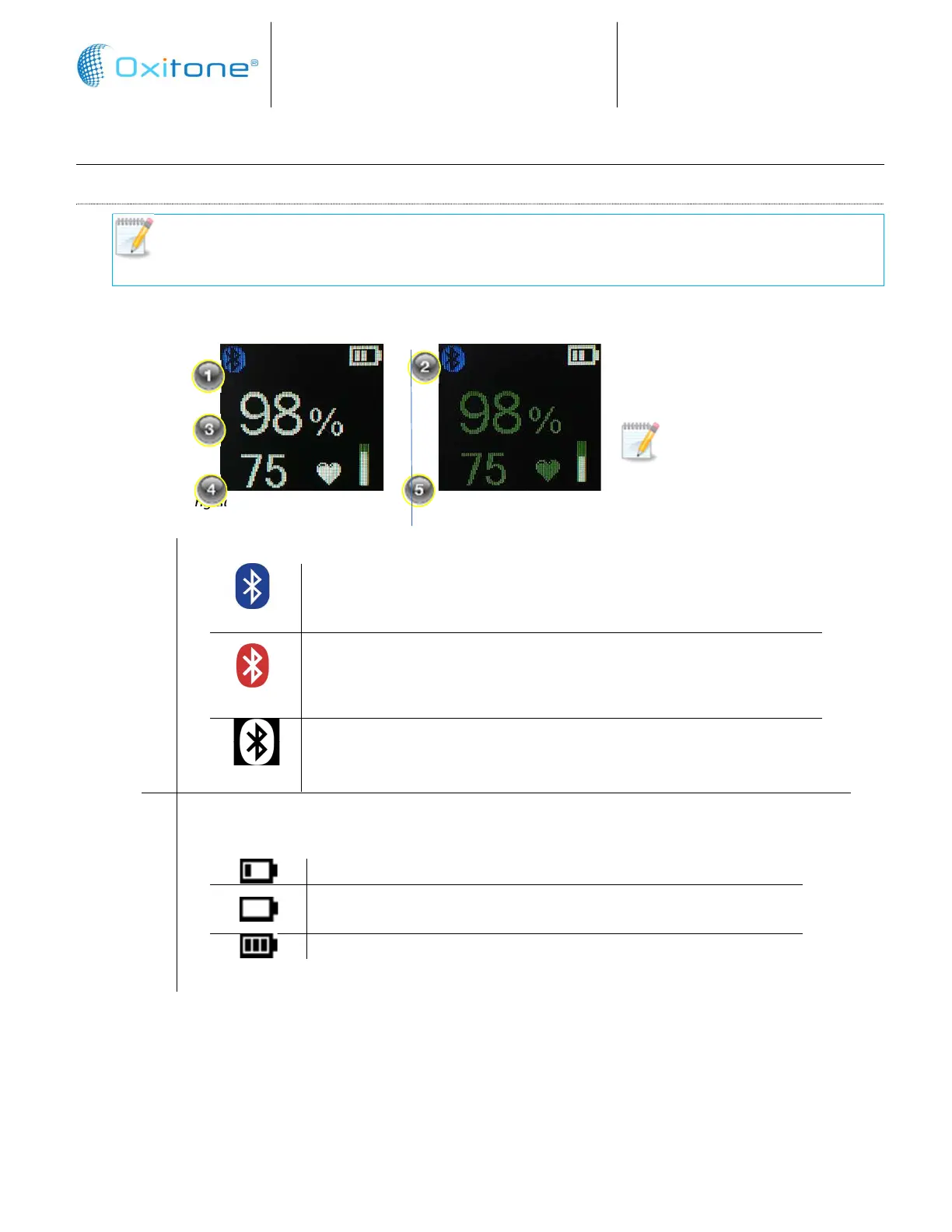
After a brief pause, while the system is collecting information, the monitoring screen displays:
Monitoring screen – active monitoring Monitoring screen –oxygen monitoring inactive
1
Blue Tooth connection status
Blue Bluetooth symbol, indicates the device is connected to
another device.
Red Bluetooth symbol, indicates there is a problem with the BLE
component, if the indication persists after a power cycle, the
device needs servicing at Oxitone's service center.
White Bluetooth symbol, indicates the BLE is functioning but not
connected.
2
Battery charge level indicator
Low battery. Recharge battery
Critical battery depleted. After the device will issue a warning,
it will turn off after 30 seconds
Full charged battery
Note: When the system is
not monitoring a value, the
value is grayed-out.


 To Next Page